
This website is a participant in the Amazon Services LLC Associates Program, an affiliate advertising program designed to provide a means for us to earn fees by linking to Amazon.com and affiliated sites.
Yes, projectors do emit blue light, but how it affects your eyes differs from other digital screens like TVs, laptops, or smartphones.
You’ve probably heard of the harmful effects of blue light—eye strain, sleep disruption, and long-term retinal damage. But what about when you’re enjoying a movie on a projector? Is it safer, or does it come with the same risks?
Interestingly, projector systems use reflected light, meaning the image is bounced off a surface (usually a screen or wall) before reaching your eyes. This makes them much gentler on your eyes compared to direct-view devices. Still, the source of that image—LED, LCD, or laser—does produce some level of blue light.
Best for Eye-Friendly Viewing: Top 3 Projectors That Minimize Blue Light Exposure
Whether you’re watching movies, gaming, or delivering presentations, eye safety matters. Here are the top projector choices that are gentle on your eyes while still delivering stunning visuals:
BenQ GS50 Smart Wireless Portable Projector
Picked for its TÜV Rheinland-certified low blue light mode and cinematic color accuracy.
- Offers Low Blue Light and Eye-Care Technology
- Android TV support and portability for on-the-go use

- COZY MOVIE NIGHTS: The best portable projector with it’s Flexible wide projection angle, autofocus & auto vertical keystone correction for seamless projection from…
- IMMERSIVE & CRYSTAL-CLEAR CINEMATIC DISPLAY: 1080p Resolution & 500 ANSI Lumens, This TV projector create a big-screen streaming experience indoors or outdoors, with…
ViewSonic PX701-4K UHD Projector
Chosen for its SuperEco™ mode that reduces brightness and extends lamp life—minimizing eye strain.
- 4K UHD clarity with lower light intensity
- Designed for longer viewing comfort
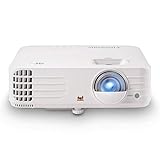
- 4K Home Theater Projector: UHD (3840x2160p) 4K resolution with a 1.5-1.6 throw ratio and 3,200 ANSI lumens perfect for gaming and home entertainment
- Designed for Fast Paced Content: Experience gaming on the big screen with 4.2ms low input lag and a magnificent 240Hz refresh rate

Epson EpiqVision Mini EF12 Smart Streaming Laser Projector
Recommended due to its laser light source, which emits less harmful blue light compared to LEDs.
- Uses laser technology, which disperses light more gently
- Built-in Android TV for seamless streaming

- Epson Certified-Refurbished Product – Epson’s quality-assurance team reviews each refurbished product. They have been inspected and tested to ensure they perform…
- Stunning Picture Quality up to 150″ — Delivers an immersive viewing experience for TV shows, sporting events, gaming and movies by accepting content up to 4K…
Do Projectors Emit Blue Light? A Scientific Breakdown
Projectors do emit blue light, but the way it reaches your eyes is fundamentally different from that of a TV or smartphone. To understand this, let’s explore what blue light is and how it interacts with projection technology.
What is Blue Light?
Blue light is a high-energy visible (HEV) light with a wavelength of 400–500 nanometers. It’s naturally emitted by the sun but also artificially produced by digital screens and LED lighting. Studies show that prolonged exposure to high levels of blue light can lead to digital eye strain, circadian rhythm disruption, and possibly long-term retinal damage.
How Do Projectors Emit Blue Light?
Unlike direct-view devices like TVs or phones, projectors work by projecting light onto a surface, which is then reflected to your eyes. This indirect method significantly reduces the intensity of blue light exposure.
However, the projector’s internal light source—whether LED, laser, or UHP lamp—still emits blue light as part of the visible spectrum. The amount of blue light depends on:
- The type of projector (LED, laser, or lamp-based)
- Brightness/lumen output
- Viewing distance and screen size
- Ambient lighting conditions
While projectors do emit blue light, their reflected-light mechanism makes them considerably safer for the eyes compared to direct-emission screens. Still, cumulative exposure over time or prolonged viewing in the dark can add strain.
How Projectors Compare to TVs, Phones, and Monitors in Blue Light Exposure
When it comes to digital eye strain, not all screens are created equal. Projectors stand out for one major reason: they don’t shine light directly into your eyes like other devices do. But how do they really compare in terms of blue light output?
Direct vs. Reflected Light: The Game-Changer
- TVs, smartphones, and monitors use direct light. This means the pixels themselves emit light that goes straight to your retina.
- Projectors use reflected light. The image is first bounced off a wall or screen before it reaches your eyes. This diffuses intensity and lowers the risk of eye fatigue and long-term damage.
Blue Light Intensity: Measurable Differences
According to optical research:
- A smartphone or monitor placed 12–18 inches from the eyes emits up to 100 times more blue light than a projector viewed from 8–10 feet away.
- Laser projectors and LED models typically emit less blue light than traditional UHP lamp projectors due to how they distribute wavelengths.
Usage Duration and Distance
- Phones and laptops are often used at close range for hours daily.
- Projectors are used at a greater distance and usually in shorter bursts like watching movies or presentations.
Conclusion:
Projectors offer a more eye-friendly alternative to TVs and screens, especially for long-term viewing. While blue light is still present, it’s far less intense due to reflection and viewing distance. If eye health is your concern, projectors may be the superior choice.
Are There Blue Light Filter Settings or Modes on Projectors?
Yes, many modern projectors come equipped with blue light reduction features, though they may go by different names. Manufacturers have started to recognize the growing concern over eye strain and are implementing eye-care technologies similar to what you find on monitors and smartphones.
Common Blue Light Reduction Features in Projectors:
- Low Blue Light Modes: Brands like BenQ and ViewSonic now include modes specifically designed to reduce blue light intensity. These settings often shift the color temperature to a warmer tone, lowering the blue spectrum output.
- Eye-Care or ComfortView Settings: These are automatic features that adjust brightness and contrast based on ambient lighting and viewing distance, ensuring eye comfort during extended use.
- Color Temperature Adjustment: Many projectors let you manually change the color temperature to a “warm” setting, which naturally reduces blue light.
- SuperEco or Eco Modes: While designed to conserve power, these modes dim the brightness, which indirectly reduces blue light exposure.
Do All Projectors Have These Features?
Not all projectors offer blue light filters, especially budget or older models. Higher-end LED or laser models are more likely to include these safety features. Always check the spec sheet or product manual before buying if blue light reduction is important to you.
Use external blue light filters or glasses in combination with these settings for an added layer of eye protection, especially during nighttime viewing.
Tips to Reduce Eye Strain When Using a Projector
Even though projectors emit less blue light than direct-view screens, it’s still important to take proactive steps to protect your eyes, especially during long viewing sessions or late-night usage.
Practical Eye-Health Tips for Projector Users:
Adjust Ambient Lighting
- Avoid watching in a completely dark room. Add soft ambient lighting to reduce the contrast between the screen and surroundings.
- A well-lit environment helps your eyes adjust naturally, reducing fatigue.
Use Eco or Low Blue Light Modes
- Switch your projector to Eco Mode or any available Low Blue Light setting.
- These reduce brightness and blue light output while extending lamp life.
Control Brightness and Color Temperature
- Set brightness to a comfortable level—not too high.
- Shift color temperature toward warmer tones (lower Kelvin values) to filter out harsh blue light.
Maintain Optimal Viewing Distance
- Sit at least 6–10 feet away from the screen, depending on its size.
- The farther you are, the less intense the blue light impact.
Follow the 20-20-20 Rule
- Every 20 minutes, look at something 20 feet away for 20 seconds. This helps your eyes relax and refocus.
Take Breaks
- For long movies or gaming sessions, take 5–10 minute breaks every hour to reduce eye muscle fatigue.
Use Blue Light Blocking Glasses
- These glasses filter out the most harmful portion of the blue spectrum and work well when paired with a projector in darker settings.
While projectors are naturally more eye-friendly, combining technology with good habits is key to protecting your long-term vision.
Which Type of Projector Is Safest for Your Eyes?
Not all projectors are created equal when it comes to eye health. The type of light source a projector uses plays a significant role in how much blue light it emits—and how safe it is for prolonged use.
Types of Projectors and Their Blue Light Impact:
LED Projectors
- Emit less blue light overall due to lower brightness and energy efficiency.
- Typically have warmer light output, reducing strain during long viewing sessions.
- Ideal for personal, casual, and portable use.
Best for eye comfort in dark environments.
Laser Projectors
- Use focused laser diodes which produce more stable and evenly distributed light.
- Emit blue light but in a less flickery and more diffused form than lamp-based models.
- Offer high brightness with better color accuracy and contrast.
Excellent for home theaters and classrooms with good blue light control.
Lamp-Based Projectors (UHP or Metal Halide)
- Tend to emit the highest level of blue light, especially at higher brightness levels.
- Often lack blue light filters or eye-care features unless found in high-end models.
Use with caution—suitable only with ambient lighting and breaks.
Other Eye-Friendly Features to Look For:
- TÜV Rheinland certification
- Auto-brightness adjustment
- Built-in blue light filters
- Smart Eco modes
For eye safety, LED and laser projectors are your best bet. They provide better control over blue light output, smoother visuals, and more customizable settings designed for long, strain-free viewing.
Conclusion
So, do projectors have blue light? Yes, they do—but not in the same way as phones, monitors, or TVs. Because projectors use reflected light instead of direct light, the blue light they emit is less intense and less harmful to your eyes.
Still, it’s essential to be mindful of how long and how often you use your projector. Choosing models with low blue light features, using Eco or Eye-Care modes, and following good viewing practices can make a big difference in reducing eye strain.
Frequently Asked Questions About Projectors and Blue Light
Do all projectors emit blue light?
Yes. All modern projectors—whether LED, laser, or lamp-based—emit some level of blue light. It’s a natural part of the visible spectrum used to produce clear, vivid images. However, the way projectors emit that light—via reflection rather than direct emission—means your eyes receive it in a more diffused and less harmful form.
Is blue light from projectors harmful to your eyes?
In general, blue light from projectors is less harmful than that from smartphones or computer monitors. Because the light is reflected off a surface and viewed from a distance, its intensity is significantly reduced. Still, prolonged exposure, especially in dark rooms or at high brightness, can contribute to digital eye strain over time.
Which type of projector is best for reducing blue light?
LED and laser projectors are the best options if you’re concerned about eye health. They tend to have better control over light output, lower flicker, and often include eye-care modes. Look for models that mention low blue light certifications or features like TÜV Rheinland Eye Comfort.
Can I use blue light glasses with a projector?
Absolutely. Blue light blocking glasses can add an extra layer of protection, especially during nighttime viewing or extended use. They work by filtering out a portion of the high-energy blue spectrum, reducing the risk of eye fatigue.
What’s the safest way to watch a projector for long periods?
- Use Eco mode or Low Blue Light settings
- Keep ambient lights on
- Sit at a proper viewing distance
- Follow the 20-20-20 rule
- Take regular breaks
These simple practices can help keep your eyes comfortable and healthy.
This website is a participant in the Amazon Services LLC Associates Program, an affiliate advertising program designed to provide a means for us to earn fees by linking to Amazon.com and affiliated sites.