
This website is a participant in the Amazon Services LLC Associates Program, an affiliate advertising program designed to provide a means for us to earn fees by linking to Amazon.com and affiliated sites.
Finding the best eye friendly projectors for 2026 is essential for protecting your vision during movie nights and work sessions. Modern projectors now offer advanced features specifically designed to minimize eye fatigue. This ensures your long-term viewing is both immersive and comfortable.
This complete guide cuts through the technical noise. We provide expert tips on the key technologies that reduce glare and flicker. You will learn how to choose a projector that prioritizes your visual health without sacrificing image quality.
We will review the top models for 2026, breaking down their eye comfort features. Our comparison includes brightness, resolution, and specialized modes. Get ready to discover proven methods for creating a truly comfortable home theater or office setup.
Best Eye Friendly Projectors for Long Term Viewing – Detailed Comparison
Epson Pro Cinema LS12000 – Best Overall Choice
The Epson Pro Cinema LS12000 is our top pick for its advanced laser light source and 4K PRO-UHD resolution. It eliminates the color wheel and lamp flicker common in DLP models, providing a stable, fatigue-free image. This is the ideal projector for dedicated home theaters where marathon viewing sessions are the norm.

- 4K PRO-UHD (1) – Advanced pixel-shifting technology works in parallel with three individual high-definition LCD chips without sacrificing picture brightness
- Precision Shift Glass Plate Technology – Unique, digitally controlled Precision Shift Glass Plate precisely refracts pixel light to display a 3840 x…

BenQ HT3560 – Best for Mixed Use & Gaming
BenQ’s HT3560 excels with its CinemaMaster Video+ technology and low input lag. It features a dedicated low-blue-light mode and flicker-free design to reduce eye strain during long workdays or gaming weekends. This model is the best option for a versatile living room that serves as both an office and entertainment center.

- PROJECTOR-OPTIMIZED 4K UHD & HDR: HDR10, HDR10+, HLG, HDR-PRO technology exclusive Local Contrast Enhancer and Tone Mapping for perfect details in dark and bright…
XGIMI Horizon Ultra – Best Smart Portable Projector
For flexibility, the XGIMI Horizon Ultra combines Dolby Vision IQ and intelligent screen adaptation. Its smart light sensor adjusts brightness to ambient room conditions, preventing harsh glare. This portable projector is recommended for creating a comfortable viewing environment in any room without complex setup.
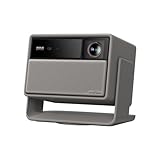
- Lossless Optics: Flexible lens shift and optical zoom give you more freedom in setup—without sacrificing clarity. Enjoy crisp, distortion-free visuals at any size…
- Daylight Ready, Triple Laser Powered: Our advanced X-Master RGB triple laser engine delivers 5700 ISO lumens of peak brightness, 20,000:1 contrast, and 110% BT…
Key Features of an Eye Friendly Projector
Choosing a projector for comfortable viewing requires understanding specific technologies. These features work together to reduce visual strain over hours of use. This section breaks down the essential specs for protecting your eyesight.
Light Source Technology: Laser vs. LED vs. Lamp
The light source is critical for a flicker-free image and consistent color. Modern projectors use three main types, each with distinct benefits for eye comfort.
- Laser Light Source: Offers the most stable light output with zero flicker. It maintains consistent brightness and color over a very long lifespan, eliminating the harsh dimming of aging lamps.
- LED Light Source: Provides instant on/off capability and is naturally flicker-free. LEDs are mercury-free and excel in portable projectors, though peak brightness can be lower than laser models.
- Traditional Lamp: Often the most affordable option but can suffer from brightness decay and subtle flicker. Lamp-based models require more frequent replacements, which can affect viewing consistency.
Essential Display Specifications for Comfort
Beyond the light source, display specs directly impact how your eyes perceive the image. Prioritizing these will make a significant difference in long-term viewing sessions.
High Native Resolution is non-negotiable. A 4K or true 1080p native resolution ensures sharp, clear text and images. This prevents your eyes from straining to decipher blurry details on a large screen.
Look for projectors with automatic brightness adjustment. This feature uses an ambient light sensor to adapt the projector’s output to your room. It prevents the image from being painfully bright in a dark room or washed out in daylight.
Specialized Eye Care Modes
Many manufacturers now include software-based features designed to reduce strain. These modes are easy to activate and provide immediate relief.
- Low Blue Light Mode: Shifts the color temperature to emit less high-energy blue light, which is linked to digital eye strain and can disrupt sleep patterns.
- Flicker-Free Certification: Ensures the projector’s light modulation technology meets strict standards to eliminate rapid, imperceptible flashing that can cause headaches.
- Reading/Eco Mode: Optimizes contrast and color for displaying text and static images, often while lowering fan noise and overall brightness to a comfortable level.
How to Set Up Your Projector for Optimal Eye Comfort
Even the best eye friendly projector can cause strain if set up incorrectly. Your viewing environment and projector placement are just as crucial as the technology itself. Follow this guide to create a truly comfortable home theater or office space.
Optimal Screen Size and Viewing Distance
Choosing the right screen size for your room prevents the need for excessive eye movement. A screen that’s too large or too close forces your eyes to work harder to track action.
A good rule is the 1.5 to 2.5 times rule. Your viewing distance should be 1.5 to 2.5 times the diagonal screen width. For a 100-inch screen (about 8.3 feet wide), sit between 12.5 and 21 feet away.
| Screen Size (Diagonal) | Minimum Viewing Distance | Maximum Viewing Distance |
|---|---|---|
| 80 inches | 10 feet | 16.5 feet |
| 100 inches | 12.5 feet | 21 feet |
| 120 inches | 15 feet | 25 feet |
Room Lighting and Ambient Light Rejection (ALR)
Controlling ambient light is essential for reducing glare and maintaining image contrast. Glare forces your pupils to constantly adjust, leading to rapid eye fatigue.
- Use Blackout Curtains: Install them to completely darken the room for critical movie viewing. This is the most effective and affordable solution.
- Invest in an ALR Screen: An Ambient Light Rejection screen directs projector light toward viewers while rejecting light from other angles. This is ideal for rooms with some unavoidable ambient light.
- Add Bias Lighting: Place a soft, dim light behind your screen. This reduces the perceived contrast between the bright screen and a dark room, lessening strain.
Calibration and Ongoing Maintenance
Proper calibration fine-tunes the image for your specific setup. Regular maintenance ensures performance doesn’t degrade over time, which can subtly increase strain.
- Run Built-in Calibration: Use your projector’s picture modes (Cinema, Game, etc.) as a starting point. Then, manually adjust brightness, contrast, and color temperature to your preference.
- Clean Air Filters Regularly: A clogged filter causes overheating, which can make the fan louder and potentially affect light output consistency. Check your manual for cleaning intervals.
- Schedule Lamp/Laser Hours: Note the rated lifespan of your light source. Plan for replacement before it fully fails to avoid a sudden drop in brightness or color accuracy.
Advanced Technologies for Reducing Eye Strain in 2026
The projector market is rapidly innovating to address visual health directly. New technologies go beyond basic specs to create a fundamentally gentler viewing experience. Understanding these advancements will help you make a future-proof purchase.
Dynamic HDR and Intelligent Tone Mapping
Static HDR can sometimes create overly bright highlights in dark scenes, causing discomfort. New dynamic systems like HDR10+ Adaptive and Dolby Vision IQ change the game.
These technologies use metadata and onboard light sensors. They adjust the HDR output frame-by-frame based on your room’s ambient light. This ensures perfect contrast without jarring, eye-straining brightness spikes.
- Benefit: Preserves shadow detail and highlight brilliance in any lighting condition.
- Look for: Projectors with built-in ambient light sensors that mention “dynamic HDR” or “auto HDR.”
Reflective (LSR) and Hybrid Light Sources
The next evolution in light engines focuses on purity and stability. Laser Phosphor (LSR) and RGB Laser Hybrid systems are leading this charge for premium eye comfort.
These sources produce a wider, more natural color gamut with exceptional uniformity. They eliminate the speckle effect and rainbow artifacts sometimes associated with single-chip DLP projectors, which are a known cause of headaches for some viewers.
Smart Adaptive Features and AI Integration
Artificial intelligence is making projectors more responsive to both the content and the viewer. These smart features automate comfort settings for a hassle-free experience.
Look for these intelligent functions in 2026 models:
- Auto Color & Focus Correction: The projector uses a camera to detect and correct color shifts or focus drift on the screen itself, maintaining a perfect image.
- Content-Aware Mode Switching: The device detects if you’re watching a film, playing a game, or displaying a document, and automatically switches to the optimal pre-calibrated eye-care mode.
- Personalized Viewing Profiles: Some models may allow settings for different users, adjusting color temperature and brightness based on individual sensitivity preferences.
Choosing the Right Eye Friendly Projector for Your Needs
With so many options, selecting your perfect projector depends on your primary use case. Different activities have unique demands on both technology and comfort features. This buyer’s guide helps you match the right specs to your lifestyle.
For Home Theater and Movie Marathons
Dedicated cinema rooms demand the highest performance for immersion without fatigue. Your priority should be image stability, color accuracy, and deep contrast.
- Must-Have Tech: Choose a native 4K laser projector with dynamic HDR (Dolby Vision or HDR10+). Laser ensures flicker-free, consistent brightness for the entire film.
- Key Feature: Look for a dedicated Cinema or Filmmaker mode. These presets are calibrated for accurate color and a comfortable, film-like cadence.
- Ideal Pick: A large-format LCoS or 3-chip DLP model to completely eliminate rainbow artifacts during long viewing sessions.
For Office Work and Presentations
Using a projector as a monitor replacement requires sharp text and features that reduce glare during daylight hours. Eye comfort is tied directly to productivity here.
Key specifications differ from home theater. You need high brightness (measured in ANSI lumens) to combat ambient office light. A high contrast ratio is critical for making text and charts legible without squinting.
| Use Case | Minimum Brightness | Critical Feature |
|---|---|---|
| Dim/Controlled Office | 2,000 – 3,000 lumens | Low Blue Light Mode |
| Bright/Shared Workspace | 3,500+ lumens | Ambient Light Rejection |
For Gaming and Interactive Use
Gamers need a projector that keeps up with fast motion without introducing lag or blur. These factors can cause disorientation and eye strain during extended play.
Prioritize projectors with a dedicated Game Mode. This setting minimizes processing delay. Also, ensure it has a fast response time to prevent motion blur in fast-paced scenes, which is a major contributor to visual fatigue.
Common Myths and Mistakes About Projector Eye Strain
Many misconceptions persist about projectors and eye health. Believing these myths can lead you to choose the wrong technology or set up your system poorly. Let’s debunk the most common errors to ensure your viewing is truly comfortable.
Myth 1: Brighter is Always Better for Your Eyes
This is a dangerous oversimplification. While sufficient brightness is needed for a clear image, excessive brightness in a dark room causes pupil constriction and glare.
Your eyes must work harder to process the intense light. The goal is balanced brightness that matches your ambient light. Always use your projector’s Eco or Cinema mode first, as these often provide the most comfortable, theater-like luminance.
- Truth: Optimal brightness provides clear detail without causing you to squint or look away from bright highlights.
- Fix: Calibrate brightness so pure white is vivid but not painful to look at against a dark background.
Myth 2: All “Flicker-Free” Claims Are Equal
The term “flicker-free” is not strictly regulated. Some projectors may still use Pulse Width Modulation (PWM) for dimming at certain brightness levels, which can cause subtle, imperceptible flicker.
True flicker-free performance comes from a direct current (DC) dimming light source, like a quality laser or LED. Don’t just trust the marketing label; check professional reviews that test for flicker across all brightness settings.
Mistake: Ignoring Your Personal Sensitivities
Choosing a projector based solely on general reviews is a mistake. Individual physiology plays a huge role in what causes strain.
- Rainbow Effect Sensitivity: If you see fleeting red/green/blue flashes, avoid single-chip DLP projectors. Opt for 3-chip DLP, LCoS, or laser models.
- Blue Light Sensitivity: If screens often give you headaches, prioritize projectors with a certified low-blue-light mode or adjustable color temperature.
- Motion Sensitivity: If fast motion causes blur or discomfort, ensure your projector has a high native refresh rate and allows you to disable motion smoothing features.
Future Trends in Eye Comfort Technology for Projectors
The pursuit of visual comfort is driving significant innovation beyond 2026. Manufacturers are integrating health-focused features directly into projector design. These emerging trends will define the next generation of eye friendly home theater and office equipment.
Biometric Integration and Personalized Viewing
Future projectors may move beyond ambient light sensors to directly respond to the viewer. Early concepts involve cameras with non-intrusive biometric tracking.
This technology could analyze subtle cues like blink rate or head position. The projector would then automatically adjust settings to counteract signs of fatigue. Imagine it dimming brightness or prompting a break when it detects prolonged, focused viewing.
- Potential Feature: Automatic pop-up reminders to practice the 20-20-20 rule (look 20 feet away for 20 seconds every 20 minutes).
- Benefit: Truly adaptive comfort that responds to your personal physiology in real-time.
Advanced Light Spectrum Engineering
The focus is shifting from just reducing blue light to engineering the entire light spectrum for wellness. Research into circadian-friendly lighting will influence projector design.
We may see “Wellness Modes” that adjust the projected light’s spectral output based on the time of day. An evening mode would minimize sleep-disrupting blue wavelengths, while a daytime work mode could promote alertness with a balanced, natural spectrum.
| Trend | Technology | Eye Comfort Benefit |
|---|---|---|
| Circadian Lighting | Tunable RGB Laser | Reduces sleep disruption from evening viewing |
| Full Spectrum Health | Violet Laser + Phosphor | Delivers richer reds and gentler blues for reduced strain |
Software-Defined Comfort and AI Optimization
The real innovation will happen in software. Projector operating systems will use machine learning to continuously optimize the image for comfort based on content type and viewing habits.
Future updates could add new eye-care profiles long after purchase. Cloud-based calibration might compare your projector’s output to a perfect reference and push automatic corrections. This ensures long-term comfort as the hardware ages.
Final Checklist Before Buying an Eye Friendly Projector
Use this actionable checklist to evaluate any projector model before purchase. It consolidates all the key factors for long-term viewing comfort into a simple, step-by-step guide. This ensures you invest in technology that truly protects your vision.
Technical Specifications to Verify
Start with the hard specs on the manufacturer’s website or retail box. These are the non-negotiable foundations of an eye friendly experience.
- Light Source: Confirm it’s a Laser, LED, or advanced LSR source for flicker-free performance. Be wary of basic lamp models for long-term use.
- Native Resolution: Ensure it’s True 4K (with 8.3 million pixels) or Native 1080p. Avoid “4K-enhanced” or “supported” claims if sharpness is critical.
- Certifications: Look for official Low Blue Light and Flicker-Free certifications from groups like TÜV Rheinland, not just marketing claims.
Comfort Features and User Controls
Next, investigate the software and modes that allow you to customize the viewing experience. A good projector puts control in your hands.
Check the menu system for dedicated eye care settings. You should easily find a low blue light mode and an ambient light sensor toggle. The projector should also offer multiple pre-calibrated picture modes (Cinema, Game, Presentation).
- Must-Have Setting: Adjustable color temperature (warm, neutral, cool).
- Bonus Feature: Automatic power-off reminder for prolonged inactivity.
Long-Term Value and Support
Consider the total cost of ownership and how the projector will perform over years. A comfortable projector should remain comfortable throughout its lifespan.
- Light Source Lifespan: Verify rated hours (e.g., 20,000+ for laser). Longer lifespan means consistent brightness and color.
- Warranty Coverage: A longer warranty (3+ years) indicates manufacturer confidence and protects your investment.
- Software Updates: Check if the brand has a history of providing firmware updates that can add new features or improve performance.
Conclusion: Choosing the Best Eye Friendly Projector for 2026
Investing in an eye friendly projector is an investment in your long-term visual comfort and health. The right model combines advanced light sources, smart features, and proper setup. This ensures your viewing sessions are immersive, not straining.
Remember, the best projector for your eyes is one that matches your specific use case and personal sensitivities. Use our final checklist to compare models before you buy. Prioritize technologies that eliminate flicker and allow for easy customization.
Take the next step by visiting retailers to demo shortlisted models. Experience the difference a comfortable image makes firsthand. Your eyes will thank you during your next movie marathon or work presentation.
With the right knowledge and careful selection, you can enjoy a stunning, large-screen experience that feels as good as it looks for years to come.
Frequently Asked Questions about Eye Friendly Projectors
What makes a projector “eye friendly” compared to a TV?
An eye friendly projector primarily reduces strain by using indirect, reflected light. This is softer on the eyes than a TV’s direct, emissive light. Key technologies include flicker-free laser/LED sources, low blue light modes, and automatic brightness adjustment to prevent harsh glare in dark rooms.
Projectors also allow for a larger screen size at a greater viewing distance. This promotes a more relaxed, cinematic field of view, reducing the need for constant eye movement and focus adjustment that can occur with a large, close-up TV screen.
How do I reduce eye strain from my current projector?
First, enable the Eco or Cinema picture mode to lower brightness to a comfortable level. Activate any low blue light or reading mode in the settings menu. Ensure you are sitting at the correct distance—1.5 to 2.5 times the screen’s diagonal width.
Improve your room environment by adding bias lighting behind the screen and using blackout curtains. Most importantly, practice the 20-20-20 rule: every 20 minutes, look at something 20 feet away for at least 20 seconds to give your eye muscles a break.
Are laser projectors better for your eyes than lamp projectors?
Yes, laser projectors are generally superior for eye comfort. They provide a consistent, flicker-free light output from the moment you turn them on until you power down. This stability eliminates the subtle strobe effect that can cause headaches with some lamp-based models.
Laser light engines also maintain their brightness and color accuracy for tens of thousands of hours. This means the image quality and comfort level do not degrade over time, unlike lamps that dim and shift color as they age, forcing your eyes to compensate.
What is the best screen type to use with an eye friendly projector?
For optimal comfort, an Ambient Light Rejection (ALR) screen is highly recommended. It directs the projector’s light toward the viewer while rejecting light from ceilings and windows. This significantly improves contrast and reduces glare in rooms with some ambient light.
In a fully darkened, dedicated theater room, a high-quality matte white screen is excellent. Avoid high-gain screens (above 1.3), as they can create “hot spots” and narrow viewing angles, which can be uncomfortable for viewers sitting off-center.
Can using a projector cause long-term damage to your eyesight?
No, using a properly set-up, eye friendly projector will not cause permanent damage to your eyesight. Projectors themselves do not emit harmful radiation like UV light. The primary risk is temporary digital eye strain from improper brightness, glare, or prolonged focus without breaks.
Long-term issues are associated with chronic strain, not the technology itself. By choosing a projector with comfort features, calibrating it correctly, and following healthy viewing habits, you can enjoy large-screen viewing safely for years.
What is the “rainbow effect” and should I be concerned about it?
The rainbow effect is a visual artifact where some viewers see fleeting red, green, and blue flashes, especially in high-contrast scenes. It is caused by the color wheel in single-chip DLP projectors. If you are sensitive to it, it can cause significant eye strain and headaches.
You should test for this sensitivity before buying a DLP projector. If you are sensitive, opt for a 3-chip DLP, LCoS (like Sony SXRD or JVC D-ILA), or a laser phosphor projector, as these technologies completely eliminate the rainbow effect.
Is a 4K projector better for your eyes than a 1080p model?
Yes, a native 4K projector is generally better for reducing eye strain during long-term viewing. The higher pixel density creates a sharper, more detailed image with smoother edges on text and objects. This reduces the effort your eyes make to resolve fine details and prevents the blur that can cause fatigue.
The benefit is most noticeable on larger screens (over 100 inches) and when sitting closer. For a 1080p image on a very large screen, individual pixels can become discernible, forcing your eyes to work harder to process the image.
How often should I take breaks when using a projector for work?
You should follow the 20-20-20 rule rigorously: every 20 minutes, take a 20-second break to look at something at least 20 feet away. This brief pause helps reset your eye’s focusing mechanism and prevents the ciliary muscle from locking into a near-point spasm, which is a major cause of computer vision syndrome.
For every two hours of continuous screen time, try to take a longer 15-minute break. Step away from the projected image entirely. This allows your eyes to lubricate fully and recover from the reduced blink rate that occurs during intense focus.
This website is a participant in the Amazon Services LLC Associates Program, an affiliate advertising program designed to provide a means for us to earn fees by linking to Amazon.com and affiliated sites.