
This website is a participant in the Amazon Services LLC Associates Program, an affiliate advertising program designed to provide a means for us to earn fees by linking to Amazon.com and affiliated sites.
An XGIMI projector with motorized lens shift allows you to reposition the projected image vertically or horizontally without physically moving the projector. The XGIMI HORIZON 20 Series introduces this useful feature, giving home theater enthusiasts greater flexibility when positioning their projectors.
Unlike digital keystone correction, which digitally adjusts the picture and can affect image quality, optical lens shift moves the projected image without requiring digital image scaling. This makes it particularly useful for installations where the projector cannot sit directly in front of the screen.
Whether you are building a dedicated home cinema, upgrading your gaming setup, or installing a projector in a living room, understanding motorized lens shift can help you choose the right equipment. In this guide, we explore compatible XGIMI models, explain how the technology works, and examine the features that make these projectors worth considering.
Best for Home Theater Projection with Motorized Lens Shift
If you are looking for an XGIMI projector with motorized lens shift, the HORIZON 20 Series is an excellent starting point. These projectors are designed to make image positioning easier while offering high-resolution home entertainment.
Here are three models worth considering:
XGIMI HORIZON 20 Max
Best overall choice
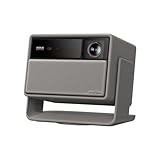
- Lossless Optics: Flexible lens shift and optical zoom give you more freedom in setup—without sacrificing clarity. Enjoy crisp, distortion-free visuals at any size…
- Daylight Ready, Triple Laser Powered: Our advanced X-Master RGB triple laser engine delivers 5700 ISO lumens of peak brightness, 20,000:1 contrast, and 110% BT…
The XGIMI HORIZON 20 Max is the flagship option for users who want premium home theater performance and flexible installation. Its motorized lens shift supports vertical adjustment of ±120% and horizontal adjustment of ±45%, subject to positioning limitations.
Why I picked it: Its 4K resolution, 5,700 ISO lumens, RGB triple-laser technology, Dolby Vision support, and motorized lens shift make it a compelling premium choice for versatile home cinema installations.
Other notable features include:
- 4K UHD resolution (3840 × 2160).
- Optical zoom with a 1.2–1.5:1 throw ratio.
- Google TV.
- Dual 12W Harman/Kardon speakers.
- Support for HDR10+, Dolby Vision, and IMAX Enhanced.
5700 ISO Lumens+1
XGIMI HORIZON 20 Pro
The HORIZON 20 Pro is another model to consider if you want premium projection capabilities without necessarily choosing the flagship Max version. It belongs to the HORIZON 20 family, whose lens-shift functionality is documented by XGIMI.

- RGB Triple Laser Brilliance: Dive into color-rich, lifelike visuals with the X-Master RGB triple laser engine. 4100 ISO lumens of brightness and ultra-deep…
- Pro-Level Gaming Features: Play big with 200″ visuals, 1ms response, 240Hz fluidity—plus VRR and ALLM for seamless sync and ultra-low latency.
Why I picked it: It is worth comparing for buyers seeking a premium home theater projector with flexible image positioning, strong picture performance, and a potentially more accessible price than the flagship model.
Consider its specifications, brightness, optical zoom, and regional availability before purchasing.
Its main specifications include:
- 4K UHD resolution.
- 4,100 ISO lumens.
- RGB triple-laser light source.
- Dolby Vision and HDR10+ support.
- Motorized optical zoom and lens shift.
Game Deeper with Pro-Grade Visuals+1
XGIMI HORIZON 20
Best value in the series
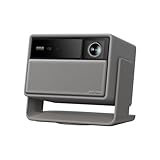
- Powered by RGB Triple Laser: The X-Master RGB triple laser engine delivers 3200 ISO lumens and a 100,000:1 contrast ratio for vivid, accurate colors and exceptional…
- Cinematic Certified: IMAX Enhanced, Dolby Vision, HDR10+, and Filmmaker Mode combine to deliver stunning visuals and true-to-intent playback—bringing the theater…
The standard HORIZON 20 is a good option for buyers who want the convenience of motorized lens shift without paying for the higher brightness of the Max model.
Why I picked it: Its 3,200 ISO lumens, 4K resolution, RGB triple-laser technology, optical zoom, and motorized lens shift provide an attractive balance for everyday home cinema.
Notable features include:
- 4K UHD resolution.
- 3,200 ISO lumens.
- RGB triple-laser technology.
- Google TV.
- Dolby Vision and HDR10+ support.
- 1.2–1.5:1 throw ratio.
How Motorized Lens Shift Works on XGIMI Projectors
Motorized lens shift on XGIMI projectors allows you to move the projected image vertically or horizontally without physically repositioning the projector. This feature is particularly useful when installing a projector in a room where the screen position, ceiling height, or furniture layout limits placement options.
Unlike digital keystone correction, lens shift uses an optical adjustment mechanism to change the position of the image on the screen. Consequently, it preserves the original image resolution rather than digitally shrinking or reshaping the picture.
Understanding the adjustment process
On compatible XGIMI HORIZON 20 Series models, motorized lens shift makes image positioning more convenient.
- Vertical lens shift: Moves the projected image up or down while the projector remains stationary.
- Horizontal lens shift: Moves the image left or right to accommodate off-center installations.
- Motorized adjustment: Uses electronic controls to make positioning easier and more precise.
- Optical image positioning: Maintains the image’s original resolution without relying on digital keystone scaling.
Lens shift versus keystone correction
These technologies solve similar positioning problems but work differently.
Lens shift physically adjusts the optical image position, while keystone correction digitally modifies the image’s geometry to compensate for angled projection.
For the best picture quality, position your XGIMI projector as squarely as possible toward the screen and use lens shift for the remaining alignment adjustments.
How to Use Motorized Lens Shift on an XGIMI Projector
Setting up motorized lens shift on an XGIMI HORIZON 20 Series projector is relatively straightforward. The feature allows you to adjust the projected image using the remote control instead of physically moving the projector or changing its mounting position.
To access the feature, first turn on your projector and display an image on your projection screen or wall. Then follow these steps:
- Open All Settings using your XGIMI remote control.
- Navigate to Projector.
- Select Image Correction.
- Choose Lens Shift.
- Use the remote control’s arrow keys to move the projected image vertically or horizontally.
- Continue adjusting until the picture fits your screen properly.
Understanding the adjustment range
XGIMI specifies the following lens-shift capabilities:
- Vertical adjustment: ±120%.
- Horizontal adjustment: ±45%.
- Default vertical position: +100%.
- Default horizontal position: 0%.
However, maximum horizontal adjustment of ±45% is available only when vertical shift is set to zero. XGIMI+1
Important setup considerations
There is one important limitation to understand before using this feature. Activating lens shift disables certain intelligent functions, including automatic keystone correction, autofocus, wall-color adaptation, and eye protection.
Therefore, complete your image adjustments carefully and check the picture before settling on your final installation position. If the lens-shift range is insufficient, physically adjust the projector’s angle or mounting position.
Benefits of Choosing an XGIMI Projector with Motorized Lens Shift
Choosing an XGIMI projector with motorized lens shift offers several advantages, especially if you want a flexible home theater installation. Instead of rearranging furniture or moving the projector whenever the image appears too high, low, or off-center, you can adjust the image position electronically.
Here are some important benefits to consider.
Flexible projector installation
One of the biggest advantages of motorized lens shift is installation flexibility. You can position your XGIMI projector on a shelf, ceiling mount, or dedicated projector stand and adjust the image to fit your screen.
This is particularly useful in living rooms where the ideal projector position may not align perfectly with the center of the screen.
Better image quality
Lens shift helps preserve the original image resolution because it moves the optical image rather than digitally reshaping it. This is beneficial when watching 4K movies, streaming television shows, or playing video games where picture clarity matters.
Convenient image adjustments
Motorized controls make repositioning easier than manually adjusting the projector. You can use the remote control to fine-tune the image without repeatedly moving the equipment.
Improved home theater organization
A projector with motorized lens shift can make it easier to maintain a clean entertainment space. You may have more freedom when choosing a mounting location, reducing the need to place the projector directly in front of your seating area.
Reduced dependence on keystone correction
Digital keystone correction can reduce the effective resolution of a projected image. Lens shift provides an optical alternative, allowing you to maintain a more natural rectangular picture.
Overall, motorized lens shift is especially valuable for permanent home theater installations. However, it does not eliminate the need for correct projector placement or guarantee that every room layout will work within the available adjustment range.
XGIMI Motorized Lens Shift vs. Digital Keystone Correction
When choosing an XGIMI projector with motorized lens shift, it is important to understand how this technology differs from digital keystone correction. Both features help position the projected image correctly, but they use different methods to achieve the result.
Motorized lens shift physically moves the projected image through the projector’s optical system. Digital keystone correction, on the other hand, electronically changes the image’s shape to compensate for an angled projector.
Key differences between the two technologies
| Feature | Motorized lens shift | Digital keystone correction |
|---|---|---|
| Adjustment method | Optical | Digital |
| Image positioning | Moves the image | Reshapes the image |
| Resolution | Preserves native resolution | Can reduce effective resolution |
| Image quality | Maintains original geometry | May introduce scaling artifacts |
| Convenience | Remote-controlled adjustment | Often automatic or manual |
| Best application | Flexible installations | Correcting angled projection |
Which option produces better picture quality?
Motorized lens shift generally offers better image preservation because it does not digitally resize the picture. This makes it particularly useful when watching 4K content or displaying detailed images.
Digital keystone correction is still helpful when you cannot position your projector directly toward the screen. However, excessive correction can create softer-looking edges, reduce the usable image area, and introduce scaling artifacts.
Which feature should you use?
For the best results, prioritize motorized lens shift when installing a compatible XGIMI projector.
Use digital keystone correction when minor alignment adjustments are necessary and optical lens shift cannot fully correct the positioning.
Ideally, place the projector perpendicular to the screen, use optical lens shift for positioning, and avoid unnecessary digital correction.
Factors to Consider When Buying an XGIMI Projector with Motorized Lens Shift
Before purchasing an XGIMI projector with motorized lens shift, consider more than just the image adjustment feature. Brightness, resolution, throw distance, connectivity, and installation requirements all influence how well the projector performs in your home theater.
Here are five important factors to evaluate.
Lens shift range
Check the available vertical and horizontal lens-shift ranges before purchasing. For example, the XGIMI HORIZON 20 Max offers substantial adjustment flexibility, making it suitable for installations where the projector cannot sit directly in front of the screen.
Remember that maximum horizontal and vertical adjustments may not be available simultaneously.
Brightness and image quality
Consider the projector’s brightness based on your viewing environment. A brighter model is generally more suitable for rooms with some ambient light, while darker rooms allow you to enjoy better perceived contrast.
The HORIZON 20, HORIZON 20 Pro, and HORIZON 20 Max offer different brightness levels.
Resolution and HDR support
Look for native 4K UHD resolution if you regularly watch high-resolution movies or play games with compatible equipment.
Also consider HDR formats such as Dolby Vision and HDR10+ for improved contrast and color reproduction with supported content.
Throw distance and optical zoom
Check whether the projector can produce your preferred screen size from the available installation distance. The HORIZON 20 Series offers a 1.2–1.5:1 optical zoom range, providing additional placement flexibility.
Connectivity and gaming features
Finally, consider the connections and entertainment features you need.
Look for:
- HDMI connectivity for gaming consoles and streaming devices.
- USB ports for compatible external storage.
- Wi-Fi and Bluetooth support.
- Google TV for streaming applications.
- Gaming features such as low-latency modes and supported high-refresh-rate input.
Buying tip: Compare the official specifications of each HORIZON 20 model rather than assuming that every feature is identical across the series. Prioritize lens-shift flexibility, brightness, and installation compatibility to avoid purchasing a projector that does not suit your room.
Conclusion
An XGIMI projector with motorized lens shift is an excellent option for home theater enthusiasts who want flexible installation and convenient image positioning. The HORIZON 20 Series offers compelling choices, including the standard HORIZON 20, HORIZON 20 Pro, and flagship HORIZON 20 Max.
Motorized lens shift helps reposition images without relying on digital keystone correction, preserving the original image resolution. Before purchasing, compare brightness, resolution, optical zoom, connectivity, and adjustment ranges.
If premium brightness and installation flexibility are your priorities, the HORIZON 20 Max deserves serious consideration. Ultimately, choosing the right model will help you create a more convenient and enjoyable home cinema experience.
Frequently Asked Questions About XGIMI Projectors with Motorized Lens Shift
Does XGIMI make projectors with motorized lens shift?
Yes. XGIMI offers motorized lens shift on its HORIZON 20 Series projectors. The feature allows users to reposition projected images vertically and horizontally without physically moving the projector.
Which XGIMI projector has motorized lens shift?
The XGIMI HORIZON 20, HORIZON 20 Pro, and HORIZON 20 Max are models to consider. The HORIZON 20 Max is particularly attractive because of its high brightness, 4K resolution, and extensive lens-shift capabilities.
Is motorized lens shift better than keystone correction?
Motorized lens shift generally provides better image preservation because it adjusts the optical position without digitally reshaping the picture. Keystone correction remains useful when correcting angled projection that cannot be addressed through lens shift alone.
Can I use motorized lens shift with a ceiling-mounted XGIMI projector?
Yes. Motorized lens shift can make ceiling-mounted installations more flexible by allowing you to reposition the projected image without moving the mount. However, you must remain within the projector’s supported adjustment range.
Does lens shift reduce image quality?
Optical lens shift does not digitally scale or crop the image like keystone correction can. However, extreme optical adjustments may affect lens performance or image uniformity, depending on the projector and operating conditions.
Does the XGIMI HORIZON 20 Max support horizontal lens shift?
Yes. The HORIZON 20 Max supports horizontal lens shift of up to ±45% and vertical lens shift of up to ±120%. Maximum horizontal adjustment requires vertical shift to be set to zero.
Is the XGIMI HORIZON 20 Max suitable for gaming?
Yes. Its 4K resolution, high brightness, and gaming-oriented features make it suitable for compatible gaming setups. However, check supported refresh rates, HDMI specifications, and input lag for your preferred console before purchasing.
Should I buy an XGIMI projector with motorized lens shift?
If you want flexible projector placement, convenient image adjustments, and high-quality home entertainment, a compatible XGIMI projector is worth considering. Compare the HORIZON 20 models to determine which offers the right combination of brightness, image quality, and installation flexibility.
This website is a participant in the Amazon Services LLC Associates Program, an affiliate advertising program designed to provide a means for us to earn fees by linking to Amazon.com and affiliated sites.