
This website is a participant in the Amazon Services LLC Associates Program, an affiliate advertising program designed to provide a means for us to earn fees by linking to Amazon.com and affiliated sites.
Yes, Meta Quest can do augmented reality (AR), but the experience depends on which Meta Quest headset you own and the apps you use. Modern headsets like the Meta Quest 3 and Meta Quest 3S feature full-color passthrough cameras that blend digital objects with your real-world surroundings, creating immersive mixed reality experiences. While older models such as the Meta Quest 2 primarily focused on virtual reality (VR), newer Quest devices have expanded into AR and mixed reality for gaming, productivity, education, fitness, and entertainment.
Imagine playing a game where digital characters run across your living room or placing multiple virtual computer monitors on your real desk. That’s exactly the type of experience Meta has been building with its latest Quest headsets.
In this guide, you’ll learn how Meta Quest handles augmented reality, which Quest models support AR features, the differences between AR, VR, and mixed reality, the best AR apps available today, and whether a Meta Quest headset is the right choice for your needs. By the end, you’ll have a clear understanding of what Meta Quest can—and cannot—do when it comes to augmented reality.
Best for Augmented Reality on Meta Quest
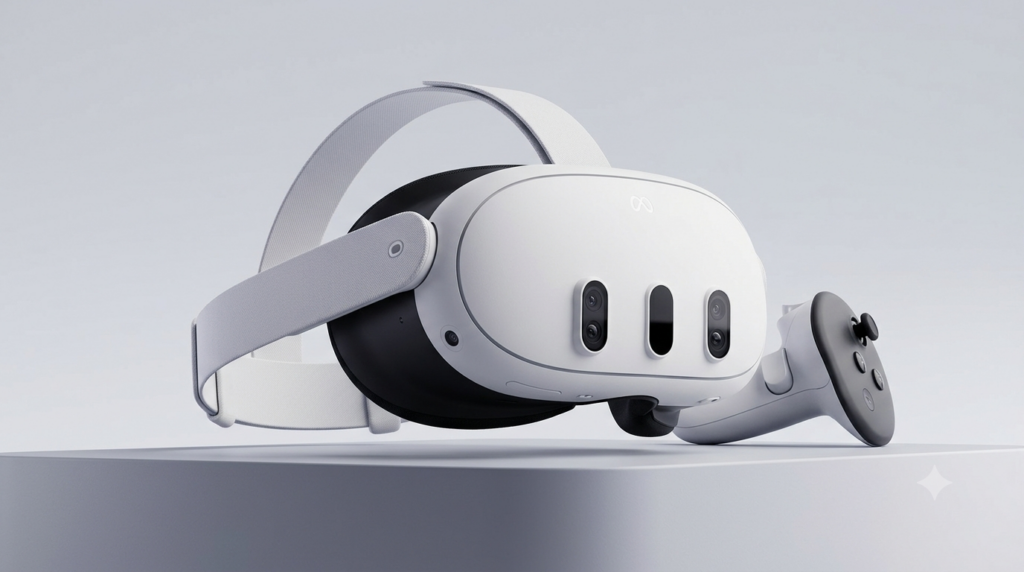
Meta Quest 3
Why we picked it
Meta Quest 3 delivers the best mixed reality experience thanks to its high-resolution full-color passthrough cameras, powerful Snapdragon XR2 Gen 2 processor, and growing library of immersive AR applications.
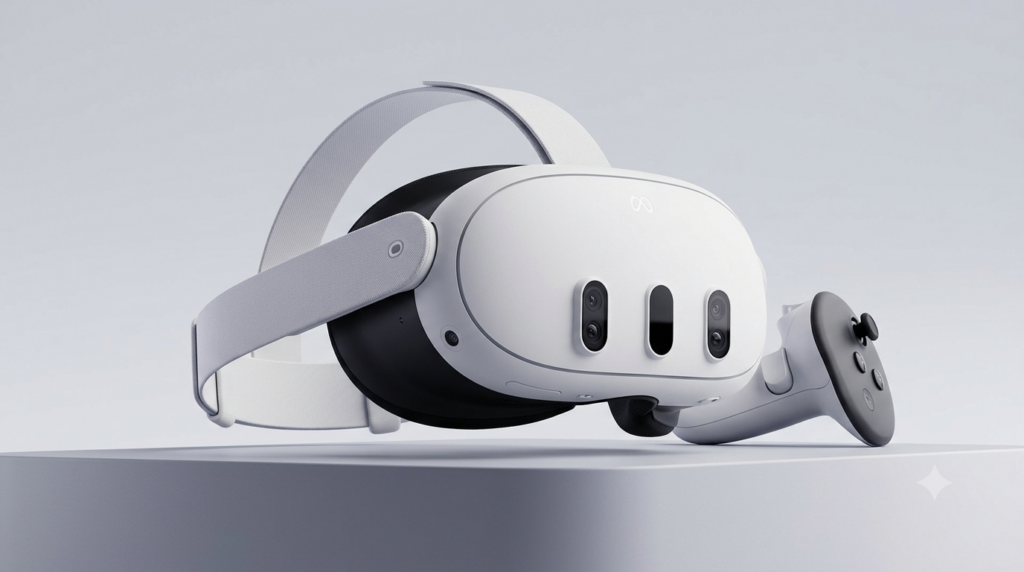
Meta Quest 3S
Why we picked it
Meta Quest 3S offers excellent mixed reality performance at a lower price, making it ideal for beginners who want modern AR capabilities without paying for premium hardware features.
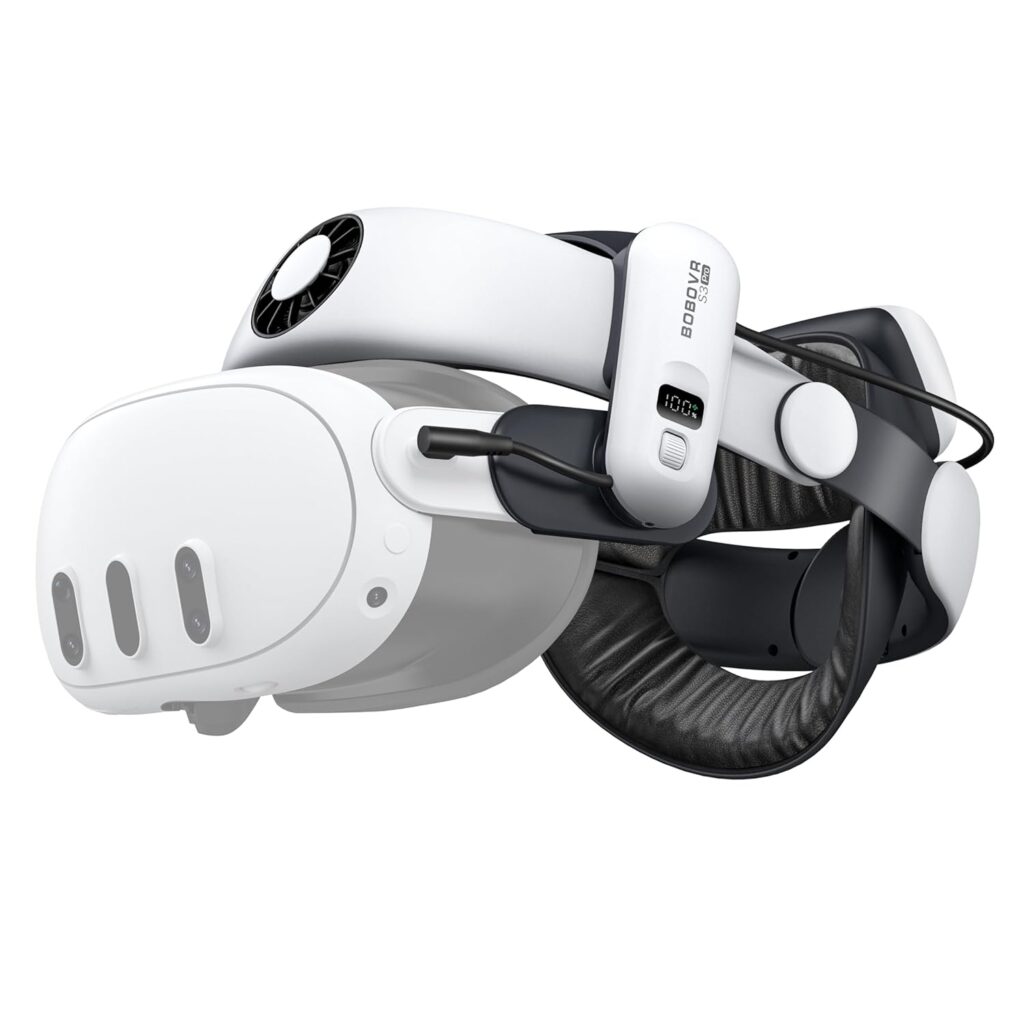
BOBOVR S3 Pro Head Strap for Meta Quest 3
Why we picked it
The BOBOVR S3 Pro improves comfort during extended AR and VR sessions by providing better weight distribution, a magnetic battery system, and enhanced overall headset stability.
What Is Augmented Reality and How Does Meta Quest Use It?
Augmented reality (AR) is a technology that overlays digital content onto your real-world environment instead of replacing it entirely. Unlike traditional virtual reality (VR), which immerses you in a completely digital world, AR lets you continue seeing your surroundings while interacting with virtual objects. Meta Quest achieves this through advanced cameras, sensors, and software that accurately map your physical space and position digital elements within it.
On the latest Meta Quest headsets, this capability is powered by full-color passthrough technology. Cameras mounted on the front of the headset capture a live view of your surroundings and display it inside the headset. The system then adds interactive digital objects that appear to remain fixed in your room as you move around. This combination of real and virtual elements is commonly referred to as mixed reality (MR), which is a more advanced form of augmented reality.
Meta Quest continuously scans your environment to understand walls, floors, furniture, and other objects. This spatial awareness allows apps to create realistic interactions, such as placing virtual screens on a desk, hiding digital characters behind furniture, or turning your living room into an interactive game space.
Some of the most common ways Meta Quest uses augmented reality include:
- Playing mixed reality games that blend with your home.
- Creating multiple virtual computer monitors for work.
- Following fitness workouts while remaining aware of your surroundings.
- Learning through interactive educational experiences.
- Viewing 3D models for design, architecture, or engineering.
- Decorating rooms by previewing virtual furniture and objects.
- Collaborating remotely with shared virtual workspaces.
Which Meta Quest Headsets Support Augmented Reality?
Not every Meta Quest headset offers the same augmented reality (AR) experience. While every Quest device can run virtual reality applications, only the newer models provide high-quality mixed reality using full-color passthrough cameras. If AR is your primary reason for buying a Meta Quest headset, choosing the right model makes a significant difference.
Meta Quest 3 — Best Overall for Augmented Reality
The Meta Quest 3 is currently the best headset for AR and mixed reality. It features high-resolution full-color passthrough cameras, an advanced depth sensor, and the Snapdragon XR2 Gen 2 processor, allowing digital objects to blend naturally into your physical environment. This combination provides more accurate room mapping, smoother interactions, and better image quality than previous Quest models.
Best for:
- Mixed reality gaming
- Productivity with virtual monitors
- Interactive education
- Home fitness
- Creative design and visualization
Meta Quest 3S — Best Budget AR Option
The Meta Quest 3S brings most of the mixed reality capabilities of the Quest 3 at a lower price point. It includes the same Snapdragon XR2 Gen 2 processor and supports full-color passthrough, making it an excellent choice for users who want modern AR features without paying for the flagship model. The primary trade-offs are its Fresnel lenses and lower display resolution compared to the Quest 3.
Best for:
- First-time VR and AR users
- Families
- Casual gaming
- Budget-conscious buyers
Meta Quest Pro — Built for Professional Mixed Reality
Originally designed for business users and developers, the Meta Quest Pro supports mixed reality with full-color passthrough and adds eye tracking and face tracking for advanced collaboration and enterprise applications. Although it remains capable, its older processor means the Quest 3 now outperforms it in many consumer mixed reality experiences.
Best for:
- Professional collaboration
- Enterprise training
- Research
- Social presence with facial expressions
Meta Quest 2 — Limited AR Capabilities
The Meta Quest 2 is primarily a virtual reality headset. It includes monochrome passthrough cameras mainly for setting up your play space and basic environmental awareness. While some software updates have expanded its functionality, it does not deliver the immersive, full-color mixed reality experience available on newer models.
Quick Comparison
| Headset | Full-Color AR | Mixed Reality | Recommended for AR? |
|---|---|---|---|
| Meta Quest 3 | ✅ Yes | ✅ Excellent | ⭐⭐⭐⭐⭐ |
| Meta Quest 3S | ✅ Yes | ✅ Very Good | ⭐⭐⭐⭐☆ |
| Meta Quest Pro | ✅ Yes | ✅ Very Good | ⭐⭐⭐⭐☆ |
| Meta Quest 2 | ❌ No (monochrome passthrough) | ⚠️ Limited | ⭐⭐☆☆☆ |
How Does Meta Quest Augmented Reality Work?
Meta Quest delivers augmented reality through a combination of full-color passthrough cameras, advanced sensors, spatial mapping, artificial intelligence (AI), and hand-tracking technology. Instead of projecting digital images onto transparent lenses like some dedicated AR glasses, Meta Quest captures your surroundings with outward-facing cameras and displays a live, full-color video feed inside the headset. Digital objects are then layered onto this live view, creating a convincing mixed reality experience.
One of the most important technologies behind Meta Quest AR is spatial understanding. When you first wear the headset, it scans your room to identify floors, walls, ceilings, furniture, and other physical objects. This process allows apps to understand the layout of your environment so virtual content behaves naturally. For example, a digital pet can sit on your couch, a virtual monitor can stay attached to your desk, or a game can use your walls as part of the gameplay.
The headset also tracks your movements with impressive precision. As you walk around, crouch, or look in different directions, the virtual objects remain anchored in place rather than moving with your head. This realistic positioning makes the experience feel much more immersive.
Meta Quest supports two primary interaction methods:
- Hand Tracking
- Uses built-in cameras to detect your hands and fingers.
- Lets you tap, pinch, grab, and manipulate virtual objects without controllers.
- Ideal for productivity, navigation, and educational apps.
- Touch Plus Controllers
- Provide precise input for gaming and creative applications.
- Include haptic feedback that simulates the feeling of interacting with virtual objects.
- Offer reliable tracking even during fast-paced movements.
Behind the scenes, Meta Quest continuously updates its understanding of your environment. If you move furniture or enter a different room, the headset can quickly rescan the space to maintain accurate placement of digital content. This dynamic mapping helps create seamless mixed reality experiences across a variety of environments.
Key Technologies That Power Meta Quest AR
- Full-color passthrough cameras
- Spatial mapping and room scanning
- AI-powered scene understanding
- Hand tracking
- Touch Plus controller tracking
- Depth perception and object recognition
- Low-latency motion tracking for smooth interactions
Real-World Examples
Here are a few ways these technologies come together:
- Gaming: Virtual aliens can emerge from your walls while your coffee table becomes part of the game.
- Work: Place multiple floating computer screens around your home office without needing physical monitors.
- Fitness: Follow workout instructions while still seeing your surroundings, reducing the chance of bumping into furniture.
- Education: Explore interactive 3D models of the human body, planets, or historical landmarks from your living room.
- Home Design: Preview virtual furniture and decorations at true scale before making a purchase.
Best Augmented Reality Apps and Games for Meta Quest
One of the biggest advantages of owning a modern Meta Quest headset is access to a growing library of augmented reality (AR) and mixed reality (MR) applications. Whether you’re interested in gaming, productivity, fitness, creativity, or education, there are plenty of experiences that blend digital content with your physical surroundings. Most of these apps are designed for the Meta Quest 3 and Meta Quest 3S, taking advantage of their full-color passthrough cameras and advanced room-mapping capabilities.
Here are some of the best AR and mixed reality experiences available for Meta Quest:
First Encounters
Best for: Learning mixed reality
First Encounters is Meta’s built-in mixed reality demo that showcases what the Quest headset can do. It scans your room and transforms it into an interactive playground where virtual creatures burst through your walls and hide behind your furniture.
Highlights:
- Introduces mixed reality controls
- Uses your real room as the game environment
- Demonstrates hand tracking and controller support
- Great for first-time Quest users
LEGO Bricktales
Best for: Puzzle solving and creativity
LEGO Bricktales combines classic LEGO building with mixed reality gameplay. Virtual LEGO models appear on your table or floor, allowing you to build, rotate, and interact with them as though they were physical bricks.
Why it’s worth trying:
- Family-friendly gameplay
- Creative problem-solving challenges
- Excellent use of room-scale mixed reality
- Bright, detailed graphics
Spatial
Best for: Productivity and remote collaboration
Spatial transforms your workspace into a virtual office. You can open multiple floating screens, review 3D models, collaborate with colleagues, or host virtual meetings while still seeing your physical surroundings.
Ideal for:
- Remote work
- Team collaboration
- Design reviews
- Virtual presentations
PianoVision
Best for: Learning to play piano
PianoVision overlays virtual notes directly onto your real keyboard, making it easier to learn songs and practice proper finger placement. It’s an engaging example of how AR can support education and skill development.
Benefits include:
- Interactive lessons
- Real-time visual guidance
- Progress tracking
- Suitable for beginners and experienced players
Figmin XR
Best for: Creativity and 3D design
Figmin XR lets you place, edit, and interact with 3D objects throughout your room. You can create digital scenes, import models, and even collaborate with others in shared mixed reality spaces.
Popular uses:
- 3D art
- Interior design visualization
- Educational projects
- Prototyping ideas
How to Choose the Right AR App
The best app depends on what you want to do with your Meta Quest:
- Gaming: First Encounters, LEGO Bricktales
- Productivity: Spatial
- Learning: PianoVision
- Creativity: Figmin XR
- Family entertainment: LEGO Bricktales and First Encounters
As Meta continues investing in mixed reality, the Quest app ecosystem is expanding rapidly. New AR games, educational tools, and productivity applications are released regularly, giving users even more ways to combine the digital and physical worlds.
Conclusion
Meta Quest has evolved far beyond being just a virtual reality headset. With the introduction of full-color passthrough and advanced mixed reality capabilities on the Meta Quest 3 and Meta Quest 3S, users can now enjoy immersive experiences that seamlessly blend digital content with the real world. Whether you’re playing interactive games, creating a virtual workspace, learning new skills, or exploring educational content, Meta Quest demonstrates how augmented reality can enhance everyday activities.
While the Meta Quest 2 offers only limited AR functionality, the latest Quest models provide a significantly more realistic and engaging mixed reality experience. As Meta continues to expand its software ecosystem and developers release new AR applications, the platform is likely to become even more versatile. If you’re looking for a headset that combines virtual reality with practical augmented reality features, the Meta Quest 3 and Quest 3S are among the strongest consumer options available today.
Frequently Asked Questions About Can Meta Quest Do Augmented Reality?
Can all Meta Quest headsets do augmented reality?
No. While all Meta Quest headsets support virtual reality, only the Meta Quest 3, Meta Quest 3S, and Meta Quest Pro offer high-quality augmented reality through full-color passthrough and mixed reality technology. The Meta Quest 2 includes basic monochrome passthrough for safety and boundary setup but does not provide the same immersive AR experience.
Is Meta Quest augmented reality the same as mixed reality?
Not exactly. Augmented reality (AR) overlays digital content onto your view of the real world, while mixed reality (MR) goes a step further by allowing digital objects to interact with your physical environment. Meta often describes the Quest 3 and Quest 3S as mixed reality headsets because they understand room layouts and anchor virtual objects to real-world surfaces.
Do I need special apps to use augmented reality on Meta Quest?
Yes. AR features are available only in apps and games that support mixed reality. Many experiences, such as First Encounters, LEGO Bricktales, Spatial, PianoVision, and Figmin XR, are specifically designed to take advantage of Meta Quest’s passthrough cameras and spatial mapping capabilities.
Can I use Meta Quest for work and productivity in augmented reality?
Absolutely. Meta Quest supports productivity apps that let you create virtual monitors, collaborate with coworkers, attend virtual meetings, and organize your workspace while still seeing your real surroundings. This makes mixed reality useful for remote work, creative projects, and multitasking.
Does augmented reality on Meta Quest require an internet connection?
Not always. Many AR experiences work without a continuous internet connection once they have been downloaded and installed. However, some multiplayer games, cloud-based collaboration tools, software updates, and online features require an active Wi-Fi connection.
Is Meta Quest a true augmented reality headset?
Meta Quest is best described as a mixed reality headset rather than a dedicated augmented reality headset. Unlike transparent AR smart glasses, it uses full-color passthrough cameras to display your surroundings and overlay digital content. The result is a highly immersive AR-like experience that combines many of the benefits of both virtual reality and augmented reality.
Which Meta Quest headset is best for augmented reality?
For most users, the Meta Quest 3 is the best choice thanks to its high-resolution displays, advanced full-color passthrough cameras, and powerful processor. If you’re looking for a more affordable option, the Meta Quest 3S offers many of the same mixed reality features at a lower price, making it an excellent value for first-time buyers.
Can a Projector Get a Virus?why you need to know
This website is a participant in the Amazon Services LLC Associates Program, an affiliate advertising program designed to provide a means for us to earn fees by linking to Amazon.com and affiliated sites.