
This website is a participant in the Amazon Services LLC Associates Program, an affiliate advertising program designed to provide a means for us to earn fees by linking to Amazon.com and affiliated sites.
To install an Arcadia Deep Heat Projector, you need a compatible heat-resistant lamp holder, a suitable thermostat, and a properly ventilated reptile enclosure designed for safe overhead heating. The Arcadia Deep Heat Projector provides radiant heat without producing visible light, making it useful for maintaining suitable temperatures during the day or night when configured correctly.
However, installing this reptile heating device involves more than simply screwing a bulb into a fixture. You must choose the correct wattage, position the projector at an appropriate distance, use suitable temperature controls, and monitor the warm and cool areas of the enclosure.
In this guide, you will learn how to install an Arcadia Deep Heat Projector, select compatible accessories, avoid common installation mistakes, and check that your heating setup works safely. Whether you are preparing a new enclosure or upgrading an existing heating system, these practical steps will help you create a more controlled environment for your reptile.
Best Products for Installing an Arcadia Deep Heat Projector
The right accessories make installation safer and help maintain stable temperatures. Consider these three products when planning your reptile heating setup.
Arcadia Deep Heat Projector 50W / 80W
The main heating component
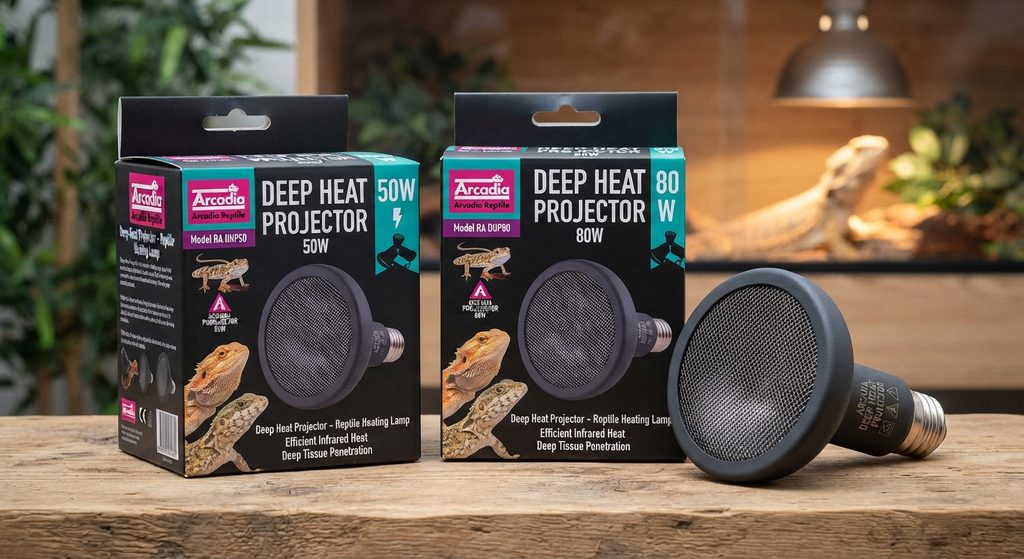
This infrared heating lamp produces virtually no visible light, making it useful for day and night heating. Choose between 50W and 80W according to enclosure conditions and species-specific temperature requirements.
Arcadia Ceramic Lamp Holder and Bracket
For secure lamp mounting
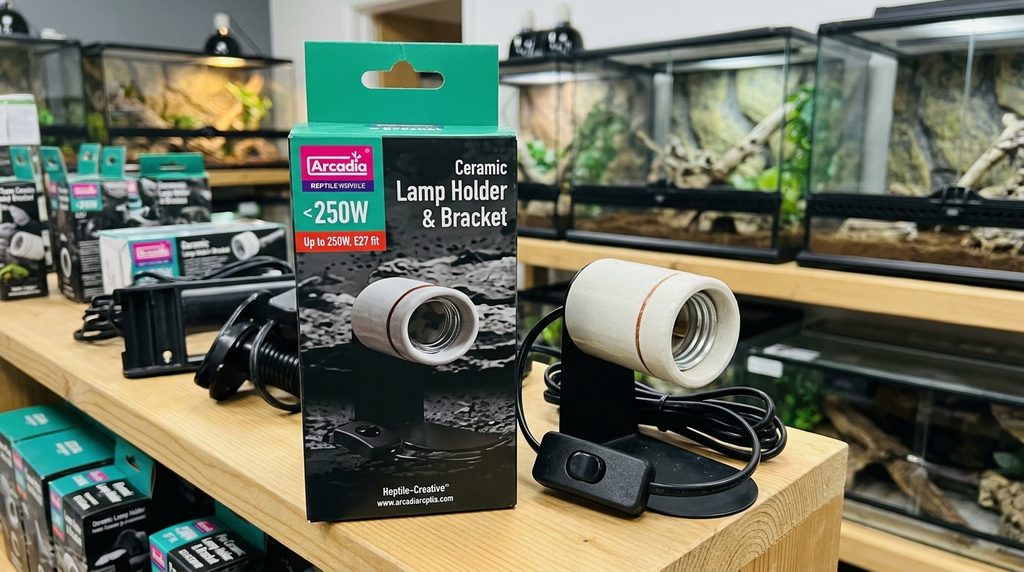
This ceramic lamp holder supports compatible screw-fit heat sources and provides a practical mounting option. Check its electrical rating, fitting, installation position, and required protective cage before purchasing.
HabiStat Digital Dimming Thermostat
For temperature regulation
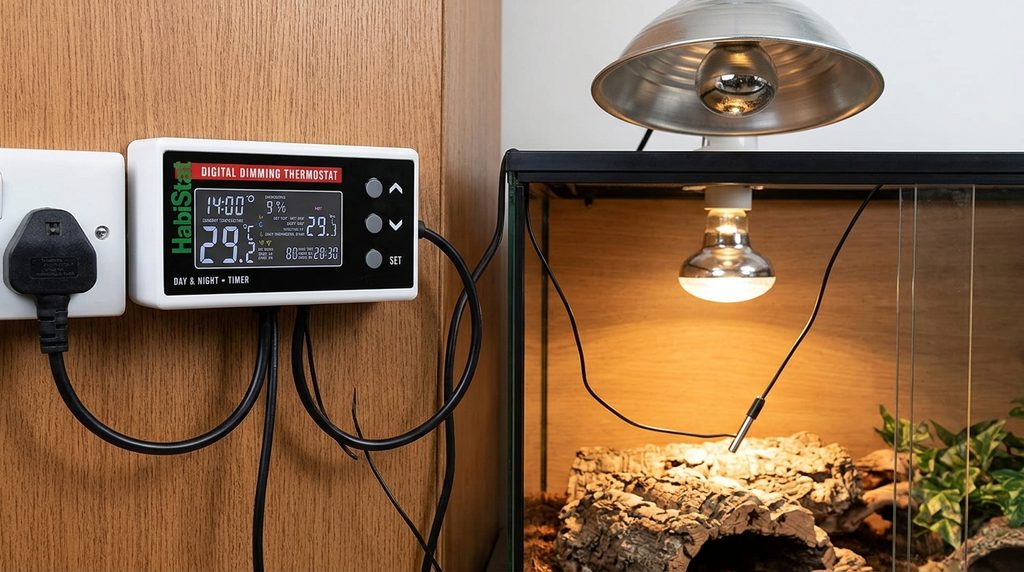
A suitable digital dimming thermostat adjusts heat output to help maintain the required basking temperature. Confirm compatibility with your projector, wattage, electrical supply, and enclosure before connecting it.
How to Choose the Right Arcadia Deep Heat Projector and Accessories
Choosing the correct Arcadia Deep Heat Projector and accessories is the first step toward a safe and effective reptile heating setup. Before purchasing anything, consider your reptile’s species, enclosure size, ventilation, and required basking temperature.
Select the Appropriate Wattage
The Arcadia Deep Heat Projector is available in different wattages, including 50W and 80W models. A lower-wattage projector may suit a smaller enclosure or a setup with lower heating demands, while a higher-wattage model may be appropriate for a larger enclosure or a cooler room.
However, wattage alone does not determine the correct choice. Enclosure material, mounting distance, ambient room temperature, and ventilation all affect heating performance. Consult your reptile’s care requirements and the manufacturer’s guidance before selecting a model.
Choose a Compatible Lamp Holder
Use a lamp holder specifically rated for the projector’s fitting, operating temperature, and electrical requirements. Ceramic holders are commonly used for reptile heat sources, but the holder must be compatible with the exact installation.
Avoid ordinary plastic fittings or improvised mounting arrangements. Secure the holder firmly and use a suitable protective guard to prevent your reptile from contacting the hot projector.
Use a Suitable Dimming Thermostat
A compatible dimming thermostat is essential for controlling the projector’s heat output. Arcadia recommends using a thermostat with its Deep Heat Projector to maintain a suitable temperature gradient and reduce the risk of overheating.
Check the Fitting and Electrical Rating
Before installation, verify the bulb fitting and your country’s electrical requirements. The standard UK/EU Arcadia Deep Heat Projector uses an E27 screw fitting, while some North American versions use an E26 fitting.
Before you proceed, gather these essentials:
- A compatible Arcadia Deep Heat Projector.
- A suitably rated ceramic lamp holder or approved dome fixture.
- A compatible dimming thermostat with a correctly positioned probe.
- An infrared thermometer for measuring basking-surface temperatures.
- A suitable protective guard if the reptile could reach the heater.
Once you have selected compatible equipment, you can move on to mounting the projector securely and preparing the enclosure for safe operation.
How to Install an Arcadia Deep Heat Projector Step by Step
Installing an Arcadia Deep Heat Projector correctly helps provide consistent warmth while reducing the risk of burns, electrical problems, and overheating. Before starting, switch off and unplug the heating equipment, allow any existing heat source to cool, and follow the instructions supplied with your projector and lamp holder.
Step 1: Prepare the Enclosure
Choose a suitable location above the basking area, leaving enough space for the projector, mounting hardware, and protective guard. Ensure the enclosure has adequate ventilation and that the reptile cannot reach the heater, wiring, or hot surfaces.
Step 2: Install the Lamp Holder
Secure a compatible ceramic lamp holder or approved fixture according to its manufacturer’s instructions. The mounting point must support the fixture’s weight and withstand the temperatures generated during operation.
Do not suspend the projector using its electrical cable, and avoid placing it near flammable materials or components that could melt.
Step 3: Fit the Deep Heat Projector
With the power disconnected, carefully screw the projector into the compatible fitting. Tighten it securely without forcing it, and install an appropriate protective guard wherever the reptile could approach the heater.
Step 4: Connect the Thermostat
Connect the heating system to a compatible dimming thermostat according to the equipment instructions. Position and secure the thermostat probe at the manufacturer’s recommended measuring point, usually near the basking area, so it accurately reflects the temperature you need to control.
Never bypass the thermostat or rely solely on the projector’s wattage to regulate heat.
Step 5: Set the Starting Distance
Position the projector at a safe distance above the basking surface, following the manufacturer’s guidance and your reptile’s care requirements. Arcadia publishes reference temperatures at different distances, but actual results vary with enclosure design, room temperature, and mounting conditions.
Step 6: Test the Heating Setup
Reconnect the power and allow the enclosure to warm up while monitoring temperatures. Use a non-contact infrared thermometer to measure the basking surface, and check the cooler area with a separate thermometer.
Confirm that the thermostat regulates the heat correctly and that your reptile can move freely between warmer and cooler areas. Adjust the setup gradually until it meets the temperature requirements for your particular species.
Safety reminder: Never operate the Deep Heat Projector without a suitable thermostat. Switch off the power and allow the lamp to cool before handling or adjusting the fixture.
How to Set the Correct Temperature and Thermostat for an Arcadia Deep Heat Projector
Setting the correct temperature is one of the most important parts of installing an Arcadia Deep Heat Projector. The goal is to create a suitable basking area while maintaining a cooler zone where your reptile can retreat when it needs to regulate its body temperature.
Choose Temperatures for Your Reptile Species
There is no single ideal temperature for every reptile. Bearded dragons, leopard geckos, crested geckos, and snakes have different heating requirements, so identify your animal’s species and life stage before adjusting the thermostat.
Check a reliable species-specific care guide for the required basking-surface temperature, warm-side air temperature, and cool-side temperature. Do not assume that a setting suitable for one reptile will be safe for another.
Set Up the Dimming Thermostat
A compatible dimming thermostat regulates the projector’s output to help maintain the selected temperature. Follow the thermostat manufacturer’s instructions to connect the heater and position the probe securely at the recommended measuring point.
Begin with a conservative setting based on your reptile’s documented temperature requirements. Allow the enclosure to warm up, then measure the basking surface with an infrared thermometer and check ambient temperatures with suitable thermometers.
Check the Temperature Gradient
A properly configured enclosure should offer a warmer basking area and a cooler retreat. This gradient lets your reptile move between different temperatures instead of being exposed to one uniform temperature throughout the enclosure.
Monitor temperatures at different locations and make small adjustments to the thermostat or mounting position when necessary. Never rely exclusively on the thermostat display, because probe readings may not accurately represent every surface or area of the enclosure.
Understand the Manufacturer’s Distance Guide
Arcadia publishes approximate basking-surface temperatures for its two projector wattages. These figures are useful starting references, not guaranteed readings for every enclosure.
| Distance from basking zone | 50W projector | 80W projector |
|---|---|---|
| 150 mm (6 inches) | 55°C | 62°C |
| 200 mm (8 inches) | 45°C | 51°C |
| 300 mm (12 inches) | 36°C | 44°C |
| 400 mm (16 inches) | 29°C | 36°C |
These temperatures demonstrate why you must measure the actual basking surface rather than choosing a distance based on guesswork. Some of the listed temperatures may be too high for particular reptiles, so always prioritize your animal’s species-specific requirements.
Important: Keep the projector connected to a compatible dimming thermostat, and never assume that a particular distance is safe without measuring the resulting temperature.
Common Arcadia Deep Heat Projector Installation Problems and How to Fix Them
Even when an Arcadia Deep Heat Projector is installed correctly, you may encounter problems with temperature control, heating performance, or equipment compatibility. Identifying the cause early helps protect your reptile and prevents damage to the heating system.
Problem 1: The Enclosure Is Not Getting Warm Enough
If your enclosure remains too cool, first check the room temperature, thermostat settings, and distance between the projector and basking surface. A projector with insufficient output for the enclosure may struggle to achieve the required temperature.
How to fix it:
- Confirm that the thermostat is configured correctly.
- Measure the basking surface with an infrared thermometer.
- Check whether the projector is mounted farther away than recommended.
- Verify that the projector’s wattage suits the enclosure and room conditions.
If temperatures remain too low, consult the manufacturer’s guidance before changing the wattage or replacing equipment.
Problem 2: The Basking Area Is Too Hot
Excessive heat can cause burns, dehydration, or dangerous overheating. A projector mounted too close to the basking surface or controlled by an incorrectly positioned probe may produce unsafe temperatures.
How to fix it:
- Switch off the heater if temperatures exceed your reptile’s safe range.
- Check the thermostat probe’s position and attachment.
- Recheck surface temperatures after the enclosure cools.
- Increase the mounting distance or adjust the thermostat according to species-specific requirements.
Never allow your reptile to remain in an enclosure with dangerously high temperatures while troubleshooting.
Problem 3: The Thermostat Does Not Control the Heat Properly
Incorrect thermostat settings, a poorly positioned probe, or an incompatible controller can cause unstable temperatures. Arcadia recommends using a dimming thermostat for accurate control of the projector’s heat output.
How to fix it:
- Verify that the thermostat supports your projector and its wattage.
- Check that the probe is secure and positioned according to the thermostat instructions.
- Confirm that the thermostat is set to the correct target temperature.
- If the temperature remains unstable, disconnect the heater and inspect the equipment for faults.
Replace damaged components rather than attempting unsafe electrical repairs.
Problem 4: The Projector Does Not Turn On
If the projector fails to heat, switch off the power before checking the setup. Inspect the plug, power supply, thermostat connections, and lamp fitting for obvious problems.
Never touch or unscrew the projector while it is hot. Disconnect it, allow it to cool completely, and check the manufacturer’s troubleshooting guidance. If the projector or wiring appears damaged, stop using it and replace or professionally inspect the faulty component.
Problem 5: The Enclosure Has No Suitable Temperature Gradient
A single hot basking spot is not enough if the rest of the enclosure becomes excessively warm. Reptiles need access to appropriate warmer and cooler areas to regulate their body temperature.
Reassess the heater’s position, enclosure ventilation, and overall heating arrangement. Measure temperatures at several points and adjust the setup to meet your reptile’s needs.
How to Maintain an Arcadia Deep Heat Projector and Keep Your Reptile Safe
Regular maintenance helps your Arcadia Deep Heat Projector operate reliably and reduces the risk of overheating, electrical faults, and accidental burns. A simple inspection routine also helps you identify problems before they affect your reptile’s enclosure.
Clean the Projector and Fixture Safely
Dust and debris can accumulate around the lamp holder, protective guard, and nearby enclosure surfaces. Before cleaning, switch off and unplug the equipment, then allow the projector to cool completely.
Use the cleaning methods recommended by the manufacturer. Avoid spraying water or cleaning products onto electrical components, and never immerse the projector or lamp holder in water.
Inspect the Holder, Wiring, and Protective Guard
Check the lamp holder, mounting bracket, cable, plug, and protective guard regularly for visible damage. Look for loose fittings, cracked ceramic components, frayed wires, corrosion, or signs of overheating.
If you notice a burning smell, unusual discoloration, damaged wiring, or intermittent operation, disconnect the equipment and stop using it until the fault has been addressed. Do not attempt improvised electrical repairs.
Monitor Temperatures Consistently
Check the basking surface and the cooler side of the enclosure regularly, especially after changing the projector, thermostat, substrate, or enclosure layout. Record your readings so you can identify unexpected changes in heating performance.
Seasonal changes in room temperature can also affect the enclosure. Reassess the heating arrangement when environmental conditions change rather than assuming that the original thermostat setting will always remain appropriate.
Use the Projector Alongside Appropriate Lighting
Although the Arcadia Deep Heat Projector produces virtually no visible light, it does not provide the UVB radiation many reptiles need. Use a separate, species-appropriate UVB lighting system and maintain a suitable day-and-night lighting schedule.
Follow a Simple Maintenance Checklist
- Check the mounting bracket and protective guard.
- Inspect the cable, plug, and lamp holder for damage.
- Clean dust away after unplugging the equipment and allowing it to cool.
- Verify basking and cool-side temperatures with suitable thermometers.
- Check thermostat operation and probe placement.
- Review the enclosure’s temperature requirements as your reptile grows.
For additional safety details, consult the official Arcadia Deep Heat Projector product data sheet. It specifies that the projector is intended for terraria and aviculture, must be used with a thermostat, and should be switched off and allowed to cool before handling
Conclusion: How to Install Arcadia Deep Heat Projector
Installing an Arcadia Deep Heat Projector correctly involves selecting the appropriate wattage, using a compatible lamp holder, connecting a suitable dimming thermostat, and positioning the heater safely above the basking area. Equally important, you must measure surface and ambient temperatures to create a suitable temperature gradient for your reptile.
Regular maintenance, secure mounting, adequate ventilation, and appropriate UVB lighting help maintain a safe and effective enclosure. Remember that every reptile species has different heating requirements, so always prioritize species-specific care guidance over general temperature recommendations.
Before introducing your reptile to the enclosure, test the complete heating setup and confirm that temperatures remain within the recommended range. For product-specific instructions, consult the official Arcadia Deep Heat Projector guide
Frequently Asked Questions About How to Install Arcadia Deep Heat Projector
Does an Arcadia Deep Heat Projector need a thermostat?
Yes. Use a compatible dimming thermostat to regulate heat output and help maintain the required basking temperature. Follow the manufacturer’s instructions for installation and probe placement.
Can I use an Arcadia Deep Heat Projector at night?
Yes. It produces virtually no visible light, making it suitable for heating when visible light is undesirable. However, ensure nighttime temperatures remain appropriate for your reptile species.
Which wattage should I choose: 50W or 80W?
The choice depends on enclosure size, room temperature, mounting distance, and your reptile’s heating requirements. Measure actual temperatures rather than choosing wattage based on enclosure size alone.
How far should the projector be from the basking surface?
There is no universally safe distance. Follow Arcadia’s guidance, consider your reptile’s temperature requirements, and use an infrared thermometer to verify the basking-surface temperature.
Can I install the projector inside the enclosure?
Only if the fixture and installation are specifically suitable for that arrangement. Prevent direct contact with the hot projector using an appropriate protective guard, and follow the manufacturer’s mounting and clearance requirements.
Does the Deep Heat Projector replace UVB lighting?
No. The projector provides heat, not the UVB radiation required by many reptile species. Provide a suitable UVB source and visible lighting according to your animal’s care requirements.
Why is my Arcadia Deep Heat Projector not heating properly?
Possible causes include incorrect thermostat settings, an unsuitable mounting distance, insufficient wattage, or faulty equipment. Check temperatures and connections with the power disconnected before inspecting the fixture. If components are damaged, stop using them and seek appropriate replacement or professional assistance.
Can I use an ordinary lamp holder?
Use only a holder compatible with the projector’s fitting, electrical rating, and operating temperature. A suitably rated ceramic holder or approved fixture is generally appropriate when installed according to its instructions.
This website is a participant in the Amazon Services LLC Associates Program, an affiliate advertising program designed to provide a means for us to earn fees by linking to Amazon.com and affiliated sites.