
This website is a participant in the Amazon Services LLC Associates Program, an affiliate advertising program designed to provide a means for us to earn fees by linking to Amazon.com and affiliated sites.
The Meta Quest 2 glasses spacer is a removable accessory designed to create additional room between the headset lenses and your prescription glasses. If you wear glasses while enjoying virtual reality games, movies, or fitness experiences, this small plastic insert can make a significant difference in comfort and lens protection.
The spacer fits between the facial interface and the headset, increasing the distance between your eyes and the VR lenses. This extra clearance helps reduce the chances of your glasses rubbing against or scratching the headset lenses. However, installing it incorrectly or using glasses with oversized frames can still cause discomfort.
In this guide, you’ll learn what the Meta Quest 2 glasses spacer does, how to install it correctly, which accessories can improve your experience, and what alternatives are available if you need additional space. We’ll also cover common fitting problems and practical tips for protecting both sets of lenses.
Best Accessories for Wearing Glasses with Meta Quest 2
Choosing the right accessories can make wearing the Meta Quest 2 with prescription glasses more comfortable. Here are three options worth considering.
AMVR Anti-Scratch Glasses Spacer for Quest 2
Why I recommend it: This accessory provides additional protection around the headset lenses, helping prevent accidental contact with prescription glasses while offering multiple silicone ring sizes for flexible fitting.
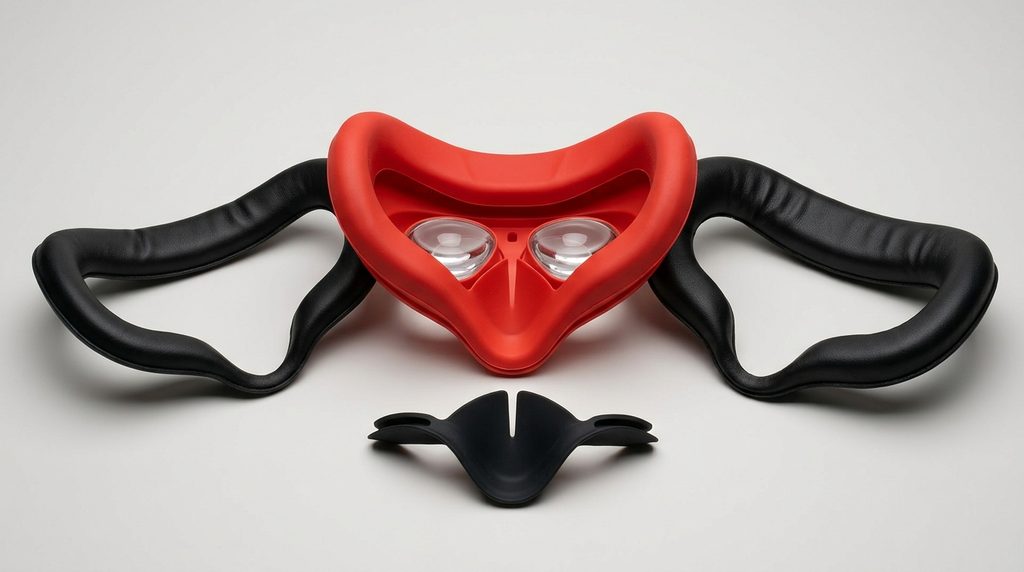
It is particularly useful if the original glasses spacer does not provide enough clearance or you want additional lens protection. AMVR
Zenni VR Prescription Lens Inserts for Meta Quest 2
Why I recommend it: These prescription inserts let glasses wearers enjoy virtual reality without wearing traditional eyewear inside the headset, reducing frame pressure and minimizing direct contact between lenses.
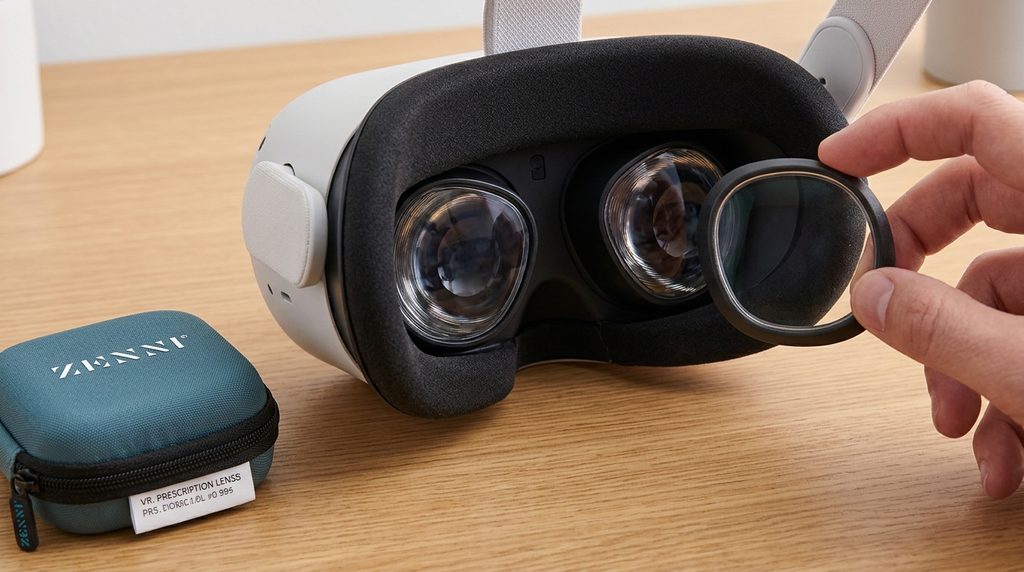
They are a useful alternative if your glasses feel uncomfortable or repeatedly fog up during extended gaming sessions. Zenni Optical
Meta Quest 2 Official Glasses Spacer
Why I recommend it: This original accessory is designed specifically for Quest 2, fits between the facial interface and headset, and provides additional clearance for compatible prescription glasses.
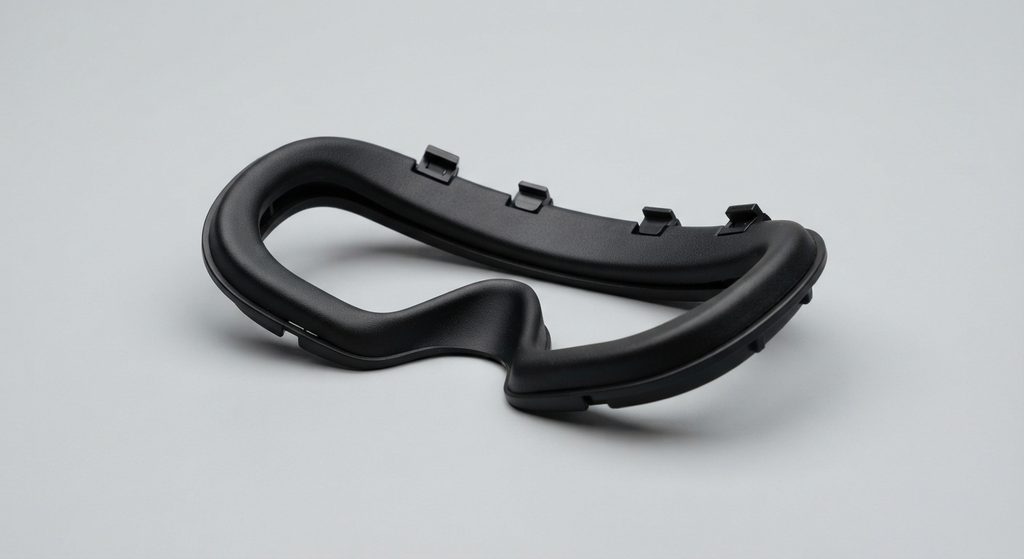
It is the first option to try if you still have the original spacer supplied with your headset. 5026658.fs1.hubspotusercontent-eu1.net+1
Related accessories to consider:
- Meta Quest 2 replacement facial interface.
- VR lens protectors.
- Microfiber lens cleaning cloth.
- Adjustable Quest 2 head strap.
- Prescription VR lens inserts.
What Is the Meta Quest 2 Glasses Spacer and Why Do You Need It?
The Meta Quest 2 glasses spacer is a small plastic accessory designed to create extra space between the headset’s optical lenses and your prescription glasses. It comes with the original Meta Quest 2 package and is especially useful for people who need corrective eyewear to see clearly.
The spacer attaches between the facial interface and the headset, slightly increasing the distance between your eyes and the VR lenses. This additional clearance helps prevent your glasses from touching the headset lenses during gaming or other virtual reality activities.
Why do you need the glasses spacer?
Wearing the Meta Quest 2 with regular glasses can sometimes cause discomfort or accidental lens contact. The spacer helps address these problems in several ways:
- Prevents lens scratches: It creates additional clearance, reducing the likelihood of prescription glasses rubbing against the headset lenses.
- Improves comfort: It gives glasses frames more room inside the headset, reducing unwanted pressure.
- Supports different frame styles: It can accommodate many standard prescription glasses, although very wide or oversized frames may still be difficult to fit.
- Makes VR sessions easier: It helps glasses wearers enjoy games, movies, and virtual experiences without constantly adjusting their eyewear.
Does every glasses wearer need the spacer?
Not necessarily. Some people have small prescription frames that fit comfortably inside the headset without additional clearance. However, using the spacer is generally advisable if your glasses come close to touching the headset lenses.
Remember that the spacer does not guarantee complete lens protection. You should still put on and remove the headset carefully and consider prescription VR lens inserts if you frequently experience fitting problems.
Important: The spacer slightly increases the distance between your eyes and the headset lenses, which may affect your field of view. Make sure the headset remains properly positioned for a clear, comfortable image.
How to Install the Meta Quest 2 Glasses Spacer Correctly
Installing the Meta Quest 2 glasses spacer is a simple process that takes only a few minutes. The accessory fits between the headset and its facial interface, creating additional room for prescription glasses without requiring special tools.
Follow these steps to install it correctly.
Step 1: Remove the Facial Interface
Start by switching off your Meta Quest 2 and placing it on a clean, flat surface. Gently grip the facial interface around its edges and pull it away from the headset.
The facial interface is the removable component containing the foam padding that rests against your face. Avoid pulling aggressively because you could damage its plastic clips.
Step 2: Position the Glasses Spacer
Take the original glasses spacer supplied with your Quest 2. Examine its shape and align it with the area where the facial interface was attached.
Make sure the spacer is facing the correct direction before pressing it into position. Gently push around its edges until it sits securely against the headset.
Step 3: Reattach the Facial Interface
Once the spacer is installed, place the facial interface over it. Align the edges carefully and press gently until the facial interface clips back into place.
Check that everything sits evenly without loose corners or gaps.
Step 4: Test the Headset Fit
Put on your headset carefully and check whether your glasses fit comfortably inside.
For best results:
- Loosen the side and top straps before putting on the headset.
- Position the headset over your glasses from front to back.
- Adjust the straps until the headset feels secure.
- Check that your glasses do not touch the headset lenses.
- Remove the headset by pulling it forward before lifting it away.
Important Installation Tips
Meta’s fitting guidance recommends glasses frames no larger than approximately 142 mm wide and 50 mm high. Frames exceeding these measurements may not fit comfortably. LibGuides at South Piedmont Community College+2
Also, ensure the spacer and facial interface do not obstruct the proximity sensor. Incorrect positioning can interfere with automatic headset detection. Meta Community Forums – 1341094
How to Wear Glasses Comfortably with the Meta Quest 2 Glasses Spacer
Wearing prescription glasses with the Meta Quest 2 glasses spacer can be comfortable when the headset is positioned correctly and your frames fit within the available space. Although the spacer provides extra clearance, proper adjustment is still important to prevent pressure, discomfort, and accidental scratches.
Here are practical ways to improve your experience.
Choose Glasses with Smaller Frames
The size and shape of your glasses can affect how comfortably they fit inside the Quest 2. Smaller frames with relatively thin temples are generally easier to accommodate than oversized or thick-framed glasses.
Meta recommends compatible glasses measuring approximately 142 mm or less in width and 50 mm or less in height.
Adjust the Headset Straps
Proper strap adjustment helps distribute the headset’s weight evenly. Loosen the side straps before putting on the headset, position it comfortably, and then tighten the straps gradually.
Avoid tightening the headset excessively because this can push your glasses against your face and create pressure around your nose and temples.
Position Your Glasses Carefully
Make sure your glasses sit naturally on your nose before wearing the headset. Avoid forcing the frames into the headset or bending their arms to make them fit.
Adjust the Lens Position
The Quest 2 has three lens-spacing positions: approximately 58 mm, 63 mm, and 68 mm. Gently move the lenses to the position that provides the clearest image for your eyes.
Correct lens spacing can improve visual clarity, although it does not replace the need for prescription glasses. Meta Quest 2 : fundamental XR+1
Prevent Fogging During Gaming
Glasses can fog up when warm air becomes trapped inside the headset. To reduce this problem:
- Avoid overtightening the headset.
- Allow the headset to cool before extended sessions.
- Keep the facial interface clean.
- Take short breaks if condensation develops.
If fogging continues, prescription VR lens inserts may be a more convenient alternative.
Pro tip: Never force your glasses into the headset. If the frames touch the headset lenses, stop using that fit until you can create sufficient clearance or switch to prescription inserts.
Common Problems with the Meta Quest 2 Glasses Spacer and How to Fix Them
Although the Meta Quest 2 glasses spacer helps create additional room for prescription eyewear, users may still experience fitting and comfort problems. These issues are often caused by incorrect installation, oversized glasses, poor headset positioning, or damaged accessories.
Here are some common problems and practical ways to fix them.
Glasses Still Touch the Headset Lenses
One of the biggest concerns for glasses wearers is accidental contact between prescription glasses and the Quest 2 lenses. The spacer increases the available clearance, but some thick or oversized frames may still touch the optical surfaces.
How to fix it:
- Check that the glasses spacer is installed correctly.
- Make sure the facial interface is securely attached.
- Try smaller glasses frames with thinner temples.
- Consider prescription VR lens inserts if there is insufficient clearance.
Never force your glasses into the headset because this can scratch either set of lenses.
The Headset Feels Too Tight
Some users experience pressure around their nose, forehead, or temples after installing the spacer. This can happen when the headset straps are too tight or the glasses frames do not fit properly.
How to fix it:
- Loosen the side straps before wearing the headset.
- Adjust the top strap to distribute the headset’s weight.
- Reposition your glasses naturally before putting on the headset.
- Take regular breaks if pressure develops.
The Image Looks Blurry
Adding the glasses spacer slightly increases the distance between your eyes and the headset lenses. If the headset is not positioned correctly, the image may appear less clear or the available field of view may feel narrower.
How to fix it:
- Adjust the headset position on your face.
- Experiment with the three available lens-spacing positions.
- Clean the headset lenses using a dry microfiber cloth.
- Ensure your prescription glasses are clean and correctly positioned.
The Headset Does Not Detect When You Wear It
Sometimes, the Quest 2 may fail to wake up automatically when you put it on. An incorrectly positioned glasses spacer or facial interface can obstruct the proximity sensor.
How to fix it:
- Remove the facial interface and check the spacer’s position.
- Reinstall the spacer without covering the proximity sensor.
- Make sure the facial interface is properly secured.
- Restart the headset and test automatic detection again.
Meta support specifically recommends checking whether the spacer blocks the proximity sensor when troubleshooting this problem. Meta Community Forums – 1341094
Light Leaks Around the Facial Interface
Installing the spacer moves the facial interface slightly farther from your face. Depending on your face shape and the facial interface design, this may allow some light to enter around the edges.
How to fix it:
- Adjust the headset angle.
- Reposition the facial interface.
- Check whether the spacer is seated evenly.
- Consider a compatible replacement facial interface if the fit remains uncomfortable.
When Should You Replace the Glasses Spacer?
Consider replacing your spacer if it has cracked, become warped, or no longer attaches securely. A damaged spacer may not provide consistent clearance or a stable facial interface.
Best Alternatives to the Meta Quest 2 Glasses Spacer
The original Meta Quest 2 glasses spacer works well for many prescription glasses wearers, but it may not provide enough room for everyone. If you have thick frames, experience frequent discomfort, or struggle with lens fogging, alternative accessories can make your VR experience more enjoyable.
Here are some alternatives worth considering.
Prescription VR Lens Inserts
Prescription VR lens inserts are among the most convenient alternatives to wearing regular glasses inside the Quest 2. These specially designed lenses attach over the headset’s optical lenses and provide vision correction based on your prescription.
Benefits:
- Eliminate the need to wear regular glasses inside the headset.
- Reduce the risk of glasses scratching the headset lenses.
- Provide a more comfortable fit for many users.
- Make putting on and removing the headset easier.
They are particularly useful for people with thick frames or those who frequently experience pressure around their nose and temples.
Anti-Scratch Lens Protectors
Anti-scratch lens protectors provide an additional protective barrier around the headset’s optical lenses. Some accessories use silicone rings or protective frames to reduce the likelihood of prescription glasses making direct contact with the lenses.
Benefits:
- Help protect expensive headset lenses.
- Provide additional peace of mind when wearing glasses.
- Are generally easy to install.
- Can complement the original glasses spacer.
However, check compatibility carefully, particularly if you already use prescription lens inserts.
Replacement or Extended Glasses Spacer
If the original spacer does not provide enough clearance, consider a compatible replacement or extended spacer, such as the VR Cover XL Spacer for Quest 2.
Benefits:
- Provides additional room for certain glasses frames.
- Can improve compatibility with some replacement facial interfaces.
- Offers another option for users who find the standard spacer restrictive.
However, an extended spacer may increase light leakage or change the headset’s field of view. Confirm compatibility with your facial interface before purchasing. device.report+1
Which Alternative Should You Choose?
| Alternative | Best for |
|---|---|
| Prescription VR inserts | People who want to stop wearing glasses inside the headset |
| Anti-scratch lens protectors | Additional lens protection |
| Extended glasses spacer | Glasses that need extra clearance |
Important compatibility note: Zenni’s current Quest 3S prescription inserts are also compatible with Quest 2, but Quest 3 inserts are not. Always check the exact headset model before ordering.
Conclusion
The Meta Quest 2 glasses spacer is a useful accessory for prescription glasses wearers who want a more comfortable virtual reality experience. It creates additional clearance between your glasses and the headset lenses, helping reduce accidental contact and scratches. Installing it correctly, choosing appropriately sized frames, and adjusting the headset straps can further improve comfort. If the original spacer does not provide enough room, prescription VR lens inserts and compatible extended spacers are worth considering. Ultimately, the best solution depends on your glasses, facial shape, and preferred gaming experience. Always prioritize proper fitting and lens protection before enjoying extended VR sessions.
Frequently Asked Questions About Meta Quest 2 Glasses Spacer
Does the Meta Quest 2 come with a glasses spacer?
Yes. The original Meta Quest 2 package includes a glasses spacer. It is designed to fit between the headset and facial interface, providing additional room for prescription glasses.
How do I install the Meta Quest 2 glasses spacer?
Remove the facial interface, position the spacer against the headset, and press it gently into place. Reattach the facial interface over the spacer and check that everything is securely fitted.
Can I use Meta Quest 2 without the glasses spacer?
Yes. You can use the headset without the spacer if your glasses fit comfortably and do not touch the headset lenses. However, using the spacer is advisable when you need additional clearance.
Does the glasses spacer prevent scratches?
It helps reduce the risk of scratches by increasing the distance between prescription glasses and the headset lenses. However, it does not guarantee complete protection, so careful headset positioning is still important.
Can I use prescription lens inserts instead of the glasses spacer?
Yes. Compatible prescription lens inserts allow you to use the headset without wearing regular glasses. Some inserts may still require the original spacer for additional clearance, depending on their design.
Why does my Meta Quest 2 feel uncomfortable with the spacer?
Discomfort may result from oversized glasses, tight straps, incorrect spacer installation, or an unsuitable facial interface. Adjust the headset and check that your glasses are not pressing against your face.
Does the Meta Quest 2 glasses spacer affect image quality?
It can slightly reduce your field of view because it moves your eyes farther from the headset lenses. However, correct headset positioning and lens spacing can help maintain a clear viewing experience.
This website is a participant in the Amazon Services LLC Associates Program, an affiliate advertising program designed to provide a means for us to earn fees by linking to Amazon.com and affiliated sites.