
This website is a participant in the Amazon Services LLC Associates Program, an affiliate advertising program designed to provide a means for us to earn fees by linking to Amazon.com and affiliated sites.
A Meta Quest 2 face pad replacement is an easy way to improve headset comfort, replace worn facial padding, and maintain better hygiene during VR gaming sessions. Over time, the original foam facial interface can absorb sweat, collect dirt, develop an unpleasant smell, or become uncomfortable against your skin.
Fortunately, replacing the Meta Quest 2 facial interface does not require complicated tools or technical knowledge. You can choose from silicone covers, PU leather replacement cushions, and complete facial interface kits designed to provide a more comfortable virtual reality experience.
However, not every replacement offers the same fit, ventilation, or level of comfort. Choosing a compatible option is important to ensure that your headset remains secure and that the replacement does not interfere with your lenses or sensors.
In this guide, we will explain how to choose the best Meta Quest 2 face pad replacement, explore recommended products, and walk you through installation, cleaning, and maintenance.
Best Face Pad Replacements for Meta Quest 2
Choosing the right Meta Quest 2 face pad replacement can make a significant difference in comfort, hygiene, and overall VR performance. Whether you experience facial pressure, excessive sweating, skin irritation, or lens fogging, upgrading the original facial interface can improve your gaming experience.
Here are three replacement options worth considering.
KIWI Design Facial Interface and Face Pad for Meta Quest 2
Best overall
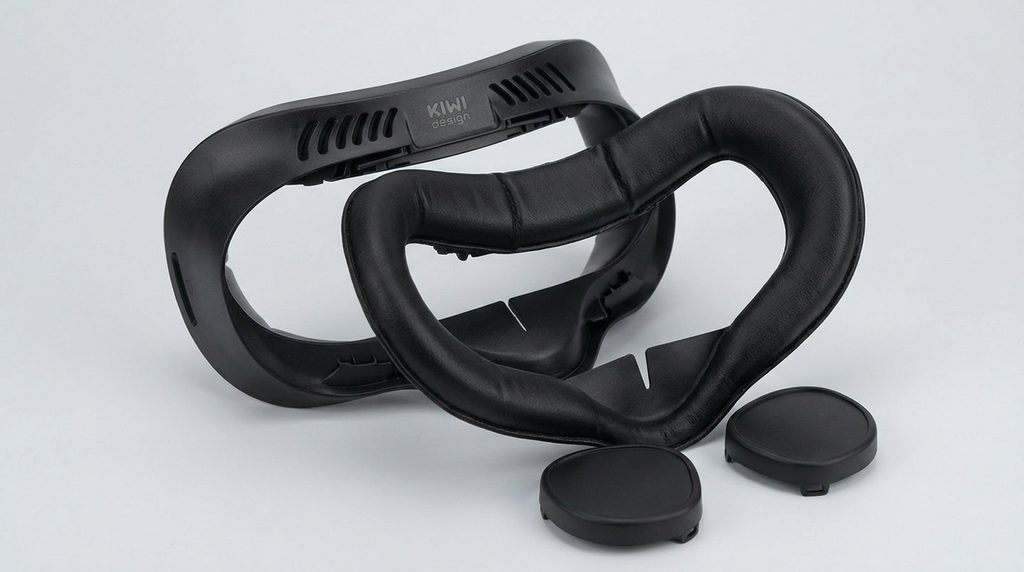
The KIWI Design Facial Interface is a popular upgrade for Quest 2 owners who want improved comfort and ventilation. It features soft PU leather padding, ventilation openings, and removable nose pieces.
Why we recommend it?
Its comfortable PU leather cushion, multiple ventilation openings, and removable nose pieces help reduce facial pressure, improve airflow, minimize lens fogging, and make regular cleaning easier.
AMVR Facial Vent and Pads for Oculus Quest 2
Best for ventilation
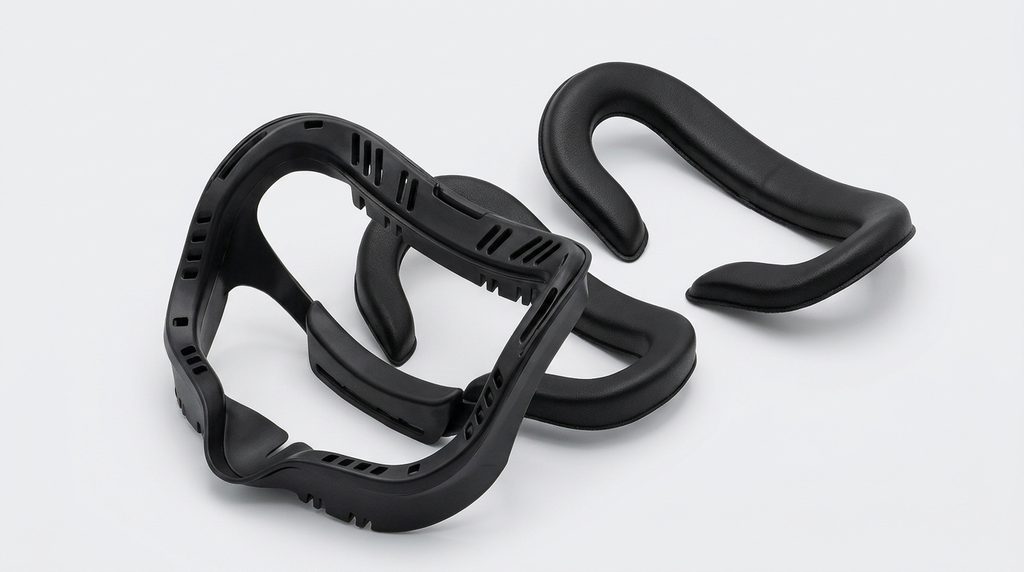
AMVR offers a replacement facial interface designed for people who want additional cushioning and improved airflow. Its vented design helps circulate air around the headset, making it particularly useful during active VR games and longer sessions.
Why we recommend it ?
Its vented facial interface, replaceable cushioning, and supportive design make it a practical upgrade for active VR players seeking better airflow, comfort, and easier facial interface maintenance.
VR Cover Facial Interface and Foam Pad Replacement Set for Meta Quest 2
Best for customizable comfort
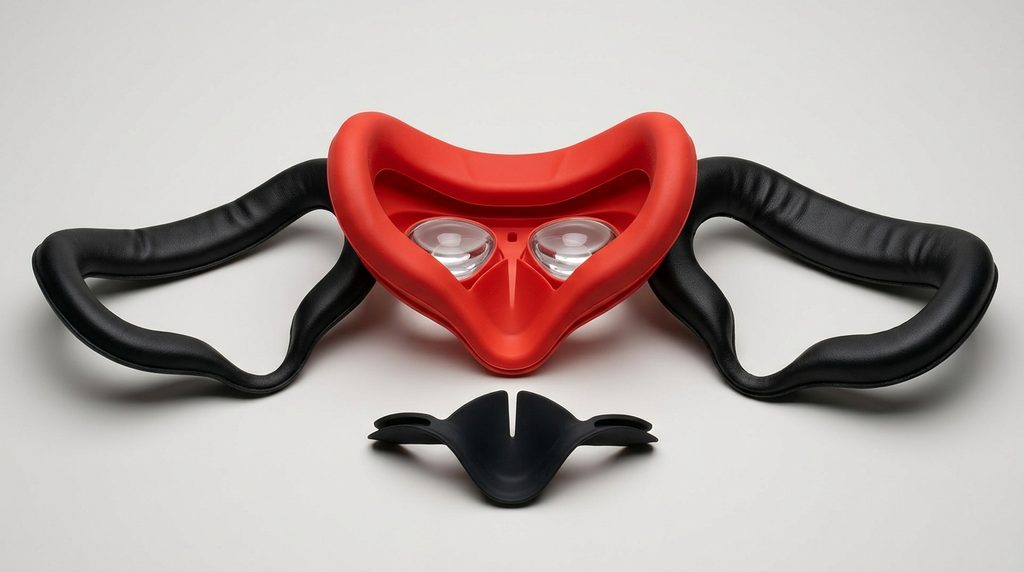
VR Cover is another established VR accessory manufacturer offering replacement facial interfaces and foam padding for the Quest 2. Its replacement set provides alternative cushioning options, allowing users to adjust their headset’s facial contact and comfort.
Why we recommend it ?
Its replacement interface and alternative foam cushions offer flexibility for different facial shapes, helping Quest 2 owners improve comfort while replacing worn or uncomfortable original padding.
Related Products Worth Considering
Besides replacing the entire facial interface, these accessories can help improve your Meta Quest 2 experience:
- Silicone Face Cover: Provides a wipe-clean protective layer over compatible facial padding.
- VR Sweatband: Helps absorb forehead sweat during active VR gaming.
- Quest 2 Glasses Spacer: Provides additional clearance for glasses wearers.
- Microfiber Cleaning Cloth: Helps remove fingerprints and dust from headset lenses.
- Replacement Nose Guard: Helps reduce unwanted light leakage around the nose.
My recommendation: The KIWI Design Facial Interface is a strong starting point if you want a complete replacement with improved ventilation and comfortable PU leather padding.
Important buying tip: Always confirm that the replacement specifically supports Meta Quest 2. Quest 3 and Quest 3S facial interfaces are not interchangeable with Quest 2 models.
How to Replace the Meta Quest 2 Face Pad Step by Step
Replacing the Meta Quest 2 face pad is a straightforward process that usually takes only a few minutes. Whether you are installing a new foam cushion, silicone cover, or complete facial interface, proper installation helps maintain comfort and ensures your headset fits correctly.
Before starting, make sure your replacement is specifically designed for the Meta Quest 2.
Follow these steps to replace the face pad:
Turn off your headset: Switch off the Meta Quest 2 and disconnect any charging cables or accessories. This prevents accidental damage while handling the headset.
Remove the facial interface: Hold the headset firmly and gently pull the existing facial interface away from the headset. Work around the edges carefully until the plastic frame releases from its clips.
Remove the old padding: If you are replacing only the foam cushion, gently peel it away from the plastic facial interface. Avoid pulling aggressively because this could damage the frame.
Clean the contact area: Use a clean, slightly damp microfiber cloth to remove dust, sweat, and residue. Allow the surface to dry completely before installing the replacement.
. Attach the new face pad: Position the replacement cushion evenly on the facial interface. If your replacement uses adhesive, follow the manufacturer’s instructions to secure it properly.
Reinstall the facial interface: Align the plastic frame with the headset opening and gently press around the edges until the clips lock into position.
Check the fit: Put on your headset and adjust the straps. Make sure the padding sits comfortably against your face without blocking the lenses or creating excessive pressure.
Important installation tips:
- Do not use screwdrivers or sharp objects to pry off the facial interface.
- Avoid pulling repeatedly on one small section, as the plastic clips can become damaged.
- If the replacement does not click into place, check whether the glasses spacer or another accessory is interfering.
- Make sure the facial interface is properly seated so it does not obstruct the proximity sensor.
Different Types of Meta Quest 2 Face Pad Replacements
Meta Quest 2 face pad replacements are available in several materials and designs, each offering different comfort and hygiene benefits. Understanding these options will help you choose a facial interface that suits your gaming habits, skin sensitivity, and budget.
Here are the most common types to consider.
Silicone Face Covers
Silicone covers fit over the original facial foam and provide a smooth, wipeable surface. They are particularly useful for people who share their headsets or frequently play fitness games.
They are easy to clean after sweaty sessions, although some users may find silicone less breathable than traditional foam.
PU Leather Replacement Pads
PU leather face pads combine soft cushioning with a wipeable outer surface. Many replacement kits use memory foam underneath to distribute facial pressure more evenly.
They are a good choice for extended gaming sessions, especially if the original foam has become uncomfortable or worn.
Foam Replacement Cushions
Traditional foam replacement cushions provide a soft contact surface between your face and headset. They are available in different thicknesses, allowing users to choose between a closer facial fit and additional cushioning.
However, untreated foam can absorb sweat and requires regular maintenance.
Complete Vented Facial Interfaces
Complete replacement interfaces include a plastic mounting frame and an attached or removable cushion. Some feature ventilation channels that help warm air escape, potentially reducing lens fogging during gameplay.
For example, Razer offers a Quest 2-compatible facial interface with foam and silicone components. Razer Support+3
Which should you choose?
- For easy cleaning: Silicone cover.
- For cushioned comfort: PU leather memory foam.
- For a simple replacement: Foam cushion.
- For ventilation: Complete vented facial interface.
Always check whether a replacement is designed to fit over the original facial interface or requires replacing the entire plastic frame.
How to Clean and Maintain Your Meta Quest 2 Face Pad
Regularly cleaning your Meta Quest 2 face pad helps maintain hygiene, prevent unpleasant odors, and extend the life of your replacement facial cushion. Since the padding rests directly against your skin, it can accumulate sweat, facial oils, makeup, and dust during regular VR gaming sessions.
The cleaning method depends on the material used.
Cleaning Silicone Face Covers
Silicone covers are among the easiest facial accessories to maintain because they do not absorb sweat as readily as traditional foam.
Follow these steps:
- Remove the silicone cover from the headset.
- Wash it gently using mild soap and lukewarm water.
- Rinse thoroughly to remove soap residue.
- Allow it to air-dry completely before reinstalling it.
Cleaning PU Leather Face Pads
PU leather replacement cushions can usually be cleaned using a soft microfiber cloth.
- Remove the facial interface if possible.
- Wipe the surface gently with a slightly damp cloth.
- Avoid soaking the cushioning material.
- Allow it to dry naturally before using the headset again.
Cleaning Traditional Foam Padding
Traditional foam requires extra care because excessive moisture can damage its structure.
Use a dry microfiber cloth to remove surface dust and follow the manufacturer’s cleaning instructions. Avoid soaking the foam or using harsh cleaning chemicals.
How Often Should You Clean Your Face Pad?
Your cleaning schedule depends on how frequently you use the headset.
| Usage | Suggested cleaning |
|---|---|
| Daily VR gaming | Wipe after each session |
| Occasional gaming | Clean after use |
| Shared headset | Clean between users |
| Fitness and active games | Clean after every session |
Important maintenance tips:
- Never reinstall a damp face pad.
- Avoid bleach, abrasive cleaners, and harsh solvents.
- Keep the facial interface away from direct sunlight and excessive heat.
- Do not spray cleaning solutions directly onto the headset.
- Replace padding that becomes cracked, permanently compressed, or difficult to clean.
For additional safety, follow Meta’s official Meta Quest support and cleaning guidance. Proper maintenance helps keep your facial interface comfortable and your headset ready for your next VR session.
Common Meta Quest 2 Face Pad Replacement Problems and How to Fix Them
Although replacing the Meta Quest 2 face pad is relatively simple, you may encounter a few problems during installation or everyday use. Understanding these issues can help you avoid damaging the facial interface and maintain a comfortable VR experience.
Here are some common problems and their solutions.
Replacement Face Pad Does Not Fit Properly
One common problem is purchasing a replacement cushion that does not match the Quest 2 facial interface.
How to fix it:
- Confirm that the product is specifically compatible with Meta Quest 2.
- Check whether it requires the original plastic frame.
- Ensure the glasses spacer is positioned correctly.
- Avoid forcing incompatible replacement parts into place.
Face Pad Keeps Coming Loose
A replacement cushion may detach if its adhesive backing is weak or the installation surface is dirty.
How to fix it:
Remove the cushion, clean the attachment surface according to the manufacturer’s instructions, and allow it to dry. Reattach the padding carefully, ensuring that its edges are aligned correctly.
Excessive Sweating During VR Gaming
Some facial cushions trap heat, particularly during active games and extended gaming sessions.
How to fix it:
Consider switching to a vented facial interface or a compatible silicone cover. Take regular breaks and clean the face pad after exercise-based VR sessions.
Light Leakage Around the Nose
A replacement facial interface may leave a small gap around the nose, allowing external light to enter the headset.
How to fix it:
Check whether the replacement includes a nose guard. If not, consider a compatible replacement interface with a better-fitting nose shield.
Facial Pressure or Discomfort
A cushion that is too thick, too firm, or incorrectly positioned can create uncomfortable pressure around your cheeks and forehead.
How to fix it:
Try a different cushion thickness, readjust the headset straps, and ensure the headset sits evenly on your face. If discomfort continues, take a break and consider another facial interface.
Pro tip: Never continue using a damaged facial interface with sharp edges, broken clips, or deteriorating padding. Replacing damaged components is safer and more comfortable than attempting to force them back into position.
Conclusion
Replacing your Meta Quest 2 face pad is a simple upgrade that can significantly improve comfort, cleanliness, and your overall virtual reality experience. Whether you choose a silicone cover, PU leather cushion, foam replacement, or complete vented facial interface, the right option depends on your personal preferences and gaming habits.
Before purchasing, always check compatibility with the Meta Quest 2 and consider factors such as ventilation, cushioning, durability, and ease of cleaning. Products from KIWI Design, AMVR, and VR Cover are worth exploring when comparing replacement options.
With proper installation and regular maintenance, your replacement facial interface can help make every VR gaming session more comfortable. Don’t wait until your original padding becomes uncomfortable or damaged before considering an upgrade.
Frequently Asked Questions About Meta Quest 2 Face Pad Replacement
Can you replace the Meta Quest 2 face pad?
Yes. The Meta Quest 2 facial interface is removable and can be replaced with compatible foam cushions, silicone covers, PU leather pads, or complete replacement facial interfaces. Most replacements can be installed without specialist tools.
How often should I replace my Oculus Quest 2 face pad?
There is no fixed replacement schedule. It depends on how frequently you use your headset and how well you maintain the padding. Replace it when it becomes worn, compressed, cracked, damaged, or difficult to clean.
Are Meta Quest 2 and Quest 3 face pads interchangeable?
No. Meta Quest 2 and Quest 3 use different facial interface designs. A replacement made specifically for Quest 3 will not normally fit the Quest 2. Always check the manufacturer’s compatibility information before purchasing.
Is a silicone face cover better than foam?
Silicone covers are easier to wipe clean and are useful for shared headsets. Foam generally provides a softer, more breathable contact surface. Your choice depends on whether you prioritize easy cleaning or cushioning comfort.
How do I remove the original Meta Quest 2 facial interface?
Gently pull the original facial interface away from the headset, working around its edges until the retaining clips release. Avoid using sharp tools or excessive force because the plastic frame can break.
Can I wash my Meta Quest 2 foam face pad?
Avoid soaking traditional foam padding. Follow the manufacturer’s cleaning instructions and use an appropriate gentle cleaning method. Silicone covers and some PU leather cushions can be wiped or washed according to their care instructions.
Which is the best replacement face pad for Meta Quest 2?
KIWI Design, AMVR, and VR Cover are worth considering. KIWI Design is a good starting point for users seeking comfortable cushioning and ventilation, while AMVR and VR Cover offer alternative designs and padding options.
This website is a participant in the Amazon Services LLC Associates Program, an affiliate advertising program designed to provide a means for us to earn fees by linking to Amazon.com and affiliated sites.