
This website is a participant in the Amazon Services LLC Associates Program, an affiliate advertising program designed to provide a means for us to earn fees by linking to Amazon.com and affiliated sites.
Meta Quest 2 lens replacement may be necessary when the headset develops scratched, cracked, or damaged lenses that affect visual clarity and your virtual reality experience. Since the lenses are essential for displaying sharp images, even minor damage can cause distracting visual problems, including blurriness, glare, and distorted images.
However, replacing Meta Quest 2 lenses is not as simple as changing a screen protector. The headset uses specialized optical components that require careful handling and appropriate repair expertise. Choosing the wrong replacement part or attempting an unsuitable repair can cause additional damage.
In this guide, you’ll discover what to do when your Oculus Quest 2 lenses become damaged, whether replacement is possible, where to find compatible replacement parts, and which accessories can help prevent future problems. We’ll also explore repair options, potential costs, and practical troubleshooting tips to help you make an informed decision before spending money on a replacement.
Best Products for Meta Quest 2 Lens Protection and Maintenance
Before considering a complete lens replacement, it’s worth looking at accessories that can help protect your headset’s optical components and maintain image clarity.
Here are three useful products to consider:
Meta Quest 2 VR Lens Protector Rings
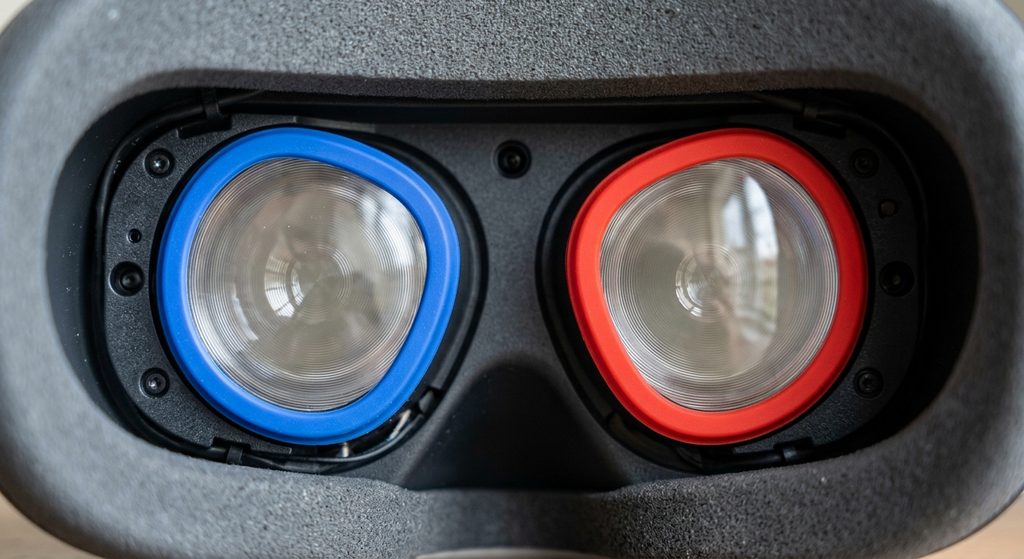
Why we picked it: These protective rings help reduce accidental contact between glasses and headset lenses. They’re particularly useful for protecting the original optics from scratches during everyday VR use.
Optical-Grade Microfiber Lens Cleaning Cloth

Why we picked it: A soft optical-grade microfiber cloth helps remove fingerprints, dust, and smudges without requiring cleaning liquids. It’s an essential accessory for routine Quest 2 lens maintenance.
Meta Quest 2 Prescription Lens Inserts
Why we picked it: Prescription inserts provide vision correction without requiring glasses inside the headset. They also help reduce the possibility of glasses accidentally rubbing against the original Quest 2 lenses.
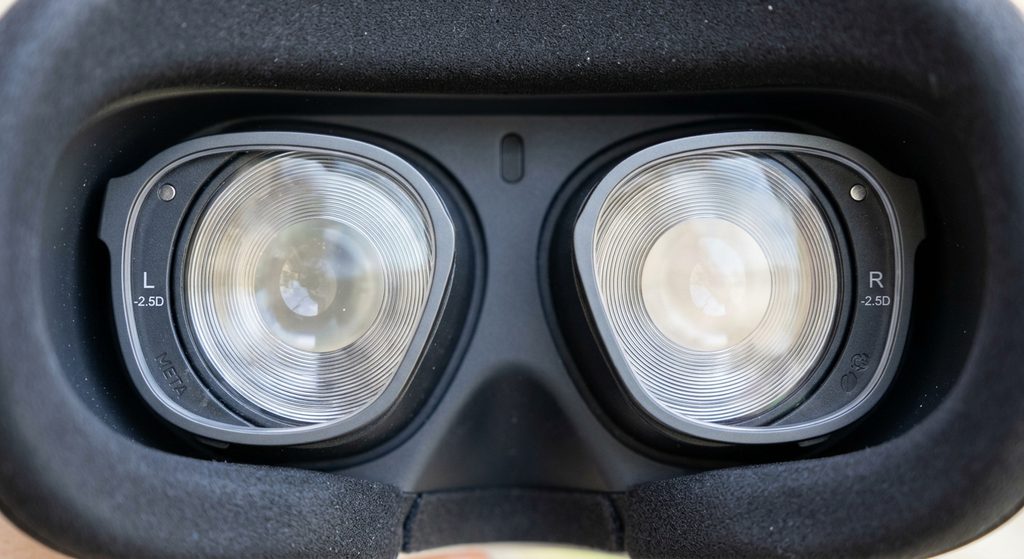
Important: These accessories protect or maintain the original lenses; none replaces a scratched or damaged internal lens assembly.
Can You Replace the Lenses on a Meta Quest 2?
Yes, Meta Quest 2 lenses can be replaced, but the process is more complicated than replacing an ordinary piece of glass. The headset uses a specialized optical system, and the lenses are integrated into an internal screen and lens assembly.
According to iFixit’s repair documentation, the replacement assembly includes the lens housing, optical components, display panels, and motion-tracking cameras. This means that repairing damaged optics may involve replacing a larger assembly rather than simply swapping out an individual lens. iFixit Repair Guide+1
There are several situations where replacement might be necessary:
- Scratched lenses: Visible scratches that remain after gentle cleaning can interfere with viewing clarity.
- Cracked lenses: Physical damage may require professional optical assembly replacement.
- Persistent blurry images: If cleaning and adjusting the headset do not resolve the problem, the optical components may need inspection.
- Sunlight damage: Exposure to direct sunlight can damage internal display components, creating visual marks that cleaning cannot remove.
Before purchasing replacement parts, consider these options:
- Contact Meta Support to ask about available repair or replacement services.
- Consult a qualified VR headset repair technician.
- Compare the estimated repair cost with the price of another working headset.
Important: Avoid attempting to pry apart the optical assembly yourself. The internal components and delicate connections can be damaged during improper repairs.
How to Identify Damaged Meta Quest 2 Lenses and Common Lens Problems
Identifying lens damage on your Meta Quest 2 is the first step toward deciding whether you need a replacement or a simple cleaning. Since the lenses sit directly between your eyes and the headset displays, damage can affect image sharpness, viewing comfort, and your overall VR experience.
Here are some common signs of damaged Quest 2 lenses:
Visible Scratches on the Lenses
Scratches may appear as thin lines, marks, or cloudy patches on the optical surface. They can become particularly noticeable when viewing bright scenes or objects against dark backgrounds.
Persistent Blurry Vision
If images remain blurry after adjusting the headset position and lens spacing, the optical components may need inspection. However, incorrect headset positioning or vision-related factors can also cause blurry images.
Unusual Glare or Light Distortion
Damaged or dirty lenses may produce distracting reflections, halos, or light distortion. First, check whether fingerprints, dust, or smudges are responsible.
Cracks or Physical Damage
Visible cracks, chips, or damaged lens surfaces are stronger indications of physical damage. These problems generally require professional assessment rather than ordinary cleaning.
Uneven Image Clarity
If one eye sees a noticeably less clear image than the other, inspect both lenses for visible damage and check the headset’s fit and lens-position settings.
Quick tip: Clean the lenses gently using a dry microfiber cloth designed for optical surfaces. Never use household glass cleaners, abrasive materials, or excessive pressure.
Sunlight damage deserves special attention because it can look like a lens problem even when the actual damage is inside the display. Direct sunlight can permanently damage the display through the headset’s optical system. Common Problems, Care And Maintenance+1
How to Fix Meta Quest 2 Lens Problems Without Replacing the Lenses
Not every Meta Quest 2 lens problem requires replacement. Sometimes, blurry images, smudges, and distracting reflections are caused by dirt, incorrect headset positioning, or unsuitable lens settings.
Before considering an expensive repair, try these troubleshooting methods to determine whether the problem can be resolved safely.
Clean the Lenses Properly
Dust, fingerprints, and oily marks can make your Quest 2 display appear blurry. Use a clean, dry microfiber cloth designed for optical lenses.
Follow these precautions:
- Gently wipe the lenses using small circular movements.
- Avoid applying excessive pressure.
- Never spray cleaning liquids directly onto the lenses.
- Avoid paper towels, tissues, and abrasive materials.
- Do not use alcohol-based or household glass-cleaning products.
If the image becomes clearer after cleaning, the problem was likely caused by surface contamination rather than permanent lens damage.
Adjust the Headset Position
Incorrect headset positioning can make images appear blurry, even when the lenses are undamaged.
Adjust the head strap so the headset sits comfortably and securely. Position the facial interface evenly and make sure both eyes are aligned with the optical sweet spot.
Adjust the Lens Spacing
The Meta Quest 2 has three physical lens spacing settings.
Try moving the lenses between the available positions until the image looks comfortable and clear. Avoid forcing the lenses beyond their intended adjustment positions.
Check Your Glasses or Prescription Inserts
If you wear prescription glasses, incorrect positioning can affect visual clarity and potentially scratch the headset lenses.
Consider compatible prescription lens inserts designed for Meta Quest 2. Make sure they fit correctly and do not interfere with the original optics.
Check Whether the Problem Comes From the Display
If you notice persistent lines, unusual colors, dark patches, or visual distortions, the problem might involve the display rather than the external lens surface.
Restart the headset and check whether the issue appears consistently across different applications. If it persists, contact Meta Support or a qualified repair technician.
Important: Never attempt to polish scratches, apply household repair compounds, or dismantle the optical assembly. These methods can permanently damage the lenses.
Where to Buy Meta Quest 2 Replacement Lenses and What to Check Before Purchasing
Finding the correct Meta Quest 2 replacement lenses can be challenging because not every replacement part advertised for Oculus or Meta headsets is compatible with the Quest 2.
Before purchasing anything, identify whether you need replacement optical components, a complete display assembly, or protective lens accessories. These are different products, and buying the wrong one can waste money without fixing the original problem.
Where to Look for Replacement Parts
Consider these options when researching repair parts:
- Meta Support: Contact Meta to ask about official repair or replacement options for your headset.
- iFixit: Consult its Meta Quest 2 repair guides to understand the assembly and parts involved.
- Specialist VR repair services: Ask an experienced technician whether the optical assembly can be repaired or replaced.
- Reputable electronics repair retailers: Check whether they offer compatible replacement assemblies and provide a warranty.
What to Check Before Buying Replacement Lenses
Before paying for a replacement, consider these important factors:
- Model compatibility: Confirm that the part is specifically designed for Meta Quest 2 (model KW49CM). Quest 3 and Quest 3S components are not interchangeable.
- Part description: Check whether the listing describes an optical lens, screen-and-lens assembly, prescription insert, or protective accessory.
- Condition: If considering a used component, ask about its condition and whether it has been tested.
- Return policy: Choose a seller that offers a reasonable return policy if the component is incompatible or defective.
- Repair warranty: Ask whether the repair service provides a warranty covering the replacement component and its installation.
Is the Meta Quest 2 Lens Assembly Available Separately?
One important detail is that iFixit’s repair documentation identifies the Quest 2 replacement component as a combined screen and lens assembly.
This assembly includes the optical lenses, display panels, lens housing, and tracking cameras. Therefore, replacing the complete assembly may be necessary rather than purchasing an individual internal lens. iFixit Repair Guide+1
Useful resources:
- iFixit Meta Quest 2 Screen and Lens Assembly Guide
- Meta Support
My recommendation: Get a repair assessment before purchasing replacement components. The internal assembly is complex, and professional installation can help prevent further damage.
How Much Does Meta Quest 2 Lens Replacement Cost?
The cost of Meta Quest 2 lens replacement depends on the extent of the damage, the replacement components required, and whether you use a professional repair service.
One important consideration is that the Quest 2 does not necessarily have a simple, individually replaceable internal lens. Its screen-and-lens assembly combines several optical and display components, which can make repairs more expensive than expected.
Factors That Affect Meta Quest 2 Lens Replacement Cost
Several factors can influence the final repair price:
- Type of damage: Minor surface contamination may only require cleaning, while damaged optical components may require assembly replacement.
- Replacement components: A complete screen-and-lens assembly can cost more than a simple protective accessory.
- Labour charges: Professional technicians may charge additional fees for diagnosis, installation, and testing.
- Shipping costs: If replacement components are unavailable locally, importing them can increase the overall expense.
- Warranty coverage: Depending on your warranty and the nature of the damage, some repair options may be available at a reduced cost.
Estimated Repair and Replacement Costs
Current online listings provide some useful price references, although prices vary by seller and location.
| Replacement or service | Advertised price |
|---|---|
| Individual replacement lens | From $16.99 |
| Left and right replacement lenses | £37.40 |
| LCD screen assembly with lens | £109.22 |
| Professional Quest 2 repairs | $35–$99 |
These are advertised prices, not guaranteed repair quotations. Shipping, taxes, installation, and availability may change the final amount. MobileSentrix UK+2
Is Replacing the Lenses Worth It?
Before committing to a repair, consider:
- Whether the damage affects one lens or both.
- Whether the replacement includes the required optical components.
- Whether professional installation is included.
- Whether the repair comes with a warranty.
- Whether the total repair expense makes sense compared with replacing the headset.
If you’re purchasing from outside the seller’s shipping region, remember to account for international delivery and possible import charges.
My recommendation: Request a complete repair quotation before purchasing anything. This helps you avoid paying for replacement parts that might not resolve the actual problem.
Conclusion
Meta Quest 2 lens replacement can restore a damaged VR headset’s viewing experience, but the correct solution depends on the type of damage. While fingerprints and dirt may require simple cleaning, scratched or cracked optical components can need professional attention.
Before purchasing replacement lenses, check compatibility, compare repair options, and understand whether you need an individual lens or a complete screen-and-lens assembly. Protecting your headset with suitable lens accessories and careful storage can also help prevent future problems.
For additional guidance, consult Meta Support and iFixit’s Quest 2 repair guide.
Frequently Asked Questions About Meta Quest 2 Lens Replacement
Can you replace just one Meta Quest 2 lens?
Yes, individual replacement lens parts are advertised by some specialist suppliers. However, compatibility and installation requirements should be confirmed before purchasing.
Can scratched Meta Quest 2 lenses be repaired?
Minor smudges can be cleaned using a dry microfiber cloth. Permanent scratches generally cannot be removed safely through ordinary cleaning. Professional assessment is recommended.
How much does Meta Quest 2 lens replacement cost?
The price depends on the replacement component and repair service. Individual lens parts may cost less than a complete screen-and-lens assembly, while professional installation adds to the total expense.
Does Meta Quest 3 use the same lenses as Quest 2?
No. Meta Quest 2 and Quest 3 have different optical systems. Always purchase components specifically identified as compatible with your headset.
Can glasses scratch Meta Quest 2 lenses?
Yes. Glasses can accidentally contact and scratch the headset’s optical surfaces. Compatible prescription inserts or suitable glasses spacers can help reduce this risk.
Can sunlight damage Meta Quest 2 lenses?
Direct sunlight entering through the lenses can damage the internal displays. Always store your headset away from direct sunlight.
Should I replace my Quest 2 lenses myself?
Professional repair is generally the safer option if internal components are damaged. The assembly contains delicate optical, display, and electronic components that require careful handling.
How can I prevent Meta Quest 2 lens damage?
Follow these precautions:
- Clean lenses with a dry microfiber cloth.
- Avoid touching the optical surfaces.
- Keep the headset away from direct sunlight.
- Use a suitable lens cover when storing it.
- Avoid allowing glasses to contact the lenses.
- Store the headset in a protective case.
This website is a participant in the Amazon Services LLC Associates Program, an affiliate advertising program designed to provide a means for us to earn fees by linking to Amazon.com and affiliated sites.