This website is a participant in the Amazon Services LLC Associates Program, an affiliate advertising program designed to provide a means for us to earn fees by linking to Amazon.com and affiliated sites.
Meta Quest 3 cricket bat accessories are specially designed attachments and controller grips that make playing cricket games in virtual reality feel more realistic and immersive. Whether you enjoy batting practice, cricket simulations, or competitive VR cricket games, the right accessory can improve comfort, controller handling, and your overall gaming experience.
Unlike a standard cricket bat, a VR cricket bat attachment typically holds or connects to a Meta Quest 3 controller, allowing you to experience a more familiar batting motion while playing compatible games.
However, not every cricket bat accessory is compatible with the Meta Quest 3. Some are designed for older Oculus Quest controllers, while others are universal VR attachments that may require additional adjustments.
In this guide, we’ll explore the best accessories to consider, what to look for when choosing a cricket bat attachment, compatibility considerations, and how to get the most out of your Meta Quest 3 cricket gaming experience.
Best for Meta Quest 3 VR Cricket Gaming
Choosing the right cricket bat accessory depends on your headset, preferred grip, controller compatibility, and gaming style. Here are three products worth considering when looking for a more realistic VR cricket experience.
LITE VR Cricket Bat for Meta Quest 3 and 3S
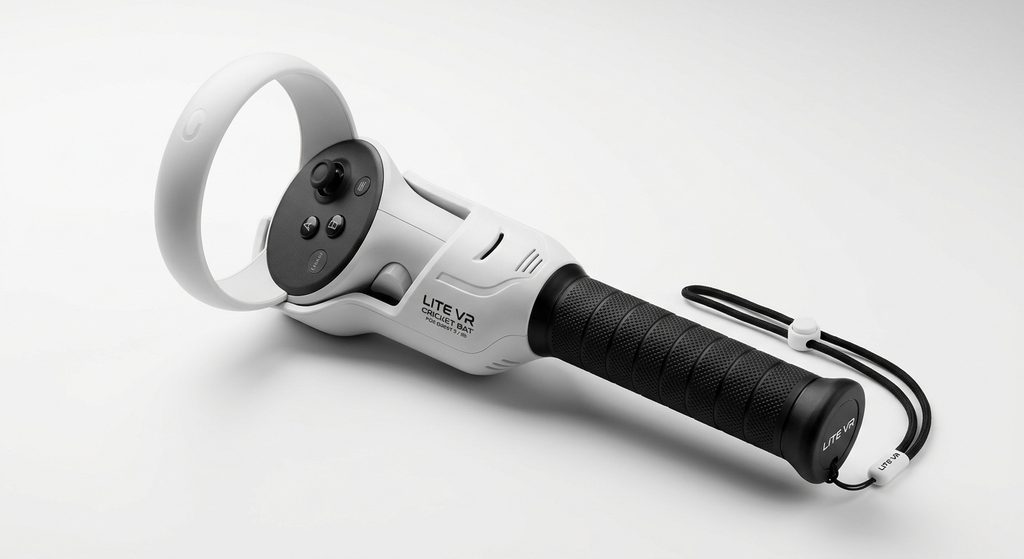
Lightweight option
- Designed specifically for Quest 3 and 3S controllers.
- Features a 22 cm grip.
- Weighs approximately 250 g with the controller.
- Includes a quick-release system and additional securing straps.
Why we picked it: Its lightweight construction, comfortable two-handed grip, and quick-release design make it an interesting choice for players seeking a simple cricket gaming attachment. VR Merch Store
The listing currently indicates sold-out status.
YEZRO VR Cricket Bat Attachment
Aluminum construction
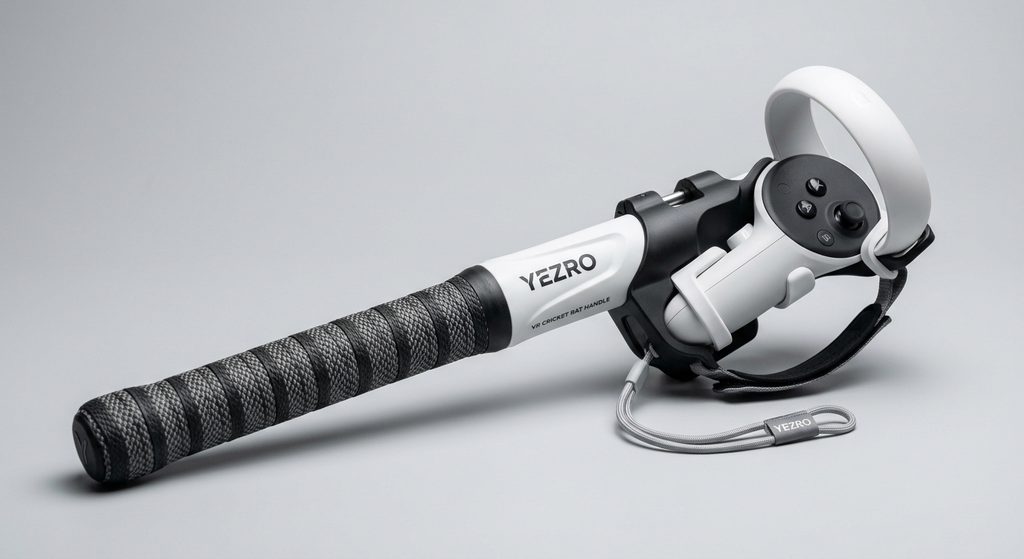
- Aluminum cricket bat handle attachment.
- Designed for iB Cricket.
- Listed compatibility includes Quest 3, Quest 3S, Quest 2, and Quest Pro.
- Listed price: $59.99.
Why we picked it: Its aluminum construction and dedicated cricket design offer an alternative for gamers looking for a more substantial controller attachment with compatibility across several Meta Quest generations. Aluminum Short Cricket Bat – yezro
YEZRO VR Cricket Bat Attachment
Custom-style option
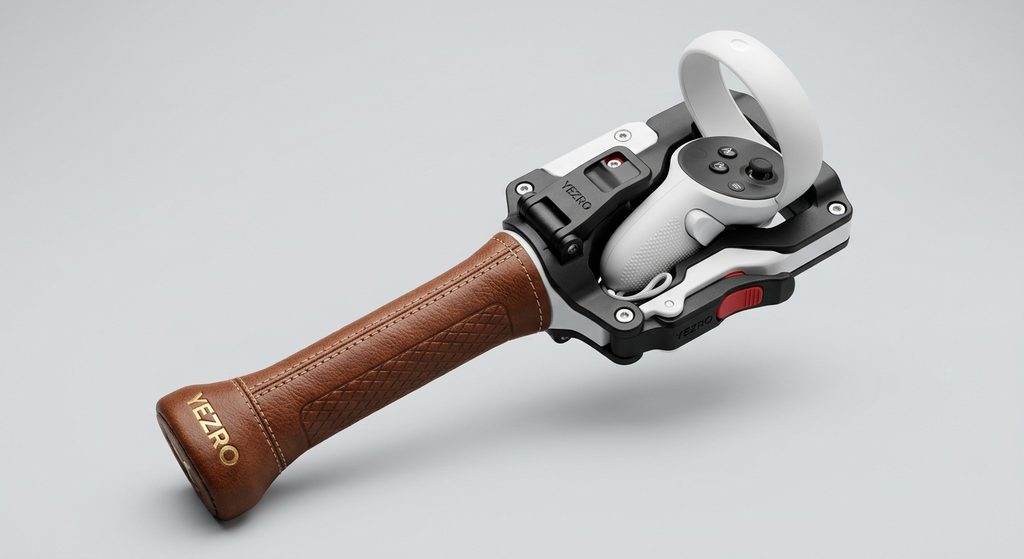
- 3D-printed PLA construction.
- Approximately 29.5 cm rubber cricket grip.
- Weighs over 500 g with the controller.
- Uses a Velcro strap to secure the controller.
Why we picked it: Its longer rubber grip and traditional cricket-inspired design provide another option for players who prefer a more substantial handle and a familiar two-handed grip. Etsy+1
Important buying tip: Check the exact controller compatibility before purchasing. Meta Quest 3 uses Touch Plus controllers, so an attachment designed for Quest 2 should not automatically be assumed to fit Quest 3. Also check current stock, international shipping, and import charges before ordering.
What Is a Meta Quest 3 Cricket Bat Accessory?
A Meta Quest 3 cricket bat accessory is a specially designed attachment that allows players to hold their VR controller like a traditional cricket bat. Instead of holding a small controller directly, users can experience a longer handle that makes virtual batting feel more familiar.
These accessories are particularly useful for cricket simulation games such as iB Cricket. The game allows players to experience virtual cricket, including batting challenges, practice sessions, and competitive gameplay.
How does a VR cricket bat attachment work?
Most VR cricket bat accessories feature a dedicated controller holder that connects to the Meta Quest controller. The headset tracks the controller’s movement, allowing the virtual game to reproduce the player’s movements.
Common features include:
- Controller holder: Keeps the compatible Meta Quest controller in position.
- Extended handle: Provides a longer gripping area for a more traditional batting experience.
- Rubber grip: Offers a comfortable surface for holding the attachment.
- Safety straps: Help keep the controller secured during normal gameplay.
- Lightweight construction: Makes the accessory easier to handle during gaming sessions.
However, a cricket bat attachment is not essential for every VR cricket game. Some titles work perfectly well with standard Meta Quest controllers.
Before purchasing an accessory, check whether your preferred game supports physical bat attachments and whether the product specifically supports Quest 3 controllers.
Why Use a Cricket Bat Attachment with Meta Quest 3?
Using a cricket bat attachment with Meta Quest 3 can make virtual cricket more immersive by giving players a familiar handle to hold while batting. Although standard Touch Plus controllers work for many VR cricket games, an extended attachment can provide a more traditional cricket-playing experience.
Here are some important benefits.
More realistic batting experience
A VR cricket bat attachment gives you a longer handle similar to a traditional cricket bat. This can make batting movements feel more natural, particularly when playing cricket simulation games such as iB Cricket.
Improved grip and handling
Some accessories feature rubberized handles, textured surfaces, and additional straps. These features can make the attachment more comfortable to hold during extended gaming sessions.
Better gaming immersion
Holding an extended cricket handle rather than a small controller can make virtual batting feel more engaging. It helps bridge the gap between traditional cricket movements and virtual reality gameplay.
More comfortable two-handed batting
Certain cricket bat attachments are designed to accommodate both hands. This can be useful for players who prefer a traditional batting stance and want a familiar grip while playing.
A dedicated VR cricket setup
A cricket bat attachment can also make your gaming setup feel more specialized. Instead of using a standard controller for every activity, you have an accessory designed specifically for virtual cricket.
Important consideration: A cricket bat attachment does not automatically improve batting accuracy or guarantee better scores. Your results still depend on timing, controller tracking, game settings, and practice
How to Choose the Right Meta Quest 3 Cricket Bat Accessory
Choosing the right Meta Quest 3 cricket bat accessory requires more than finding an attachment that looks like a traditional cricket bat. You should consider controller compatibility, handle design, grip comfort, weight, and the VR cricket games you intend to play.
Here are the most important factors to consider.
Check Meta Quest 3 compatibility
Compatibility should be your first priority. Make sure the attachment specifically supports Meta Quest 3 Touch Plus controllers. An accessory designed for Quest 2 may have a different controller mounting system.
Consider the handle length
Cricket bat attachments come in different lengths. Choose a design that feels comfortable to hold without making your virtual batting movements awkward.
Look for a comfortable grip
A rubberized or textured handle can provide a more comfortable holding experience. This is especially useful when playing games that involve repeated batting movements.
Check the attachment weight
A lightweight accessory may be easier to handle during longer gaming sessions. Heavier attachments can feel more substantial but may become uncomfortable with extended use.
Examine the controller mounting system
Look for a secure controller holder that is specifically designed for your headset. Adjustable straps and properly fitted mounting points can help keep the controller in place.
Verify game compatibility
Not every VR cricket game supports physical bat attachments in the same way. Check the game’s controller requirements and accessory recommendations before buying.
7. Consider build quality and price
Compare materials, customer reviews, return policies, and shipping costs. A well-made accessory with confirmed compatibility is generally a better choice than purchasing based on appearance alone.
Buying advice: Pay particular attention to the mounting system. The official iB Cricket website currently states that its bat is still being adjusted for Quest 3 controllers, although the game itself supports Quest 3. Therefore, verify compatibility with the accessory manufacturer before ordering
How to Set Up and Use a Cricket Bat Attachment with Meta Quest 3
Setting up a cricket bat attachment with Meta Quest 3 involves preparing your headset, checking controller compatibility, and securely connecting the accessory. Once everything is ready, you can enjoy a more immersive virtual cricket experience with compatible games.
Follow these steps:
Step 1: Prepare your Meta Quest 3
Make sure your headset and controllers are sufficiently charged. Start your headset and check that both Touch Plus controllers are working correctly.
Step 2: Check the attachment compatibility
Before connecting anything, confirm that the cricket bat attachment is designed for Meta Quest 3 controllers. Check the manufacturer’s instructions to identify the correct mounting position.
Step 3: Secure the controller
Place the compatible controller into the accessory’s designated holder. Follow the manufacturer’s fitting instructions and make sure the controller is firmly secured without forcing any components.
Step 4: Adjust the handle
Position the handle so you can comfortably hold it with both hands, if the attachment supports a two-handed grip. Check that the controller buttons and tracking features remain unobstructed.
Step 5: Launch your VR cricket game
Open a compatible cricket game, such as iB Cricket. Check the game’s instructions to determine whether additional controller configuration or calibration is required.
Step 6: Test the setup
Start with gentle movements in the game’s practice environment. Confirm that your virtual bat responds correctly before beginning a full match.
Important compatibility note: iB Cricket confirms that its game works with Meta Quest 3 controllers, but its official website says adjustments are still being made to support Quest 3 controllers when using its physical cricket bat. Oculus Quest 2+1
Safety tip: Set up the Meta Quest boundary before playing. Keep people, furniture, pets, and other obstacles outside your playing area, and never make large movements near surrounding objects
Common Problems with Meta Quest 3 Cricket Bat Accessories and How to Fix Them
Although a Meta Quest 3 cricket bat attachment can improve your virtual cricket experience, you may occasionally encounter compatibility, tracking, or comfort issues. Understanding these problems can help you identify whether the issue comes from the accessory, controller, or VR game.
Here are some common problems and their solutions.
Cricket bat attachment does not fit the controller
Some cricket bat attachments are designed for older Meta Quest controllers. If the holder does not fit your Quest 3 controller, check the manufacturer’s compatibility information rather than forcing the controller into place.
Controller tracking problems
If the virtual bat does not respond accurately, check whether the controller is working correctly without the attachment. Also check the headset cameras for obstructions and ensure your playing environment has adequate lighting.
Loose controller mounting
A poorly secured controller can affect the experience and create a safety concern. Inspect the mounting system and straps before each session. Stop using the attachment if the controller cannot be secured properly.
Uncomfortable handle grip
An uncomfortable handle can make extended gaming sessions less enjoyable. Consider an accessory with a suitable grip material and handle length.
Cricket game does not recognize the attachment
Some games may not support physical cricket bat accessories automatically. Check the game’s controller settings and the accessory manufacturer’s compatibility instructions.
Poor virtual bat alignment
If the virtual bat appears incorrectly positioned, check whether the game offers a calibration option. Follow the game’s official instructions and avoid using an attachment that causes inconsistent tracking.
Accessory feels unstable
Stop using an attachment if it moves, rattles, or cannot securely hold the controller. Contact the manufacturer about replacement parts or compatibility support rather than improvising a mounting solution.
Important: iB Cricket’s official compatibility information distinguishes between Quest 3 game support and physical bat support. The game supports Quest 3 controllers, but its website says adjustments are being made for its physical bat. Oculus Quest 2+1
Conclusion: Is a Meta Quest 3 Cricket Bat Accessory Worth Buying?
A Meta Quest 3 cricket bat accessory can make virtual cricket more immersive by providing a familiar handle, improved grip, and a more traditional batting experience. However, choosing the right attachment requires careful attention to controller compatibility, handle design, weight, and game support.
Options such as the LITE VR Cricket Bat, YEZRO VR Cricket Bat Attachment, and MINT3Dworkshop attachment offer different designs worth exploring.
Before purchasing, confirm that your preferred accessory supports Meta Quest 3 Touch Plus controllers and works with your chosen cricket game.
Ultimately, the best VR cricket bat accessory is one that fits securely, feels comfortable, and makes your virtual cricket sessions more enjoyable.
Frequently Asked Questions About Meta Quest 3 Cricket Bat Accessories
Can you use a cricket bat attachment with Meta Quest 3?
Yes. Some cricket bat attachments are designed for Meta Quest 3, although compatibility varies between manufacturers. Always check whether the attachment supports Touch Plus controllers.
Does iB Cricket work with Meta Quest 3?
Yes. iB Cricket supports Meta Quest 3. However, its official website has indicated that adjustments are being made to support Quest 3 controllers with its physical cricket bat.
What is the best cricket bat attachment for Meta Quest 3?
The best choice depends on your requirements. The LITE VR Cricket Bat offers a lightweight design, YEZRO provides an aluminum attachment, and MINT3Dworkshop offers a longer, traditional-style grip.
Can I use a Meta Quest 2 cricket bat attachment with Quest 3?
Not necessarily. Quest 2 and Quest 3 controllers have different designs. Check the attachment’s mounting system and manufacturer compatibility information before purchasing.
Do you need a physical cricket bat attachment to play VR cricket?
No. You can play compatible VR cricket games using standard Meta Quest controllers. A physical attachment is an optional accessory for players who prefer a more traditional batting grip.
Are VR cricket bat attachments adjustable?
Some models feature adjustable straps or controller holders, while others have fixed mounting systems. Check the product specifications before buying.
Where can I buy Meta Quest 3 cricket bat accessories?
You can explore specialist VR accessory retailers, including VR Merch Store, YEZRO, and independent sellers on Etsy. Check availability, shipping options, return policies, and controller compatibility before ordering.
Are Meta Quest 3 cricket bat attachments safe?
They can be used responsibly when properly fitted and used in a suitable playing environment. Secure the controller, maintain a clear playing area, and follow the manufacturer’s safety instructions.
This website is a participant in the Amazon Services LLC Associates Program, an affiliate advertising program designed to provide a means for us to earn fees by linking to Amazon.com and affiliated sites.