
This website is a participant in the Amazon Services LLC Associates Program, an affiliate advertising program designed to provide a means for us to earn fees by linking to Amazon.com and affiliated sites.
Projectors typically last between 2,000 to 30,000 hours, depending on the type of light source and how they’re used. That’s the direct answer—but the real story behind projector lifespan is far more interesting.
Have you ever noticed your projector dimming over time or wondered when it might finally give out? You’re not alone. Many users assume projectors “just stop working,” but in reality, their lifespan is influenced by several factors like lamp type, maintenance habits, and usage environment.
Modern projectors—especially LED and laser models—are built to last significantly longer than traditional lamp-based ones. However, even the most advanced projector won’t reach its full potential without proper care.
Best Products for Extending Projector Lifespan
Best Overall: Replacement Projector Lamp
Epson ELPLP96 Replacement Projector Lamp
A failing lamp forces your projector to work harder, increasing heat and internal stress. Replacing it on time keeps performance optimal.
- Typical lifespan: 2,000–8,000 hours depending on mode
- Restores brightness and prevents overheating
- Essential for maintaining image quality and hardware health

- Lamp Model:ELPLP96/V13H010L96 replacement lamp with housing, high brightness lasting 4500h, “ECO” more durable (brightness only slightly reduced), lumen output of…
- Achieve perfect compatibility, ensure high-definition image quality output and stable light source, allowing you to enjoy a visual feast.
Why it matters: Running a worn-out lamp can shorten your projector’s overall lifespan significantly.
Best for Dust Protection: Universal Projector Air Filter Kit
Universal Projector Air Filter Kit
A cut-to-size filter that prevents dust buildup and improves cooling efficiency inside your projector.
Dust is one of the biggest enemies of projectors. This simple upgrade protects internal components.
- Prevents dust from reaching optics and fan systems
- Improves airflow and cooling efficiency
- Reduces risk of overheating and image distortion
A clogged filter can reduce cooling efficiency and increase heat, which shortens projector life
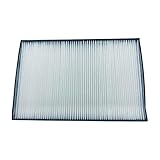
- Replacement Air Filter for select NEC Projectors – NP-9AF01- NC1000C-IMS, NC1000C-R, NC-900C, NC1000C, and NC-1000C
- Easy Installation: Replacing the air filter is straightforward, making it a convenient task during regular maintenance or lamp replacement
Best for Cooling & Power Protection: Surge Protector + Cooling Setup
(Recommended setup combining airflow + electrical safety)
While not a single product, this combo is critical:
- Surge Protector: Protects against voltage spikes that can damage internal circuits
- External Cooling Fan / Ventilation Setup: Keeps temperatures low during long sessions
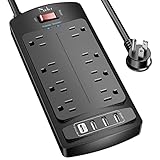
- 【Power Strip with 8AC outlets & 4 USB】- Power bars with surge protector with 8AC outlets & 4 USB charging ports (1 USB C Outlet), 6 Feet Heavy Duty extension…
- 【USB- C Fast & Smart Charge】- 4 USB Charging ports, each USB A port features 2.4A Max output. USB C charging port features 3A MAX. Built- with smart technology…
Heat is the #1 factor that degrades projector components over time. Better airflow = longer lifespan.
Product Comparison Table
| Feature | Epson ELPLP96 Replacement Projector Lamp | Universal Projector Air Filter Kit | Cooling + Surge Setup |
|---|---|---|---|
| Primary Purpose | Restore brightness | Prevent dust buildup | Reduce heat & power damage |
| Lifespan Impact | ⭐⭐⭐⭐⭐ | ⭐⭐⭐⭐ | ⭐⭐⭐⭐⭐ |
| Maintenance Frequency | Every few years | Every 3–6 months check | Continuous use |
| Prevents Overheating | Yes | Yes | Yes (strongest) |
| Difficulty Level | Moderate | Easy | Easy |
How to Choose the Right Product
- If your image is dim → Replace the lamp immediately
- If your projector runs hot or dusty → Install/replace air filters
- If you use it often → Improve cooling + use surge protection
The best approach is combining all three for maximum lifespan.
Best Overall: High-Quality Replacement Lamp
Epson ELPLP96 Replacement Projector Lamp
This is the most important upgrade for extending lifespan. Projectors rely heavily on the lamp, and using a worn-out one increases heat and internal damage.
- Designed specifically for Epson models (perfect compatibility)
- OEM-quality ensures proper brightness and efficiency
- Helps avoid overheating caused by dim lamps
Genuine lamps are built to match factory specs, ensuring optimal performance and longevity

- Original Performance Lamp Modules
- Easily replace your old lamp with the benchmark in performance solution
Best Budget Replacement Option
An affordable replacement lamp with up to 6000 hours lifespan, ideal for maintaining performance without overspending.
If you want a cost-effective option, this lamp still delivers strong performance.
- Up to 6,000 hours lifespan
- Suitable for multiple Epson models
- Available locally with delivery options
Regular lamp replacement prevents brightness loss and reduces strain on internal components

- Designed as replacement components for projector lamp configurations used on specific device models.
- Manufactured to match the physical structure and mounting points of standard lamp assemblies.
Best for Cooling & Power Protection
Universal Projector Replacement Lamp (Multi-brand Options)
A flexible option covering multiple brands, ensuring easy replacement and consistent projector performance.
This category covers multi-brand compatible lamps—ideal if you don’t own Epson.
- Works with brands like BenQ, Sony, Panasonic, and more
- Available in OEM, original bulb, or compatible versions
- Helps maintain stable brightness and cooling balance
Using the correct lamp type is crucial—wrong or low-quality lamps can reduce brightness and even damage the projector

- IET Lamps only use original manufacturer OEM bulbs inside. (UHP, NSH, PVIP, SHP, HS)
- IET Lamps housing units are made from durable and quality materials and are guaranteed to fit properly. This lamp will meet the original manufacturer quality and…
PRODUCT COMPARISON TABLE
| Feature | Epson ELPLP96 Replacement Projector Lamp | Epson CO-W01 Projector Lamp | Universal Projector Replacement Lamps |
|---|---|---|---|
| Compatibility | Epson specific | Epson models | Multi-brand |
| Lifespan | — | Up to 6000 hours | Varies |
| Quality Level | OEM (highest) | Mid-range | Varies (OEM to generic) |
| Best Use Case | Long-term reliability | Budget maintenance | Flexible replacement |
| Risk Level | Very low | Low | Medium (depends on quality) |
Final Recommendation
- Choose OEM lamps (like ELPLP96) if you want maximum lifespan and reliability
- Pick budget lamps if you’re maintaining an older projector
- Avoid cheap generic lamps unless verified—they can reduce brightness and damage components
The single biggest factor in projector lifespan is timely lamp replacement—ignore it, and your projector’s life can drop drastically.
Best for Extending Projector Lifespan (Top Products You Should Use)
Choosing the right accessories comes down to three critical factors: cooling efficiency (heat control), airflow quality, and durability. Heat is the #1 cause of projector wear, so these products directly help extend lifespan.
Best Overall: External Cooling Fan (Top Pick)
Gdstime 120mm USB Cooling Fan
This is the most effective and affordable way to extend projector life. It improves airflow and prevents overheating during long sessions.
- Delivers strong airflow (56.7 CFM) for efficient cooling
- Extremely quiet (~23 dBA), ideal for home theaters
- Long lifespan (~40,000 hours), making it reliable long-term
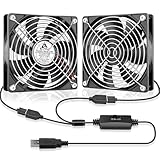
- WIDELY USED: Dual 120mm usb fan powered by one USB cable; This usb fans can be placed or mounted virtually anywhere you want to optimize airflow, from gaming…
- USB POWERED: One 2 in 1 USB cable included, USB plug can power the fan through USB ports found behind popular AV electronics and video game consoles; 2 fans can…
Why it matters: Even a small temperature drop can significantly extend lamp and internal component life. Overheating is responsible for most early projector failures
Best Premium Cooling Option
Noctua NF-A12x25 5V Premium Quiet Fan
A premium ultra-quiet fan with exceptional build quality and long lifespan, perfect for high-end projector setups.
If you want top-tier performance and silence, this is the best choice.
- Ultra-quiet operation (~21 dB)
- Extremely durable (150,000+ hour lifespan)
- High airflow efficiency with premium materials

- Premium quiet fan, 120x120x25mm, 5V, 4-pin PWM, 1900 RPM, max. 21.4 dB(A), >150,000 h MTTF
- Next-generation 120x25mm A-series design provides unprecedented quiet cooling performance, ideal for CPU coolers and watercooling radiators
Ideal for: Home cinema users who want silent operation without compromising cooling.
Best for Compact Spaces / Cabinets
GDSTIME 120mm USB Blower Fan (3-Speed)
A directional blower fan designed for tight spaces and cabinets where airflow is restricted.
This is perfect if your projector sits in a cabinet or enclosed shelf.
- Focused airflow (blower design) for tight spaces
- Adjustable speed control for flexibility
- Prevents heat buildup in enclosed setups
Why it matters: Poor ventilation in cabinets traps heat, which accelerates wear and can cause shutdowns

- Multi-Purpose Small USB Blower: Quickly inflates holiday decorations (Christmas, Halloween, etc.); 120 mm centrifugal blower also revives weak flames, controls…
- 3 Speeds Adjustable: The 120×32 mm usb blower fan features a 3-speed slide controller (Low, Medium, High) to set the fan’s speed (range from 1100 to 2800 RPM) to…
PRODUCT COMPARISON TABLE
| Feature | Gdstime 120mm USB Cooling Fan | Noctua NF-A12x25 5V Fan | GDSTIME USB Blower Fan |
|---|---|---|---|
| Cooling Type | Standard airflow | Premium airflow | Directed airflow |
| Noise Level | ~23 dBA | ~21 dBA | ~32 dBA |
| Lifespan | ~40,000 hrs | 150,000+ hrs | — |
| Best Use Case | General cooling | Silent setups | Enclosed spaces |
| Ease of Use | Plug & play | Plug & play | Plug & play |
| Price Level | Budget-friendly | Premium | Mid-range |
Final Recommendation
- Best overall: Gdstime 120mm USB fan (great balance of price + performance)
- Best premium: Noctua fan (ultra-quiet and long-lasting)
- Best for cabinets: Blower fan (focused airflow where needed)
The biggest takeaway:
Adding proper airflow can reduce internal temperatures by up to 5–12°C, which directly improves projector lifespan and prevents overheating shutdowns
Best Overall: Dual USB Cooling Fan (High Airflow + Control)
iPower Quiet 120mm Dual USB Cooling Fan
This is the most balanced solution for extending projector life.
- Dual fans deliver strong airflow (~50 CFM per fan) for effective cooling
- Adjustable speed control lets you balance noise vs cooling
- Quiet (~20 dB) and long-lasting dual ball bearings
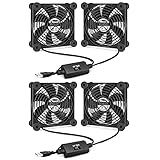
- USB plug & 2-in-1 design: Plug and play, very convenient. USB plug can power the fan through USB ports found behind popular AV electronics and game consoles…
- Adjustable speed: With the 3-speed controller, you can adjust the fan speed easily, optimal it to suitable airflow levels and noise. Maximum speed is 1500 RPM

Best for: Everyday users who want plug-and-play cooling + reliability
Best Budget Option: High Airflow USB Fan
Wathai 120mm USB Cooling Fan (Dual Setup)
An affordable dual-fan setup with speed control, designed for cooling projectors and AV equipment efficiently.
If you want affordable cooling that still works well, this is a strong pick.
- Dual 120mm fans increase airflow coverage
- Multi-speed controller for flexibility
- Works with projectors, routers, consoles, and AV cabinets

- 2 IN 1 USB Fan 120mm, 2 fans connect to one USB cable and work at the same time. NOTE: Power input Max 5V/1A, excess may damage the motor
- Multi-speed controller to set the fan’s speed to optimal noise and airflow levels. Suare design allows the fans to be laid flat or stand upright. perfect for…
Best for: Budget setups or occasional projector use
Best Long-Term Durability: High-Lifespan USB Fan
upHere U1203 Silent Dual 120mm USB Fan
A durable dual-ball bearing fan with long lifespan and strong airflow, ideal for continuous projector cooling.
This is built for long-term use and reliability.
- Dual-ball bearings rated up to ~70,000 hours
- Strong airflow with stable performance
- Designed for continuous cooling applications

- 【Silent and Efficient Cooling】The upHere 120mm USB Fan is engineered to deliver quiet and effective cooling for a variety of devices, including your computer…
- 【Compact and Portable Design】Measuring just 120X120X25mm and weighing only 350g, this fan is designed for versatility in small spaces. Its lightweight and…
Best for: Heavy users (home theater, business, long sessions)
PRODUCT COMPARISON TABLE
| Feature | iPower Quiet 120mm Dual USB Cooling Fan | Wathai 120mm USB Cooling Fan | upHere U1203 Silent Dual USB Fan |
|---|---|---|---|
| Cooling Power | High (dual fans, ~50 CFM each) | High (dual fan airflow) | High |
| Noise Level | Very quiet (~20 dB) | Moderate | Quiet |
| Lifespan | Long | Moderate | Very long (~70,000 hrs) |
| Speed Control | Yes | Yes | Limited |
| Best Use Case | Everyday use | Budget setups | Heavy/continuous use |
Final Takeaway (What Actually Extends Lifespan)
- Cooling fans = biggest impact (reduce heat → extend lamp + internal parts)
- Even small cooling improvements can noticeably reduce internal temperatures
- Combining cooling with clean airflow + proper placement gives the best results
Real-world insight: Some users report temperature drops of several degrees and noticeably cooler projector surfaces when adding external fans—helping components last longer over time.
How Long Do Projectors Last? (Average Lifespan by Type)
Projector lifespan varies significantly depending on the type of light source used, as well as usage habits and maintenance. While many people assume all projectors last the same amount of time, that’s far from true.
Average Lifespan by Projector Type
- Lamp-based projectors:
Typically last 2,000 to 5,000 hours (up to 8,000 hours in eco mode).
These are the most common but require regular lamp replacements. - LED projectors:
Offer a much longer lifespan of around 20,000 to 30,000 hours.
They don’t use traditional bulbs, so they degrade more slowly. - Laser projectors:
The most durable option, lasting 20,000 to 30,000+ hours with minimal maintenance.
Ideal for heavy or professional use.
In simple terms:
Lamp → shortest lifespan | LED → longer | Laser → longest
What “Lifespan” Actually Means
Projectors don’t usually stop working suddenly. Instead, their brightness gradually decreases over time.
- A projector is considered “end of life” when brightness drops to about 50% of its original level
- This means the image may look dim even if the projector still turns on
- For lamp models, replacing the bulb restores brightness—but not always overall performance
Real-World Lifespan vs Manufacturer Claims
Manufacturers often list maximum lifespan under ideal conditions, such as:
- Using eco mode
- Operating in a cool, dust-free environment
- Limited daily usage
However, real-world conditions can reduce lifespan:
- High temperatures
- Poor ventilation
- Long continuous usage
Example: A “5,000-hour” lamp might only last 3,000–4,000 hours in everyday use.
Key Takeaway
- If you want low maintenance → choose LED or laser projectors
- If you’re on a budget → lamp projectors are fine but require replacements
- Lifespan isn’t just about hours—it’s about consistent performance over time
What Affects Projector Lifespan? (Key Factors Explained)
A projector’s lifespan isn’t fixed—it depends heavily on how you use and maintain it. Even a high-end model can fail early if exposed to poor conditions, while a budget projector can last years with proper care.
Below are the most important factors that directly impact how long your projector will last:
Heat & Ventilation (The #1 Lifespan Killer)
Heat is the biggest enemy of any projector. Internal components, especially lamps and electronics, degrade faster under high temperatures.
- Poor airflow causes overheating and automatic shutdowns
- Enclosed spaces trap heat, accelerating wear
- High temperatures shorten lamp life significantly
Always ensure:
- At least 30–50 cm of clearance around vents
- No blocked airflow (especially near walls or cabinets)
- A cool room environment when possible
Dust & Air Quality
Dust buildup can silently damage your projector over time. It clogs filters, reduces airflow, and even affects image clarity.
- Dust blocks cooling vents → leads to overheating
- Can settle on internal optics → blurry or dull images
- Increases fan workload and noise
Prevent this by:
- Cleaning or replacing air filters regularly
- Avoiding use in dusty environments
- Using protective covers when not in use
Usage Habits (How Often & How Long You Use It)
How you use your projector daily plays a major role in its lifespan.
- Long continuous sessions generate more heat
- Frequent on/off cycles can stress components
- Running at full brightness constantly wears out the lamp faster
Best practices:
- Use eco mode when possible
- Turn off the projector properly (don’t unplug instantly)
- Avoid excessive marathon sessions without breaks
Light Source Type (Lamp vs LED vs Laser)
As discussed earlier, the type of light source determines baseline longevity.
- Lamp projectors: Shorter lifespan, require replacements
- LED projectors: Longer-lasting with slower degradation
- Laser projectors: Most durable and consistent
Choosing the right type upfront can save money and maintenance effort long-term.
Power Supply & Electrical Stability
Unstable electricity can damage internal circuits and reduce lifespan.
- Power surges may cause permanent damage
- Sudden shutdowns can interrupt cooling cycles
- Voltage fluctuations stress internal components
Protect your projector by:
- Using a surge protector or UPS
- Avoiding abrupt power cuts
- Letting the fan complete its cooling cycle before unplugging
Key Takeaway
Projector lifespan isn’t just about hours—it’s about conditions and habits.
Keep it cool
Keep it clean
Use it wisely
Protect it from power issues
Do this, and you can significantly extend your projector’s life—sometimes even beyond the manufacturer’s expectations.
Signs Your Projector Is Reaching the End of Its Life
Projectors rarely fail suddenly—instead, they show clear warning signs as they approach the end of their lifespan. Recognizing these early can help you decide whether to replace a part or upgrade the entire unit.
Noticeably Dim Image
One of the earliest and most obvious signs is a loss of brightness.
- Images appear dull even in dark rooms
- Colors look washed out
- Increasing brightness settings doesn’t help much
This usually means the lamp or light source is wearing out. For lamp projectors, replacing the bulb can often fix this—temporarily.
Color Distortion or Yellow Tint
If your projector starts displaying strange colors, it’s a sign something is wrong internally.
- Yellow, blue, or green tint across the screen
- Uneven color distribution
- Poor color accuracy compared to before
This may indicate lamp degradation, optical damage, or failing internal components.
Flickering or Unstable Image
A flickering screen is more than just annoying—it’s a warning.
- Brightness fluctuates randomly
- Image cuts in and out
- Screen “pulses” during use
Often caused by a failing lamp, power instability, or aging electronics.
Frequent Overheating or Shutdowns
If your projector shuts down unexpectedly, heat may be the problem.
- Automatic shutdowns during use
- Loud fans running constantly
- Warning messages about temperature
This could mean:
- Blocked airflow
- Worn-out cooling system
- Internal components nearing failure
Unusual Noises from the Projector
Projectors are never completely silent, but new or loud noises are a red flag.
- Grinding or rattling sounds
- Fans running louder than usual
- Clicking noises during startup
These often point to fan wear, internal damage, or aging hardware.
Repeated Lamp Replacements Needed
If you find yourself replacing the lamp more often than expected:
- Lamps burn out quickly
- Performance doesn’t improve after replacement
- Costs start adding up
This is a strong sign the projector itself—not just the lamp—is nearing the end.
When to Repair vs Replace
Consider repairing if:
- The issue is only the lamp
- The projector is relatively new
- Repair cost is low
Consider replacing if:
- Multiple issues appear at once
- Repairs are expensive
- The projector is outdated or inefficient
Key Takeaway
Projectors don’t die instantly—they gradually decline.
Dim image
Color issues
Flickering
Overheating
Strange noises
Spotting these early helps you avoid sudden failure and plan your next move wisely.
How to Extend Projector Lifespan (Proven Tips That Work)
Extending your projector’s lifespan isn’t complicated—but it does require consistent habits and the right setup. The tips below are practical, proven, and used by both home users and professionals to get the most hours out of a projector.
Keep Your Projector Cool at All Times
Heat is the fastest way to shorten your projector’s life. Managing temperature is critical.
- Place your projector in a well-ventilated area
- Leave at least 30–50 cm of space around vents
- Avoid enclosed cabinets unless airflow is actively improved
Pro tip: Adding an external cooling fan can significantly reduce internal temperature during long sessions.
Clean Air Filters and Vents Regularly
Dust buildup restricts airflow and causes overheating.
- Clean filters every 1–3 months depending on usage
- Check vents for dust accumulation
- Use compressed air carefully (never directly into the lens)
A clean projector runs cooler, quieter, and lasts longer.
Use Eco Mode Whenever Possible
Eco mode reduces brightness slightly—but dramatically increases lifespan.
- Lowers lamp power consumption
- Reduces heat generation
- Extends lamp life by up to 50% or more
Best used in dark rooms or nighttime viewing where full brightness isn’t necessary.
Avoid Long Continuous Usage
Running your projector for hours without breaks builds up internal heat.
- Give it a cool-down break every few hours
- Avoid leaving it on when not in use
- Turn it off properly instead of letting it idle
Short breaks can significantly reduce long-term wear.
Always Use Proper Shutdown (Never Unplug Immediately)
Projectors need time to cool down after use.
- Always use the power button to turn it off
- Let the fan complete its cooling cycle
- Never unplug while it’s still hot
Skipping this step can damage the lamp and internal components.
Protect Against Power Surges
Electrical issues can instantly shorten your projector’s life.
- Use a surge protector or UPS
- Avoid unstable power sources
- Prevent sudden shutdowns during operation
Stable power = safer electronics and longer lifespan.
Optimize Placement and Environment
Where you place your projector matters more than you think.
- Keep it away from heat sources (windows, heaters)
- Avoid dusty or humid environments
- Use a stable mount or surface to reduce vibrations
A controlled environment helps maintain consistent performance.
Conclusion
Projectors can last anywhere from 2,000 to 30,000+ hours, but their true lifespan depends less on the number and more on how well you take care of them. Lamp-based models require more maintenance and replacements, while LED and laser projectors offer longer, more consistent performance with minimal upkeep.
The key takeaway is simple: heat, dust, and usage habits are the biggest factors affecting longevity. By keeping your projector cool, cleaning it regularly, using eco mode, and protecting it from power issues, you can significantly extend its life and maintain image quality over time.
Frequently Asked Questions About How Long Projectors Last (Lifespan Explained)
Projector lifespan is one of the most common concerns for buyers and users. Below are clear, practical answers to help you understand what to expect and how to get the most out of your device.
How many years does a projector typically last?
Most projectors last between 3 to 10 years, depending on usage and technology.
- Lamp projectors may last 3–5 years with regular use
- LED and laser projectors can last 7–10+ years due to longer light source life
The more frequently you use your projector, the faster it will reach its hour limit.
Can you extend a projector’s lifespan?
Yes, significantly. Proper care can add thousands of hours to your projector’s life.
- Use eco mode to reduce heat
- Clean filters regularly
- Ensure proper ventilation
- Avoid frequent abrupt shutdowns
Many users extend lifespan by 30–50% with good maintenance habits.
What part of a projector wears out first?
The lamp (bulb) is usually the first component to degrade in traditional projectors.
- It dims gradually over time
- Needs replacement after a few thousand hours
- Replacement restores brightness but not full “new” performance
In LED and laser projectors, the light source lasts much longer and rarely needs replacement.
Does overheating damage a projector?
Yes—overheating is one of the leading causes of early failure.
- Damages internal electronics
- Shortens lamp life
- Can cause sudden shutdowns
Keeping your projector cool is the single most important factor for longevity.
Is it worth replacing a projector lamp?
It depends on the projector’s condition.
- Worth it if the projector is still modern and working well
- Not worth it if there are multiple issues or it’s outdated
If repair costs approach the price of a new projector, replacement is usually the better choice.
Can power outages damage a projector?
Yes, especially if they occur while the projector is running.
- Interrupts the cooling cycle
- Can damage the lamp or internal components
- May reduce overall lifespan
Using a surge protector or UPS helps prevent this.
Can a Projector Get a Virus?7 reasons why?
This website is a participant in the Amazon Services LLC Associates Program, an affiliate advertising program designed to provide a means for us to earn fees by linking to Amazon.com and affiliated sites.