
This website is a participant in the Amazon Services LLC Associates Program, an affiliate advertising program designed to provide a means for us to earn fees by linking to Amazon.com and affiliated sites.
A projector table attachment for a tripod is a flat support platform that connects to a compatible tripod, allowing you to position a projector at a convenient height without needing a separate table. It is particularly useful when working with portable projectors, giving you a flexible setup for home entertainment, presentations, classrooms, and other viewing environments.
However, not every tripod tray fits every projector. Before choosing an attachment, you need to consider the tray dimensions, weight capacity, mounting thread, anti-slip features, and the space required for ventilation and cables.
Whether you already own a camera tripod or want a more flexible projector stand, understanding these features can help you make a suitable choice. This guide explains how projector table attachments work, what features matter most, and how to evaluate compatibility before setting up your equipment.
Research note: Manufacturer guidance emphasizes checking the projector’s mounting design, tripod compatibility, and stability rather than assuming that every projector fits every tripod.
Best Projector Table Attachments for Tripod Setups
Choosing the right projector table attachment for a tripod depends on your projector’s dimensions, weight, and mounting requirements. The following three products are worth considering when comparing tripod-based projector support options.
CAHAYA Projector Tripod Stand
Best for: General home entertainment and portable presentations.
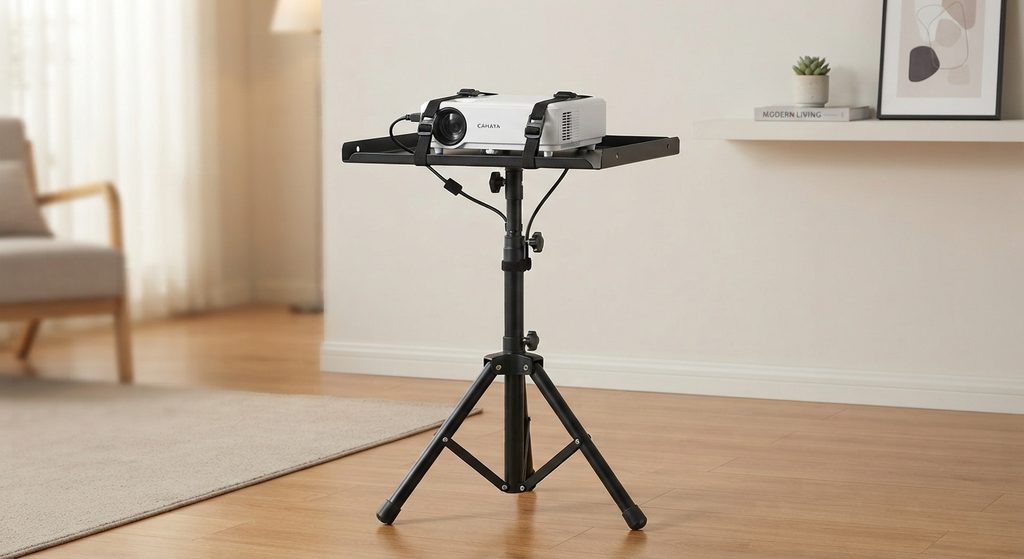
The CAHAYA Projector Tripod Stand features a 16 × 11-inch adjustable tray, metal construction, and a height range of approximately 26–51.5 inches. Its anti-slip features help support compatible equipment.
VIVO STAND-VP01T Projector Tripod Stand
Best for: Portable projector setups and occasional presentations.
The VIVO STAND-VP01T offers a 15 × 11-inch tray, adjustable height, and lightweight aluminum construction. Its folding design and carrying bag make transportation and storage convenient.
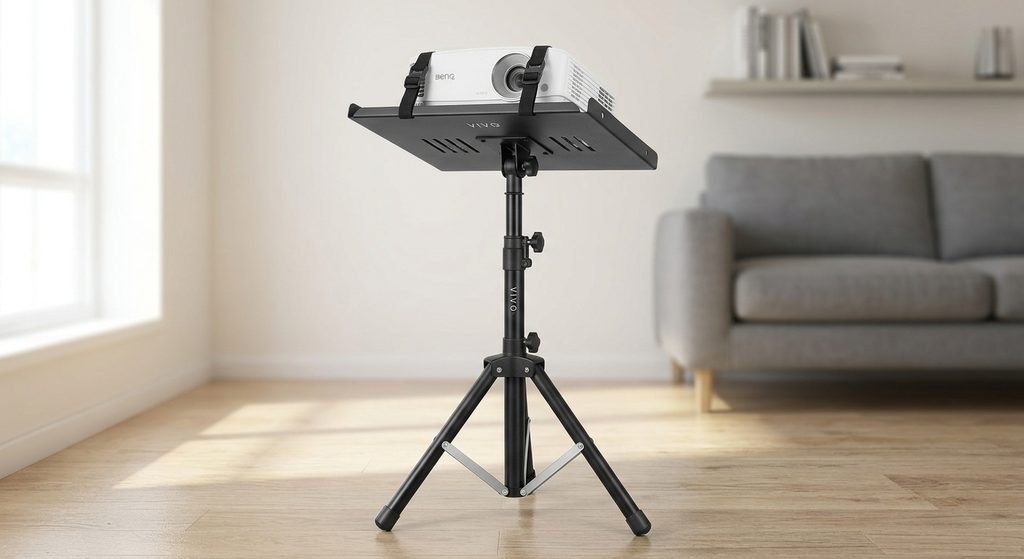
Pyle PLPTS4 Universal Projector Stand
Best for: Larger projector platforms and presentation equipment.
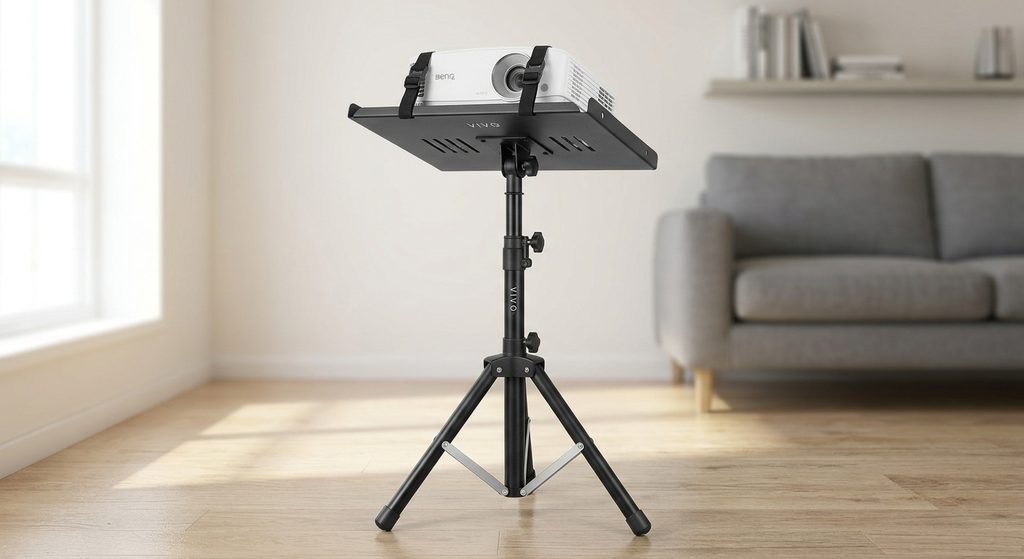
The Pyle PLPTS4 features a spacious 20 × 16-inch platform and adjustable tripod construction. Its larger surface provides more room for compatible equipment, although you should confirm its supported weight before purchasing. RottenWiFi+1
Important buying tip: These are complete tripod stands rather than three standalone replacement attachments. If you already own a tripod, check whether its connection accepts a separate tray attachment before purchasing.
What Is a Projector Table Attachment for a Tripod and How Does It Work?
A projector table attachment for a tripod is a supporting platform designed to hold a projector or compatible presentation equipment above the floor. Instead of placing your projector on a desk, cabinet, or dedicated projector stand, you can attach a suitable tray to a tripod and adjust its position according to your viewing requirements.
Most projector tripod table attachments feature a flat metal or plastic platform supported by a mounting bracket. Some have raised edges, adjustable clamps, rubber pads, or anti-slip surfaces to help keep equipment securely positioned.
How Does a Projector Tripod Tray Work?
The attachment connects to a compatible tripod through a mounting mechanism. Depending on its design, it may use a standard threaded connection, a quick-release plate, or a dedicated mounting bracket.
Once connected, the tray provides a stable surface for placing compatible equipment.
A typical setup involves:
- Opening the tripod: Extend the tripod legs and position them on a firm, level surface.
- Attaching the tray: Connect the projector table attachment to the tripod’s mounting point.
- Securing the platform: Tighten the connection according to the manufacturer’s instructions.
- Positioning the projector: Place the projector centrally on the tray.
- Adjusting the height: Extend the tripod to achieve the required projection position.
Where Can You Use a Projector Table Attachment?
These attachments are useful in several environments:
- Home entertainment: Position a portable projector for movie nights without occupying a permanent table.
- Business presentations: Elevate a projector during meetings and presentations.
- Classrooms: Create flexible projection arrangements for lessons and demonstrations.
- Outdoor entertainment: Position compatible portable projectors for backyard movie screenings.
- Photography and creative work: Support suitable small electronic equipment during demonstrations and creative projects.
The biggest advantage is flexibility. You can reposition, fold, and transport many tripod-based projector platforms more easily than traditional projector furniture.
However, remember that a tripod tray is not automatically compatible with every projector. Always check the equipment’s weight, dimensions, mounting requirements, and ventilation clearance before using an attachment.
How to Choose the Right Projector Table Attachment for a Tripod
Choosing the right projector table attachment for a tripod requires more than finding a platform that looks suitable. You need an attachment that supports your projector’s weight, accommodates its dimensions, and connects securely to your existing tripod.
Here are the most important features to consider before purchasing.
Check the Tray Size
The tray should provide enough surface area to accommodate your projector comfortably. Measure your projector’s length and width before selecting an attachment.
A platform that is too small may leave the projector unstable, while an unnecessarily large tray can make the setup bulky.
Consider Weight Capacity
Always check the manufacturer’s maximum supported load. Your projector, cables, and any additional equipment placed on the tray should remain within the stated limit.
Avoid assuming that a metal tray automatically supports heavier equipment.
Verify Tripod Compatibility
Not every projector table attachment connects to every tripod. Check the mounting thread, quick-release mechanism, or adapter requirements before purchasing.
If you already own a camera tripod, confirm that the attachment supports its particular mounting system.
Choose Durable Materials
Common materials include:
- Aluminum: Lightweight, portable, and resistant to corrosion.
- Steel: Generally sturdy but often heavier.
- Plastic: Lightweight and affordable, depending on its construction.
Look for Adjustable Height and Anti-Slip Features
An adjustable tripod makes it easier to position your projector at a suitable height. Rubber pads, raised edges, and secure mounting hardware can also improve equipment stability.
Finally, consider cable access and ventilation. The tray should not block projector air vents or interfere with power connections.
Buying tip: Prioritize compatibility, weight capacity, and stability over decorative features. These three considerations will help you avoid purchasing an attachment that cannot safely support your equipment.
How to Attach a Projector Table to a Tripod
Attaching a projector table to a tripod is relatively straightforward when both accessories are compatible. The process involves connecting the tray securely, checking the tripod’s stability, and positioning your projector correctly.
Follow these steps to create a practical projector setup.
Step 1: Prepare Your Tripod
Start by placing your tripod on a flat, stable surface. Extend its legs fully and adjust the leg locks according to the manufacturer’s instructions.
Check that all three legs have firm contact with the floor before installing the attachment.
Step 2: Check the Mounting Connection
Examine the tripod head and the projector table attachment to identify their connection types. Some attachments use threaded mounting points, while others require quick-release plates or compatible adapters.
Make sure the mounting hardware matches. Never force incompatible threads or connections together.
Step 3: Install the Projector Tray
Position the attachment over the tripod’s mounting point and secure it using the supplied hardware.
Tighten the connection according to the manufacturer’s instructions. Avoid excessive force that could damage the mounting components.
Step 4: Check the Platform
Before placing your projector on the tray, gently check that the platform is level and does not move unexpectedly.
Confirm that the tripod’s maximum load capacity is sufficient for the equipment.
Step 5: Position Your Projector
Place your projector centrally on the tray, ensuring that it sits entirely within the supporting surface.
Keep ventilation openings unobstructed and leave sufficient space for power cables and other connections.
Step 6: Adjust the Projection Position
Adjust the tripod height to achieve the required projection angle. Use the projector’s built-in image adjustment features where necessary.
Important safety tips:
- Never exceed the tripod or tray’s weight capacity.
- Avoid placing the setup on uneven surfaces.
- Keep cables away from walking paths.
- Do not leave the equipment unattended in an unstable location.
- Follow the manufacturer’s installation instructions.
A properly installed projector table attachment provides a flexible alternative to traditional projector furniture while making it easier to reposition your equipment.
Common Problems With Projector Table Attachments for Tripods and How to Fix Them
Although a projector table attachment for a tripod provides a convenient mounting solution, you may encounter problems during installation or everyday use. Understanding these issues can help you identify the cause and choose an appropriate solution.
The Projector Tray Does Not Fit the Tripod
One common problem is discovering that the attachment has a different mounting connection from your tripod.
How to fix it:
- Check the tripod’s mounting thread and attachment specifications.
- Look for a manufacturer-approved adapter.
- Compare the connection types before purchasing replacement hardware.
Never force incompatible mounting connections together.
The Projector Table Feels Unstable
An unstable tray can make positioning your projector difficult and may increase the risk of equipment falling.
How to fix it:
- Place the tripod on a level surface.
- Check that all leg locks are secured.
- Confirm that the tray is properly installed.
- Remove equipment that exceeds the supported weight capacity.
The Projector Moves Around on the Tray
Some projector trays have smooth surfaces that provide limited grip.
How to fix it:
Look for an attachment with rubber padding, anti-slip material, or raised edges. Make sure the projector sits centrally without hanging over the platform.
The Projector Is Positioned Too High or Too Low
Incorrect positioning can affect the projected image and viewing experience.
How to fix it:
Adjust the tripod height and reposition the projector. Check the projector’s recommended placement distance and angle to achieve the desired image.
The Projector Overheats
Insufficient ventilation can cause projector temperature problems.
How to fix it:
Ensure that the tray does not cover ventilation openings. Leave adequate clearance around the projector and follow the manufacturer’s cooling recommendations.
Final troubleshooting tip: If your attachment repeatedly becomes loose or unstable, stop using it until the mounting problem has been resolved. Replacing incompatible or damaged hardware is safer than attempting an improvised repair.
Conclusion: Choosing the Best Projector Table Attachment for a Tripod
A projector table attachment for a tripod is a practical solution for anyone who wants a portable, adjustable platform for their projector. It eliminates the need for a permanent table while making it easier to position equipment for home entertainment, business presentations, and outdoor movie nights.
Before purchasing, consider the tray dimensions, weight capacity, mounting compatibility, construction materials, and stability features. Options such as the CAHAYA Projector Tripod Stand, VIVO STAND-VP01T, and Pyle PLPTS4 provide useful starting points when comparing complete tripod systems.
Ultimately, the best choice is one that securely supports your equipment and suits your intended setup. Always prioritize compatibility and safe installation over price or appearance.
Frequently Asked Questions About Projector Table Attachments for Tripods
Can you attach a table to a regular camera tripod?
Yes. You can attach a compatible projector tray or platform to certain camera tripods. However, you must check the mounting connection, weight capacity, and stability before installation. Not every camera tripod is designed to support a projector.
What is a projector tripod tray?
A projector tripod tray is a flat platform that connects to a compatible tripod and provides a surface for holding a projector. Some models include adjustable height, rubber padding, and raised edges to improve equipment support.
Are projector table attachments universal?
No. Although some attachments use common tripod mounting connections, others require specific adapters or mounting hardware. Always check the manufacturer’s compatibility specifications before purchasing.
What size projector tray should I buy?
Choose a tray that comfortably accommodates your projector’s dimensions. Measure its length and width before purchasing. Allow additional space for ventilation and cable connections without compromising stability.
Can a projector tripod tray hold a laptop?
Some larger projector trays can accommodate laptops, provided their dimensions and weight remain within the manufacturer’s specifications. However, avoid placing multiple devices on a tray unless it is specifically designed to support their combined weight.
Are projector tripod stands adjustable?
Many projector tripod stands feature adjustable legs or central support poles. This allows users to raise or lower their equipment depending on the room layout and projection requirements.
Can I use a projector table attachment outdoors?
Yes, provided the tripod and attachment are suitable for the environment. Place the equipment on firm, level ground, protect it from wind and moisture, and avoid leaving it unattended.
Is a projector tripod tray better than a regular table?
A tripod tray offers portability, adjustable height, and convenient repositioning. A regular table may provide a larger supporting surface and greater stability. Your choice depends on your available space and equipment requirements.
How do I prevent my projector from sliding off the tray?
Choose a tray with rubber padding, anti-slip material, or raised edges. Position the projector centrally and ensure the tripod is level before use.
Can I make a DIY projector table attachment?
Yes. A DIY platform is possible, but it must be constructed using suitable materials and compatible mounting hardware. Its weight capacity and stability should be properly verified before placing expensive equipment on it.
This website is a participant in the Amazon Services LLC Associates Program, an affiliate advertising program designed to provide a means for us to earn fees by linking to Amazon.com and affiliated sites.