
This website is a participant in the Amazon Services LLC Associates Program, an affiliate advertising program designed to provide a means for us to earn fees by linking to Amazon.com and affiliated sites.
The Microsoft Xbox Series X is a powerful home gaming console designed to deliver high-quality 4K gaming, fast loading times, and an immersive entertainment experience. Developed by Microsoft as part of its Xbox gaming ecosystem, the console combines advanced hardware, a large game library, and support for modern gaming technologies.
Whether you enjoy action games, sports simulations, racing adventures, or multiplayer competitions, the Xbox Series X offers features for different types of players. Its solid-state drive (SSD) helps reduce loading times, while its powerful graphics hardware supports detailed environments and smooth gameplay in compatible titles.
However, choosing the right accessories, setting up your console correctly, and resolving common technical problems can make a significant difference to your experience. This guide explores the Microsoft Xbox Series X’s key features, recommended accessories, setup considerations, and practical troubleshooting tips to help you get more from your console.
Best Accessories for Microsoft Xbox Series X Gaming
The right accessories can improve comfort, communication, and storage capacity when using the Microsoft Xbox Series X. Here are three useful options to consider, depending on your gaming needs. Microsoft confirms that compatible wireless controllers and dedicated storage expansion cards are available for the Xbox Series X.
Best for everyday gaming
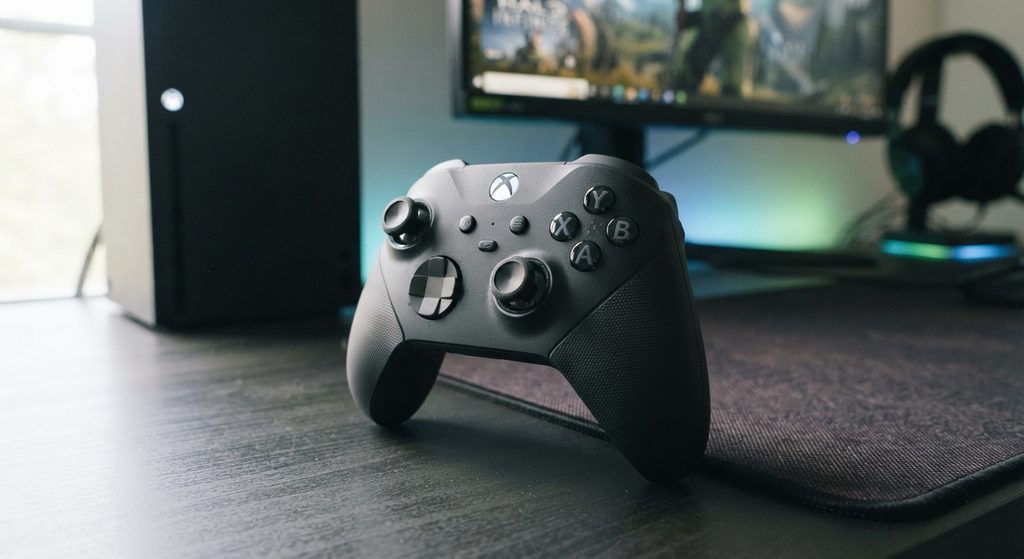
The Xbox Wireless Controller offers comfortable handling, responsive controls, textured triggers, and a dedicated Share button, making it a practical choice for casual gaming and competitive play.
Best for immersive audio and multiplayer chat
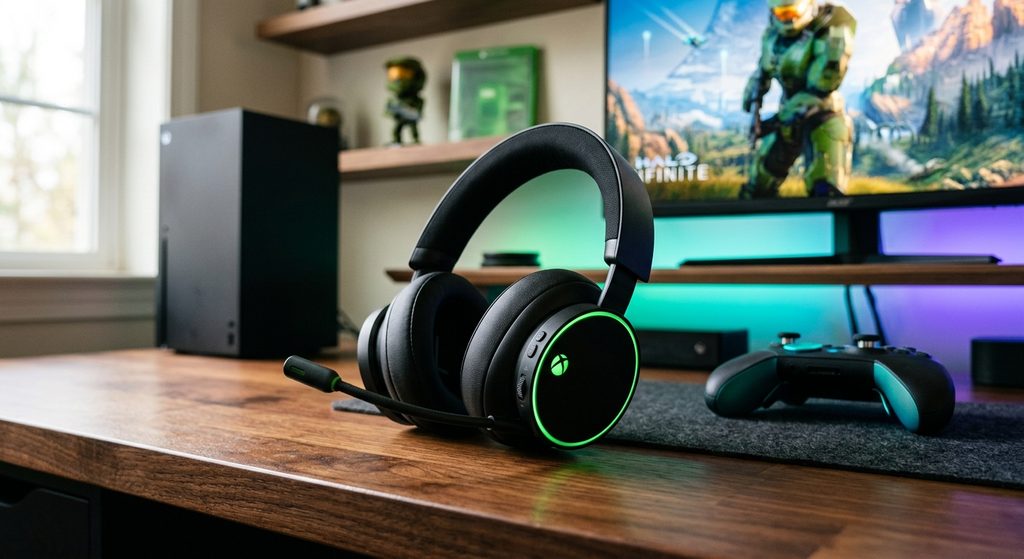
The Xbox Wireless Headset is designed for compatible Xbox consoles and supports wireless gaming audio and voice communication, helping players hear in-game details and coordinate with teammates.
Seagate Storage Expansion Card for Xbox Series X|S
Best for expanding game storage
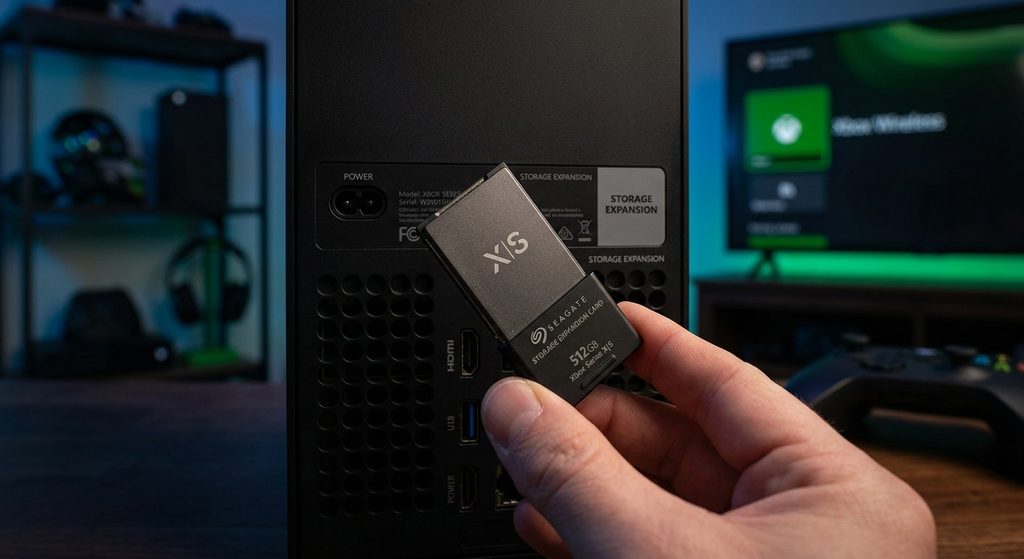
This expansion card adds storage for a growing game library while maintaining performance for compatible games. It fits the console’s dedicated expansion slot and is useful for players who install many large titles.
Related accessories to consider: A compatible HDMI 2.1 cable, rechargeable controller batteries, a headset stand, and an external USB drive for storing compatible games can also be useful additions.
What Are the Key Features of the Microsoft Xbox Series X?
The Microsoft Xbox Series X is designed for gamers who want powerful performance, detailed graphics, and a responsive gaming experience. Its combination of advanced hardware, fast storage, and modern display support makes it a strong option for home entertainment.
Powerful Performance and 4K Gaming
One of the Xbox Series X’s biggest advantages is its custom AMD processor and graphics architecture. The console is designed to support gaming at resolutions up to 4K, with frame rates of up to 120 frames per second in supported games and compatible display setups.
This means players can enjoy detailed environments, smoother movement, and responsive controls in games that support these features. Actual resolution and frame rates vary depending on the title and its graphics settings.
Fast Loading with an SSD
The Xbox Series X includes a high-speed solid-state drive (SSD) that reduces loading times compared with traditional hard-drive-based consoles. Its Quick Resume feature also allows players to switch between supported games without restarting each one from the beginning.
Extensive Game Compatibility
The console supports thousands of games across multiple Xbox generations, although compatibility varies by title. Players can also access digital games through the Microsoft Store and explore eligible titles through Xbox Game Pass, depending on their subscription and regional availability.
Modern Audio and Display Support
The Xbox Series X supports features such as HDR, Dolby Vision gaming in supported configurations, and spatial audio technologies for compatible equipment. These features can improve visual contrast and create a more immersive sound experience.
Key takeaway: The Microsoft
Series X combines powerful graphics, fast loading, backward compatibility, and modern entertainment features in one console, making it suitable for a wide range of gaming preferences.
How to Set Up the Microsoft Xbox Series X for the First Time
Setting up the Microsoft Xbox Series X is straightforward when you follow the correct steps. You will need the console, its power cable, the included HDMI cable, a compatible TV or monitor, an internet connection, and a Microsoft account for the initial online setup.
Step 1: Position the Console Correctly
Place your Xbox Series X on a stable, level surface with sufficient space around its ventilation openings. Avoid enclosed cabinets or locations where heat can build up, as proper airflow helps the console operate reliably.
Step 2: Connect the Console to Your TV
Connect the HDMI cable to the HDMI output on the back of the console and plug the other end into an available HDMI input on your TV. Connect the power cable, turn on the TV, and select the corresponding HDMI input.
Step 3: Turn On the Console and Controller
Press the Xbox power button to start the console. Turn on the wireless controller using its Xbox button and follow the on-screen instructions to pair it if necessary.
Step 4: Connect to the Internet
Choose your Wi-Fi network and enter its password, or connect the console to your router using an Ethernet cable. A wired connection can provide a more consistent connection for online gaming and downloads.
Step 5: Complete the Initial Setup
Follow the prompts to select your language, region, and account preferences. You can use the Xbox mobile app or complete setup directly on the console. Sign in with your Microsoft account and install any required system updates before playing.
Step 6: Install Your First Game
Insert a compatible game disc or download a digital game from your library or the Microsoft Store. Once installation and updates are complete, launch the game and adjust your display and audio settings.
How to Fix Common Microsoft Xbox Series X Problems
Although the Microsoft Xbox Series X is designed for reliable gaming, users may occasionally experience startup failures, display problems, overheating warnings, controller connectivity issues, or slow downloads. Identifying the symptoms helps you choose the right troubleshooting method before considering professional repairs.
Fix 1: Xbox Series X Won’t Turn On
If your console does not start, check that the power cable is firmly connected to the console and a working wall outlet. Disconnect the power cable for about 10 seconds, reconnect it, and try turning the console on again.
If the console still does not respond, check the cable for visible damage. Avoid opening the console or attempting internal electrical repairs.
Fix 2: Xbox Series X Shows a Black Screen
A black screen may result from an incorrect TV input, a loose HDMI connection, or a display compatibility issue. Confirm that your television is switched to the correct HDMI input and reconnect the HDMI cable securely at both ends.
If the problem continues, try another HDMI port or a compatible display. Microsoft recommends checking the display connection when diagnosing console display problems.
Fix 3: Console Overheating or Making Unusual Noise
Place the console on a stable surface with its ventilation openings unobstructed. Remove nearby objects that restrict airflow and keep the console away from direct heat sources.
If it displays an overheating warning, turn it off and allow it to cool. Persistent overheating, unusual mechanical noises, or visible heat damage warrant professional assistance.
Fix 4: Controller or Internet Connection Problems
For controller issues, replace or recharge the batteries, restart the controller, and pair it with the console again if necessary. For network problems, restart your router and check whether other devices can connect successfully.
You can also test a wired Ethernet connection to determine whether Wi-Fi instability is affecting gameplay.
Is the Microsoft Xbox Series X Worth Buying?
The Microsoft Xbox Series X is worth considering if you want powerful 4K gaming, fast loading times, and access to a broad library of console games. It is particularly appealing to players who own a compatible 4K television, prefer physical game discs, or want to explore Microsoft’s Xbox gaming ecosystem.
Advantages of the Xbox Series X
One of the console’s main strengths is its performance. Its custom processor, graphics hardware, and SSD support detailed visuals, reduced loading times, and frame rates of up to 120 FPS in compatible games.
Other advantages include:
- 4K gaming: Enjoy high-resolution graphics on compatible displays.
- Quick Resume: Switch between supported games and return to previous sessions quickly.
- Backward compatibility: Play many games from earlier Xbox generations.
- Disc support: Models equipped with an optical drive can play compatible physical games and UHD Blu-ray movies.
- Game Pass access: Explore a rotating selection of games with an eligible subscription.
What Should You Consider Before Buying?
The console’s price is an important consideration, especially when you factor in games, additional storage, and accessories. Subscription services may also involve recurring costs, and not every game is included in every plan.
You should also check which Xbox Series X model you are buying. Microsoft offers disc-equipped and all-digital configurations, with storage capacities and finishes varying by model and market.
The Xbox Series X may be a good fit if you:
- Want a powerful home console with 4K gaming capabilities.
- Already own Xbox games or accessories.
- Prefer physical discs, provided you choose a disc-drive model.
- Want fast loading and a large selection of games.
If you mainly play occasionally or do not need native 4K gaming, a less expensive console may be sufficient.
Verdict: The Microsoft Xbox Series X remains a compelling gaming console, but its value depends on your preferred games, display, budget, and whether you need a disc drive.
Conclusion: Is the Microsoft Xbox Series X a Good Gaming Console?
The Microsoft Xbox Series X is a powerful gaming console that combines high-resolution graphics, fast SSD storage, Quick Resume, and access to an extensive library of games. Its support for compatible 4K displays, high frame rates, and many older Xbox titles makes it an attractive option for both experienced gamers and newcomers.
Before purchasing, consider your budget, preferred games, storage requirements, and whether you want a disc-drive model or an all-digital version. Accessories such as the Xbox Wireless Controller, Xbox Wireless Headset, and a compatible storage expansion card can further enhance your gaming experience.
Whether you are upgrading from an older console or entering the Xbox ecosystem for the first time, choosing the right configuration can help you get the most value from your investment.
Frequently Asked Questions About Microsoft Xbox Series X
Is the Microsoft Xbox Series X worth buying?
Yes, the Xbox Series X is worth considering if you want powerful gaming performance, fast loading times, and access to a large game library. Its value depends on your budget, preferred games, and whether you need a disc drive.
Can the Xbox Series X play games in 4K?
Yes. The Xbox Series X supports 4K gaming, although the resolution and frame rate depend on the individual game and your display. Compatible games and equipment are required to take advantage of features such as 4K at up to 120 FPS.
Can you play Xbox One games on Xbox Series X?
Yes. The console supports many Xbox One games, along with selected Xbox 360 and original Xbox titles. Compatibility varies by game, and physical backward-compatible games require a disc-drive model.
Does the Xbox Series X require an internet connection?
An internet connection is useful for initial setup, system updates, downloading digital games, and online multiplayer. Some games can be played offline after setup, depending on the title, licensing requirements, and console settings.
How much storage does the Xbox Series X have?
Storage capacity depends on the model. Available configurations include 1TB and 2TB SSD options, although usable space is lower because the operating system and other system files occupy some storage. You can expand storage using a compatible expansion card or external USB drive.
What is the difference between Xbox Series X and Xbox Series S?
The Xbox Series X targets higher-resolution gaming and offers disc-drive options, while the Xbox Series S is designed primarily for digital gaming at a lower target resolution. Both consoles support features such as Quick Resume and high frame rates in compatible games.
How can you fix an Xbox Series X that will not turn on?
Check the power connection and wall outlet first. Disconnect the console from power for about 10 seconds, reconnect it, and try again.
This website is a participant in the Amazon Services LLC Associates Program, an affiliate advertising program designed to provide a means for us to earn fees by linking to Amazon.com and affiliated sites.