
This website is a participant in the Amazon Services LLC Associates Program, an affiliate advertising program designed to provide a means for us to earn fees by linking to Amazon.com and affiliated sites.
Rear projection screens work by displaying an image from a projector placed behind a specially designed screen that diffuses and directs light toward viewers on the opposite side. Unlike traditional front projection systems, the projector remains hidden behind the screen, creating a cleaner appearance while eliminating shadows and glare.
Have you ever wondered how television studios, trade show displays, and immersive home theaters produce large, bright images without visible projectors? The answer often lies in rear projection technology. This display method has been used for decades and continues to evolve thanks to advancements in projection materials and high-definition projectors.
Whether you’re considering a rear projection setup for home entertainment, business presentations, or digital signage, understanding how these screens work can help you determine whether this technology suits your needs. In this guide, we’ll explore the science behind rear projection screens, their advantages, limitations, and the situations where they perform best.
Best for Rear Projection Displays
Choosing the right equipment is essential for getting the most out of a rear projection setup. The following products are widely regarded as excellent options because they offer bright images, flexible installation, and compatibility with rear projection screens.
Epson Pro EX11000 Wireless Projector
Why we picked it
This projector delivers impressive brightness, Full HD resolution, and wireless connectivity. Its high lumen output produces vivid images on rear projection screens, making it suitable for home theaters, classrooms, and presentations.
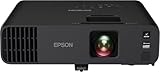
- Exceptional Brightness (1) — 4,600 lumens of color and white brightness ideal for displaying video conferences, large-group presentations, spreadsheets and videos…
- High-performance laser light source — 20,000 hours virtually maintenance-free laser light source (2) delivers incredible brightness with no bulbs to replace

Elite Screens Yard Master 2 Rear Projection Screen
Why we picked it
This portable rear projection screen features excellent light diffusion and a durable frame. It provides wide viewing angles and quick assembly, making it ideal for outdoor movies, events, and exhibitions.

- 【150 inch Freestanding Portable Projector Screen】 This projector Screen is 150-inch Diagonal, 16:9 Aspect Ratio. View Size: 73.5″ H x 130.8″ W. Overall Size…
- 【Amazing Visual Feast】Wraith Veil Dual – 0.8 Gain – 150˚ Wide Viewing Angle – Front and Rear Projection Surface – 4K Ultra HD, HDR, and Active 3D Ready – PVC…
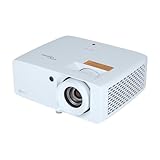
Optoma ZH450 Laser Projector
Why we picked it
This laser projector combines long-lasting performance with high brightness and sharp image quality. Its compact design and reliable color reproduction make it an excellent choice for professional rear projection installations.
- E9PD7L321EZ1
What Is a Rear Projection Screen and How Does It Work?
A rear projection screen is a specialized display surface that allows images from a projector positioned behind the screen to be viewed from the front. Instead of reflecting light back toward the audience like a traditional front projection screen, a rear projection screen transmits and diffuses light through its material, creating a bright and evenly distributed image.
The system consists of three primary components: the projector, the rear projection screen, and the viewing area. The projector sits behind the screen and sends light toward the back surface. The screen material then scatters the light in a controlled manner so viewers on the opposite side can see a clear picture.
The Basic Process
- The projector generates an image using light and lenses.
- The image is projected onto the back of the screen.
- The screen diffuses and directs the light forward.
- The audience views the image from the front side.
Because the projector is hidden behind the screen, people can walk in front of the display without creating shadows. This is one reason rear projection systems are popular for conferences, museums, exhibitions, and television studios.
Another advantage is reduced glare. Since the projector’s light source remains behind the screen, viewers are less likely to experience eye strain caused by direct exposure to bright projection beams.
Rear projection screens are manufactured using specialized materials that balance light transmission and image clarity. High-quality screens are designed to:
- Distribute light evenly across the display
- Maintain consistent brightness at different viewing angles
- Minimize hot spots and reflections
- Preserve image sharpness and color accuracy
The Science Behind Rear Projection Screens: How They Display Images
The effectiveness of a rear projection screen comes down to how it manages light. Unlike ordinary fabric, plastic, or wall surfaces, rear projection materials are engineered to transmit, diffuse, and direct light in a highly controlled way. This allows viewers standing in front of the screen to see a bright, detailed image even though the projector is located behind it.
When the projector emits light, that light contains all the visual information needed to create the image. As the projected beam strikes the back of the screen, the screen’s microscopic structure scatters the light across its surface. Rather than allowing the light to pass straight through, the material redirects it toward the audience while maintaining image sharpness.
Key Optical Principles at Work
Light Transmission
The screen must allow enough projector light to pass through so the image remains bright and visible.
Light Diffusion
The screen spreads light evenly across the viewing surface, preventing overly bright areas and creating uniform illumination.
Viewing Angle Control
Premium rear projection screens direct light toward the audience while minimizing light loss to the sides, improving visibility from multiple positions.
Contrast Enhancement
Many modern screens include optical coatings that help block ambient light, resulting in deeper blacks and improved image contrast.
How Screen Materials Affect Performance
Different rear projection screen materials produce different viewing experiences. Manufacturers often design screens for specific environments.
Common screen types include:
- Diffusion Screens – Provide wide viewing angles and balanced brightness.
- High-Contrast Screens – Improve black levels in rooms with ambient light.
- Holographic Screens – Use advanced optical layers to increase brightness and image clarity.
- Rigid Acrylic Screens – Common in commercial installations requiring maximum durability.
The relationship between projector brightness and screen gain also plays an important role. Screen gain measures how efficiently a screen directs light toward viewers. Higher-gain screens appear brighter but may reduce viewing angles, while lower-gain screens provide more consistent visibility across a wider area.
Why Images Look So Clear
Modern rear projection systems achieve impressive image quality because they combine:
- High-resolution projectors
- Precision optical screen materials
- Advanced color processing
- Controlled light distribution
As a result, rear projection displays can produce sharp text, vibrant colors, and detailed graphics across very large screen sizes.
Advantages and Disadvantages of Rear Projection Screens
Rear projection screens offer several benefits that make them attractive for professional installations, events, and dedicated entertainment spaces. However, like any display technology, they also come with limitations that should be considered before investing in a system.
Advantages of Rear Projection Screens
One of the biggest advantages is that the projector remains hidden behind the screen. This creates a clean, professional appearance because viewers do not see equipment, cables, or bright projector beams.
Another major benefit is the elimination of shadows. With front projection systems, people walking between the projector and screen interrupt the image. Rear projection avoids this problem entirely because the projector sits behind the display surface.
Rear projection systems also reduce glare and improve viewer comfort. Since the light source is positioned behind the screen, audiences are less likely to experience eye strain from direct projector light.
Key advantages include:
- No shadows crossing the image
- Cleaner and more professional installations
- Reduced glare and eye fatigue
- Better image consistency in high-traffic areas
- Improved security because equipment remains hidden
- Excellent for interactive displays and presentations
Disadvantages of Rear Projection Screens
Despite their strengths, rear projection systems require more installation space. The projector must sit behind the screen at an appropriate distance, which means additional room is necessary.
Image quality can also be affected by ambient lighting. Although some modern screens resist outside light, brightly lit environments may still reduce contrast and color depth.
The initial investment can also be higher than standard front projection setups because specialized screens and installation requirements increase overall costs.
Common drawbacks include:
- Requires significant space behind the screen
- Higher installation and equipment costs
- More complicated setup and alignment
- Performance can decline in very bright rooms
- Large installations may need specialized mounting systems
Quick Comparison
| Feature | Rear Projection | Front Projection |
|---|---|---|
| Projector Visibility | Hidden | Visible |
| Shadows on Screen | None | Possible |
| Space Requirements | Higher | Lower |
| Installation Complexity | Moderate to High | Low to Moderate |
| Professional Appearance | Excellent | Good |
| Ambient Light Handling | Moderate | Moderate |
Where Are Rear Projection Screens Commonly Used?
Rear projection screens are used in environments where large, bright images and unobstructed viewing are essential. Because the projector remains hidden behind the screen, these systems create a clean presentation area and allow people to move freely without casting shadows on the display.
Home Theaters
Dedicated home theaters often use rear projection systems to create an immersive viewing experience. Large screen sizes and hidden equipment help replicate the feel of a commercial cinema.
Homeowners also appreciate the clutter-free appearance. By placing the projector behind the screen, the room can maintain a sleek and professional design.
Business Presentations and Conference Rooms
Companies frequently use rear projection screens in boardrooms and presentation spaces. Presenters can stand close to the screen without blocking important information.
Rear projection displays are particularly useful for:
- Corporate meetings
- Training sessions
- Product demonstrations
- Video conferencing
- Interactive presentations
Trade Shows and Exhibitions
Exhibition booths often attract heavy foot traffic. Rear projection screens allow attendees to gather around the display without creating shadows or interfering with presentations.
The hidden projector also improves aesthetics by eliminating visible cables and equipment, resulting in a more polished and professional exhibit.Television Studios and Broadcasting
Television studios regularly use rear projection technology for news broadcasts, weather presentations, and virtual sets. Since presenters can stand directly in front of the display without obstructing the image, producers gain greater flexibility during filming.
Benefits for broadcasting environments include:
- Shadow-free presentations
- Large, high-resolution backgrounds
- Cleaner camera angles
- Enhanced visual effects integration
Museums, Educational Facilities, and Digital Signage
Museums and educational institutions use rear projection screens to create interactive exhibits and immersive learning experiences. The hidden equipment protects projectors from accidental damage and discourages tampering.
Digital signage installations also benefit from rear projection because the technology provides:
- Continuous viewing in public spaces
- Better protection for equipment
- Professional-looking displays
- Large-scale visual communication
How to Choose the Right Rear Projection Screen for Your Needs
Selecting the right rear projection screen involves more than simply choosing a screen size. Factors such as room dimensions, lighting conditions, projector brightness, and intended use all affect performance. The ideal screen should provide clear images, consistent brightness, and a comfortable viewing experience.
Consider Your Available Space
Rear projection systems require sufficient room behind the screen because the projector must be positioned at an appropriate throw distance. Before purchasing a screen, measure both the viewing area and the space behind the display.
Questions to ask include:
- How much room is available behind the screen?
- Will the projector be permanently installed?
- Is the setup intended for indoor or outdoor use?
Evaluate Ambient Lighting
Lighting conditions significantly influence image quality. Rooms with minimal outside light generally produce better contrast and richer colors.
For brighter environments, consider:
- High-contrast rear projection screens
- Higher-lumen projectors
- Window coverings or controlled lighting
Choose the Appropriate Screen Size
A larger screen creates a more immersive experience but requires sufficient projector brightness to maintain image clarity.
A general guideline is:
- Small rooms: 80–100-inch screens
- Medium rooms: 100–120-inch screens
- Large rooms or events: 120 inches and above
Match Screen Material and Viewing Requirements
Different screen materials serve different purposes.
| Screen Type | Best For | Main Benefit |
|---|---|---|
| Diffusion Screen | Home theaters | Wide viewing angles |
| High-Contrast Screen | Bright rooms | Improved black levels |
| Holographic Screen | Commercial displays | Enhanced brightness |
| Acrylic Screen | Permanent installations | Durability and image sharpness |
Check Projector Compatibility
The projector and screen should complement one another. Pay attention to:
- Resolution (Full HD, 4K, or higher)
- Brightness rating (lumens)
- Throw ratio requirements
- Color performance
- Installation flexibility
Consider Long-Term Value
Although rear projection systems may have higher upfront costs, quality components often provide years of reliable performance. Investing in durable materials and an appropriate projector can improve image quality while reducing maintenance needs over time.
Conclusion
Rear projection screens work by placing a projector behind a specially engineered screen that transmits and diffuses light toward viewers. This unique design creates large, bright images while keeping the projector hidden from sight. As a result, audiences enjoy shadow-free viewing, reduced glare, and a cleaner overall installation.
Throughout this guide, we’ve explored the science behind rear projection technology, its advantages and disadvantages, common applications, and the factors to consider when choosing the right screen. Whether you’re building a home theater, setting up a trade show display, or installing digital signage, rear projection can provide an impressive and professional viewing experience.
The key is selecting the right combination of screen material, projector brightness, and installation space. By understanding how rear projection screens work, you can make informed decisions and create a display system that delivers excellent image quality for years to come.
Frequently Asked Questions About “How Do Rear Projection Screens Work?”
Do rear projection screens work in bright rooms?
Yes, rear projection screens can work in bright rooms, but performance depends on the screen material and projector brightness. High-contrast screens and projectors with higher lumen ratings generally deliver better results in environments with ambient light.
Why don’t rear projection screens create shadows?
The projector is positioned behind the screen instead of in front of it. Since viewers stand on the opposite side of the projector beam, they cannot block the light, eliminating shadows and interruptions.
Are rear projection screens better than front projection screens?
Neither technology is universally better. Rear projection excels when you need a clean installation and uninterrupted viewing, while front projection often requires less space and can be more affordable.
Can I use any projector with a rear projection screen?
Most projectors can work with rear projection screens, but compatibility depends on factors such as brightness, resolution, and throw ratio. Some installations may require short-throw or ultra-short-throw projectors.
What materials are rear projection screens made from?
Rear projection screens are commonly manufactured from diffusion fabrics, optical films, acrylic panels, and specialized translucent materials. These materials are engineered to transmit and evenly distribute light.
Are rear projection screens suitable for home theaters?
Yes. Many dedicated home theaters use rear projection systems because they provide large images, eliminate shadows, and hide equipment behind the screen, creating a cinema-like experience.
How much space is needed behind a rear projection screen?
The required space depends on the projector’s throw ratio and the desired screen size. Some setups need several feet of clearance, while short-throw projectors can significantly reduce the distance required.
Can a Projector Get a Virus?why you need to know
This website is a participant in the Amazon Services LLC Associates Program, an affiliate advertising program designed to provide a means for us to earn fees by linking to Amazon.com and affiliated sites.