
This website is a participant in the Amazon Services LLC Associates Program, an affiliate advertising program designed to provide a means for us to earn fees by linking to Amazon.com and affiliated sites.
Yes, the Meta Quest 2 supports basic mixed reality experiences through its black-and-white passthrough feature, allowing users to see their physical surroundings while interacting with virtual content. However, it does not offer the full-color mixed reality experience available on newer headsets like the Meta Quest 3 and Meta Quest 3S.
If you’ve wondered whether the Oculus Quest 2 can blend virtual objects with your real-world environment, the answer is yes, but there are some important limitations.
The Quest 2 was originally designed primarily for virtual reality gaming. Nevertheless, Meta introduced passthrough capabilities that allowed developers to create applications combining digital experiences with views of the physical environment.
In this guide, we’ll explore how Meta Quest 2 mixed reality works, what features it supports, its limitations, and how it compares with newer Meta Quest headsets. We’ll also look at some useful devices to consider if you’re interested in exploring mixed reality further.
Best for Exploring Mixed Reality and VR Experiences
Here are three Meta Quest headsets worth knowing about when exploring mixed reality technology.
Best overall for mixed reality
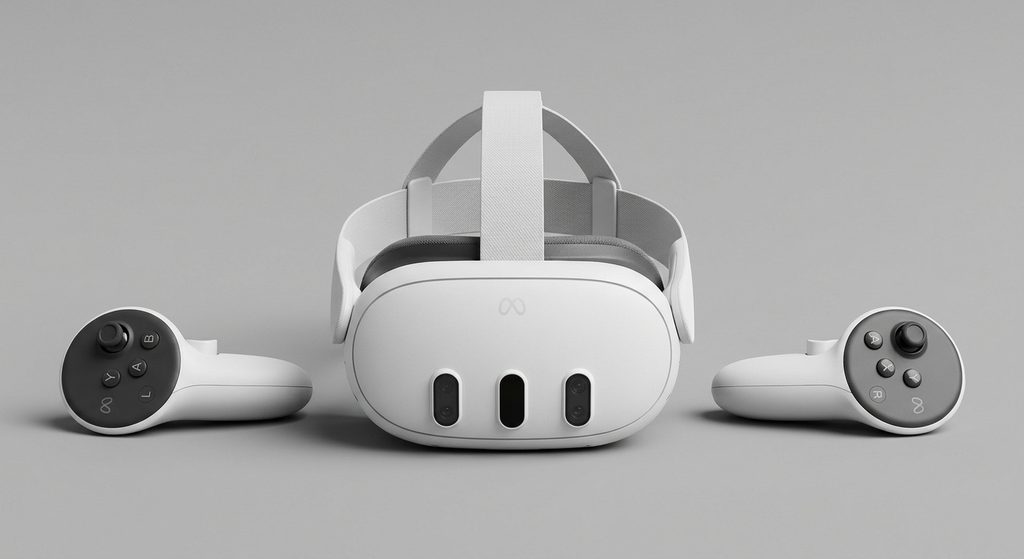
The Meta Quest 3 offers full-color passthrough, improved depth perception, and advanced mixed reality capabilities, making it an excellent choice for immersive experiences beyond traditional VR gaming.
Best budget-friendly mixed reality option
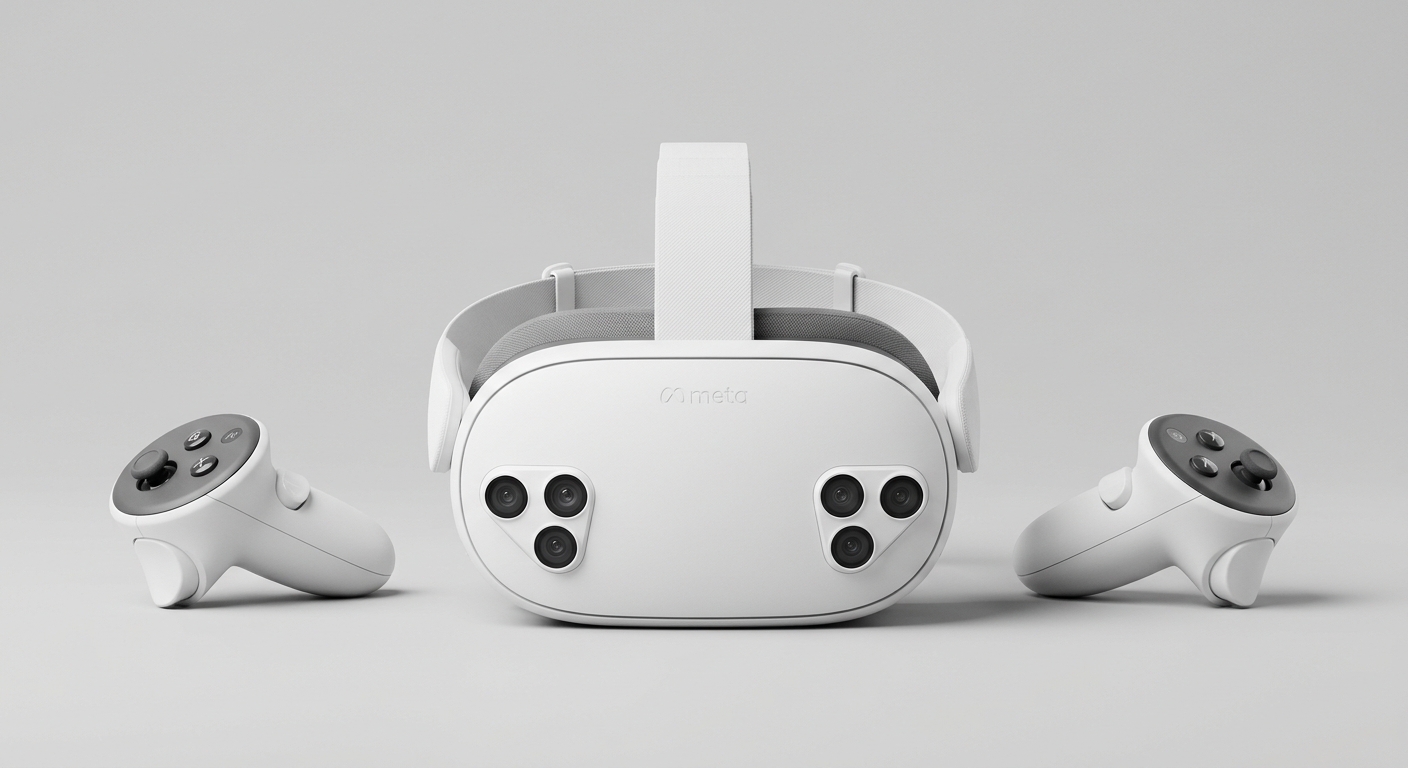
The Meta Quest 3S provides access to full-color passthrough and modern mixed reality applications, making it a more affordable alternative for users interested in exploring immersive digital experiences.
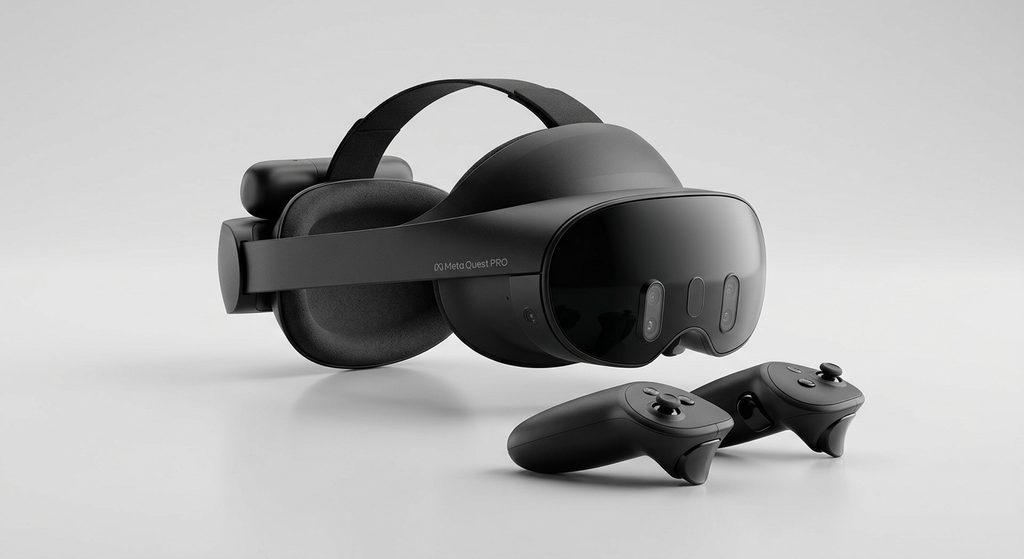
The Meta Quest Pro combines color passthrough, eye tracking, and face tracking, offering additional features for productivity, collaboration, and compatible mixed reality applications.
How Does Mixed Reality Work on Meta Quest 2?
Meta Quest 2 creates mixed reality experiences using a technology called passthrough, which allows users to see their physical surroundings through the headset’s external cameras. Instead of completely replacing the real world with a virtual environment, passthrough displays a live black-and-white view of the room while compatible applications add digital objects and experiences.
The technology combines your physical surroundings with computer-generated content, creating a connection between virtual reality (VR) and augmented reality (AR).
How Does Meta Quest 2 Passthrough Work?
The Meta Quest 2 uses its external tracking cameras and software to provide a view of your surroundings inside the headset. This allows you to remain visually aware of your room without removing the device.
Here is how the process works:
- External cameras capture your surroundings: The headset uses its cameras to provide a live view of the physical environment.
- Passthrough displays your room: Your surroundings appear inside the headset in black and white.
- Compatible applications add virtual elements: Developers can overlay digital objects, interfaces, and interactive content onto the passthrough view.
- Users interact with digital content: Depending on the application, you can interact with virtual objects while remaining aware of your physical environment.
Meta introduced passthrough development capabilities for Quest 2 to help developers create experiences that combine physical and virtual environments. Meta Horizon OS Developers+1
What Does Mixed Reality Look Like on Meta Quest 2?
Imagine sitting at your desk wearing a Meta Quest 2 headset. Instead of seeing a completely virtual environment, you can view your desk and surrounding room in black and white.
A compatible application could then display a virtual screen, digital objects, or interactive content within that environment.
This creates a mixed reality experience, although the visual quality is more limited than what newer headsets offer.
Is Meta Quest 2 Passthrough the Same as Full Mixed Reality?
Not exactly. Passthrough is the technology that makes certain mixed reality experiences possible, but it does not automatically mean every VR application supports mixed reality.
The quality and functionality depend on the headset’s hardware and the application being used.
Important: Meta Quest 2 supports basic mixed reality, but its monochrome passthrough and older hardware make it less capable than the Quest 3 and Quest 3S.
What Mixed Reality Features Does Meta Quest 2 Support?
The Meta Quest 2 supports several mixed reality features that allow developers to combine virtual content with the physical environment. Although it lacks the advanced full-color passthrough found on newer headsets, it offers useful capabilities such as monochrome passthrough, spatial anchors, scene understanding, and controller-based interactions.
These features were introduced through Meta’s Presence Platform, which provides developers with tools for building immersive experiences that connect the virtual and physical worlds. Meta Horizon OS Developers+1
Let’s look at the main features available on Meta Quest 2.
Black-and-White Passthrough
Passthrough is one of the most important mixed reality features on Meta Quest 2. It allows users to see their physical surroundings through the headset’s external cameras without taking the headset off.
However, the image appears in grayscale rather than full color. This makes it easier to remain aware of your surroundings, although the visual experience is less realistic than newer Quest headsets.
Spatial Anchors
Spatial Anchors allow developers to position virtual objects at specific locations in a physical environment.
For example, an application could place a virtual screen in front of your desk or position digital artwork in a particular area of your room.
The virtual content can remain associated with that physical location, including across sessions when the application supports persistence. Meta Horizon OS Developers+1
Scene Understanding
Meta Quest 2 also supports developer tools for scene understanding.
This technology helps compatible applications understand elements of a physical environment, including walls, floors, ceilings, and furniture.
Developers can use this information to create experiences where virtual objects interact more naturally with physical surroundings. Meta Horizon OS Developers+1
Controller and Hand Interactions
The headset supports controller-based interactions and hand tracking capabilities.
Depending on the application, users can interact with virtual menus and digital objects using their controllers or tracked hands.
This makes certain mixed reality experiences more interactive without requiring users to navigate everything through traditional controller buttons.
Quick Overview of Meta Quest 2 Mixed Reality Features
| Feature | Meta Quest 2 support |
|---|---|
| Black-and-white passthrough | Yes |
| Full-color passthrough | No |
| Spatial anchors | Yes |
| Scene understanding | Developer-supported |
| Hand tracking | Yes |
| Virtual object placement | Supported by compatible apps |
| Advanced depth-based occlusion | Limited compared with Quest 3 |
Important: Not every feature is automatically available in every application. Some capabilities require specific developer implementations, software support, and permissions.
Overall, Meta Quest 2 provides a foundation for mixed reality, but its hardware limitations prevent it from delivering the same visual quality and environmental awareness as newer headsets.
What Are the Limitations of Meta Quest 2 Mixed Reality?
Although Meta Quest 2 supports mixed reality, it has several hardware and software limitations that affect the overall experience. The headset was initially designed for virtual reality gaming rather than advanced mixed reality applications.
As a result, users can enjoy basic passthrough and selected mixed reality experiences, but they should not expect the realistic visuals and environmental interactions available on newer headsets.
Here are the main limitations to understand before using Meta Quest 2 for mixed reality.
Black-and-White Passthrough Instead of Full Color
One of the biggest limitations is its black-and-white passthrough.
Unlike newer headsets, Meta Quest 2 uses its tracking cameras to display a grayscale representation of your surroundings. This makes it difficult to recognize colors and certain environmental details.
For example, identifying colored objects or reading small text in your physical environment can be challenging.
Limited Environmental Depth and Realism
Meta Quest 2 does not provide the same advanced depth-sensing capabilities as Meta Quest 3.
Consequently, virtual objects may not interact with physical surroundings as naturally as they do on newer devices.
Although developers can implement scene understanding and spatial interactions, the overall experience has hardware limitations.
Older Processing Hardware
The Meta Quest 2 uses the Qualcomm Snapdragon XR2 processor, which is older than the processor found in Meta Quest 3.
This affects the complexity of applications developers can create and the performance they can achieve.
More demanding mixed reality applications may be designed specifically for newer headsets rather than Quest 2.
Limited Mixed Reality Application Compatibility
Not every mixed reality application supports Meta Quest 2.
Some newer applications require hardware features available only on Quest 3 or Quest 3S. For example, Meta’s Passthrough Camera API requires Quest 3 or Quest 3S and does not support Quest 2. GitHub+1
Therefore, always check an application’s compatibility requirements before purchasing or downloading it.
Less Realistic Physical Object Interaction
Mixed reality becomes more convincing when virtual objects can respond naturally to physical surfaces and objects.
Quest 2 supports certain developer tools for environmental interaction, but its older tracking and camera hardware limits the experience compared with newer devices.
Meta Quest 2 Mixed Reality Limitations at a Glance
| Limitation | What it means |
|---|---|
| Grayscale passthrough | Physical surroundings appear black and white |
| Older processor | Less processing power for demanding experiences |
| Limited depth perception | Less realistic environmental interactions |
| App compatibility | Some newer MR apps are unsupported |
| Older camera hardware | Fewer advanced environmental sensing capabilities |
Is Meta Quest 2 still worth using for mixed reality?
Yes, if you already own one and want to experiment with basic passthrough experiences. However, if full-color passthrough, advanced environmental tracking, and more realistic mixed reality are your priorities, newer Quest headsets offer a better experience.
Meta Quest 2 vs Meta Quest 3 – Which Is Better for Mixed Reality?
When comparing Meta Quest 2 vs Meta Quest 3 for mixed reality, the Meta Quest 3 is the clear winner. While both headsets support passthrough experiences, the Quest 3 offers full-color passthrough, improved depth perception, better processing performance, and more advanced mixed reality capabilities.
The Meta Quest 2 remains suitable for basic VR gaming and selected mixed reality applications. However, its older camera technology and grayscale passthrough make it less immersive for users who want to blend digital content with their physical surroundings.
Let’s compare the two headsets to understand their differences.
Passthrough Quality
Meta Quest 2
Black-and-white passthrough with limited environmental detail.
Meta Quest 3
Full-color passthrough with improved environmental understanding.
The biggest difference is how each headset displays the physical world.
Meta Quest 2 uses grayscale passthrough, while Meta Quest 3 uses full-color passthrough with a dedicated depth sensor. This makes the Quest 3 significantly better for applications that combine virtual objects with real-world surroundings.
Processing Performance
The Meta Quest 2 uses the Qualcomm Snapdragon XR2 platform, while Meta Quest 3 features the more powerful Snapdragon XR2 Gen 2 platform.
The newer processor provides improved graphics performance and allows developers to build more demanding VR and mixed reality experiences.
Mixed Reality Features
Meta Quest 3 includes additional hardware designed specifically to improve mixed reality experiences.
These include:
- Full-color passthrough cameras.
- A dedicated depth sensor.
- Improved environmental understanding.
- Better virtual object placement.
- Support for newer mixed reality applications.
The Quest 2 supports selected mixed reality development features, but it cannot provide the same hardware-assisted experience.
Display Quality and Comfort
The Meta Quest 3 also improves visual quality through higher-resolution displays and pancake lenses.
Its pancake lenses provide a slimmer headset design and a wider field of view than the Quest 2. This can make mixed reality and traditional VR experiences feel more immersive.
Meta Quest 2 vs Meta Quest 3: Feature Comparison
| Feature | Meta Quest 2 | Meta Quest 3 |
|---|---|---|
| Passthrough | Black and white | Full color |
| Processor | Snapdragon XR2 | Snapdragon XR2 Gen 2 |
| RAM | 6GB | 8GB |
| Depth sensor | No | Yes |
| Display resolution | 1832 × 1920 per eye | 2064 × 2208 per eye |
| Lens type | Fresnel | Pancake |
| Mixed reality | Basic | Advanced |
| Hand tracking | Yes | Yes |
Meta Horizon OS Developers+2
Which Headset Should You Choose?
Choose Meta Quest 2 if:
- You already own the headset.
- You mainly enjoy traditional VR games.
- You want to experiment with basic passthrough experiences.
Choose Meta Quest 3 if:
- You want full-color mixed reality.
- You prefer improved environmental awareness.
- You want access to newer mixed reality applications.
My verdict: Meta Quest 3 is the better headset for mixed reality because of its improved cameras, dedicated depth sensor, and more powerful processor. However, Meta Quest 2 remains useful for compatible VR and basic mixed reality experiences.
One additional consideration is software support: Meta announced in November 2026 that Quest 2 is reaching the end of feature development, although existing apps will continue to work
Can You Play Mixed Reality Games on Meta Quest 2?
Yes, you can play certain mixed reality games on Meta Quest 2, provided they support the headset’s passthrough and tracking capabilities. These games combine virtual elements with your physical surroundings, allowing you to experience digital content without completely replacing your real-world environment.
However, the selection is more limited than on Meta Quest 3 and Quest 3S. Some newer mixed reality games require full-color passthrough, advanced depth sensing, or other hardware features that the Quest 2 does not have.
What Types of Mixed Reality Games Can You Play?
Meta Quest 2 supports selected experiences that incorporate passthrough technology.
Some examples of mixed reality experiences include:
- Interactive tabletop experiences: Digital objects and game elements appear within your physical surroundings.
- Virtual fitness experiences: Certain applications combine virtual interfaces with awareness of your surroundings.
- Augmented reality-style games: Compatible applications place digital objects within a view of your physical room.
- Mixed reality creative applications: Users can interact with digital objects and creative tools while viewing their surroundings.
Examples of Mixed Reality Experiences on Meta Quest 2
Some applications and experiences worth knowing about include:
- Arkio: An architectural design application that allows users to work with virtual models in physical spaces.
- Horizon Workrooms: Offers virtual collaboration and productivity experiences, including the ability to view your physical surroundings.
- Passthrough-enabled developer experiences: Developers can create interactive games and applications that combine virtual content with the real world.
Meta has documented passthrough-based gaming and productivity experiences for Quest 2. Meta Horizon OS Developers+2
How to Find Compatible Mixed Reality Games
Before downloading a game, check its supported devices and features.
- Open the Meta Horizon Store.
- Search for the game or application.
- Check its device compatibility requirements.
- Look for passthrough or mixed reality support.
- Confirm that Quest 2 is listed as a supported headset.
Remember that an application supporting Quest 3 does not automatically support Quest 2.
Is Meta Quest 2 Still Worth Using for Mixed Reality Games in 2026?
Yes, but with some limitations.
Meta announced on November 2, 2026, that Quest 2 is reaching the end of feature development. Existing applications will continue working, and developers can still update existing Quest 2 apps. However, newer platform capabilities will increasingly focus on Quest 3 and Quest 3S. Meta Horizon OS Developers
If you already own a Quest 2, you can still enjoy compatible experiences. If you’re buying a headset primarily for mixed reality gaming, the Quest 3 or Quest 3S is a better option.
Conclusion: Does Meta Quest 2 Have Mixed Reality?
Yes, Meta Quest 2 has mixed reality capabilities through its black-and-white passthrough technology and compatible applications. It allows users to view their physical surroundings while interacting with selected virtual objects and digital experiences.
However, it does not offer the full-color passthrough, dedicated depth sensor, and advanced environmental interactions available on Meta Quest 3 and Quest 3S.
If you already own a Quest 2, you can still enjoy compatible mixed reality experiences. But if you’re planning to purchase a headset specifically for mixed reality gaming, productivity, or immersive applications, Meta Quest 3 is the better investment.
Ultimately, Meta Quest 2 offers a basic introduction to mixed reality, while newer Quest headsets provide a more advanced experience.
Frequently Asked Questions About Does Meta Quest 2 Have Mixed Reality?
Does Oculus Quest 2 support mixed reality?
Yes. Oculus Quest 2, now called Meta Quest 2, supports basic mixed reality experiences through passthrough technology. However, its passthrough displays the physical environment in black and white rather than full color.
Does Meta Quest 2 have color passthrough?
No. Meta Quest 2 does not have full-color passthrough. Its external cameras provide a grayscale view of your surroundings. For full-color passthrough, consider Meta Quest 3 or Meta Quest 3S.
Can you play augmented reality games on Meta Quest 2?
Yes, you can play selected compatible applications that combine virtual content with your physical surroundings. However, not every augmented reality or mixed reality game supports Quest 2.
Is Meta Quest 2 better than Meta Quest 3 for mixed reality?
No. Meta Quest 3 is significantly better for mixed reality because it offers full-color passthrough, a dedicated depth sensor, improved processing performance, and more advanced environmental interactions.
Can Meta Quest 2 see your surroundings?
Yes. Its passthrough feature allows you to view your physical surroundings through the headset’s external cameras. The image appears in black and white, making it useful for checking your environment without removing the headset.
Can you watch movies in mixed reality on Meta Quest 2?
You can use compatible applications to watch virtual screens while viewing your physical surroundings through passthrough. However, the experience depends on the application’s features and compatibility.
Should I upgrade from Meta Quest 2 to Meta Quest 3?
If you’re interested in advanced mixed reality, full-color passthrough, improved graphics, and newer applications, upgrading to Meta Quest 3 is worthwhile. If you mainly play traditional VR games and your Quest 2 meets your needs, upgrading may not be necessary.
Does Meta Quest 2 support hand tracking?
Yes. Meta Quest 2 supports hand tracking, allowing compatible applications to recognize hand movements and gestures. This provides an alternative to using controllers for certain interactions.
Is Meta Quest 2 still worth buying in 2026?
Meta Quest 2 can still be useful for compatible VR games and basic mixed reality experiences. However, with its feature development ending, buying a newer headset is generally a better long-term choice.
Which Meta Quest headset is best for mixed reality?
Meta Quest 3 is the best choice among these three headsets for advanced mixed reality. Meta Quest 3S offers a more affordable alternative with full-color passthrough, while Meta Quest 2 is suitable for basic experiences.
This website is a participant in the Amazon Services LLC Associates Program, an affiliate advertising program designed to provide a means for us to earn fees by linking to Amazon.com and affiliated sites.